Ohio pasrr form 2026

Get Form
ohio pasrr form Preview on Page 1

Here's how it works

01. Edit your ohio pasrr form online
Type text, add images, blackout confidential details, add comments, highlights and more.

02. Sign it in a few clicks
Draw your signature, type it, upload its image, or use your mobile device as a signature pad.

03. Share your form with others
Send pasrr ohio via email, link, or fax. You can also download it, export it or print it out.

How to use or fill out Ohio PASRR form with our platform

Form edit decoration
9.5
Ease of Setup
DocHub User Ratings on G2
9.0
Ease of Use
DocHub User Ratings on G2
  1. Click ‘Get Form’ to open the Ohio PASRR form in the editor.
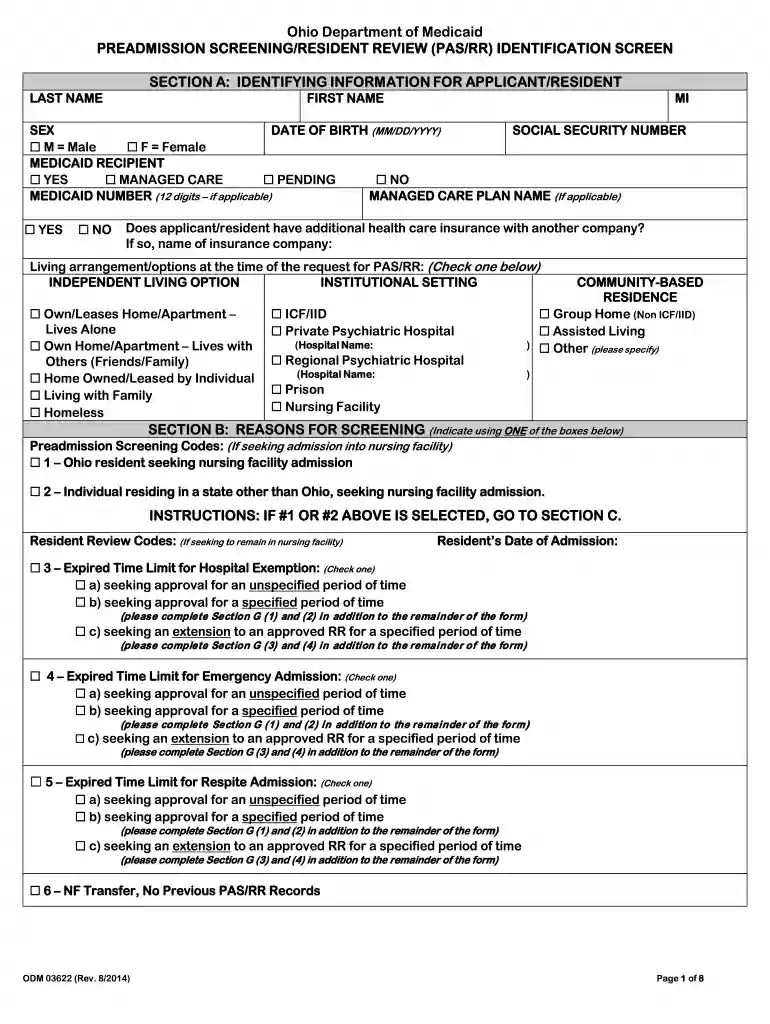
  2. Begin with Section A, where you will enter identifying information for the applicant or resident. Fill in the last name, first name, middle initial, sex, date of birth, and social security number. Indicate if they are a Medicaid recipient and provide their Medicaid number if applicable.
  3. Move to Section B to indicate the reasons for screening. Select one of the preadmission screening codes based on whether the individual is seeking admission into a nursing facility or a resident review.
  4. In Section C, answer questions regarding medical diagnosis. If applicable, provide details about any changes in diagnosis since admission.
  5. Complete Sections D and E by answering questions related to serious mental illness and developmental disabilities. Ensure all relevant boxes are checked based on the individual's condition.
  6. Finally, fill out Section I with your information as the submitter and ensure all sections are completed accurately before submitting.

Start using our platform today to streamline your Ohio PASRR form completion for free!

See more ohio pasrr form versions

We've got more versions of the ohio pasrr form form. Select the right ohio pasrr form version from the list and start editing it straight away!
Versions Form popularity Fillable & printable
2014 4.9 Satisfied (211 Votes)
2010 4.4 Satisfied (559 Votes)
be ready to get more

Complete this form in 5 minutes or less

Get form

Got questions?

We have answers to the most popular questions from our customers. If you can't find an answer to your question, please contact us.
Contact us
The PASRR Level I Screening is a preliminary assessment completed for all individuals prior to admission to a Medicaid-certified Nursing Facility in order to determine whether an individual might have a mental illness or intellectual disability.
A level of care determination is a decision made about an individuals physical, mental, social, and/or emotional status. In Ohio, there are two primary levels of care: nursing facility and developmental disabilities levels of care.
A PASRR must be completed prior to a hospital discharging an individual to a NF. A PASRR must also be completed prior to an individual being admitted to the NF directly from the community. Please note, the PASRR process has been designed to minimize disruption in the transition of an individual to a NF.
Preadmission Screening and Resident Review (PASRR) is a federal requirement to help ensure that individuals are not inappropriately placed in nursing homes for long term care.

Security and compliance

At DocHub, your data security is our priority. We follow HIPAA, SOC2, GDPR, and other standards, so you can work on your documents with confidence.

Learn more
ccpa2
pci-dss
gdpr-compliance
hipaa
soc-compliance