




Here's how it works



How to use or fill out Natchitoches Parish School Board Field Trip Request Form with DocHub

- Click ‘Get Form’ to open the Natchitoches Parish School Board Field Trip Request Form in our editor.
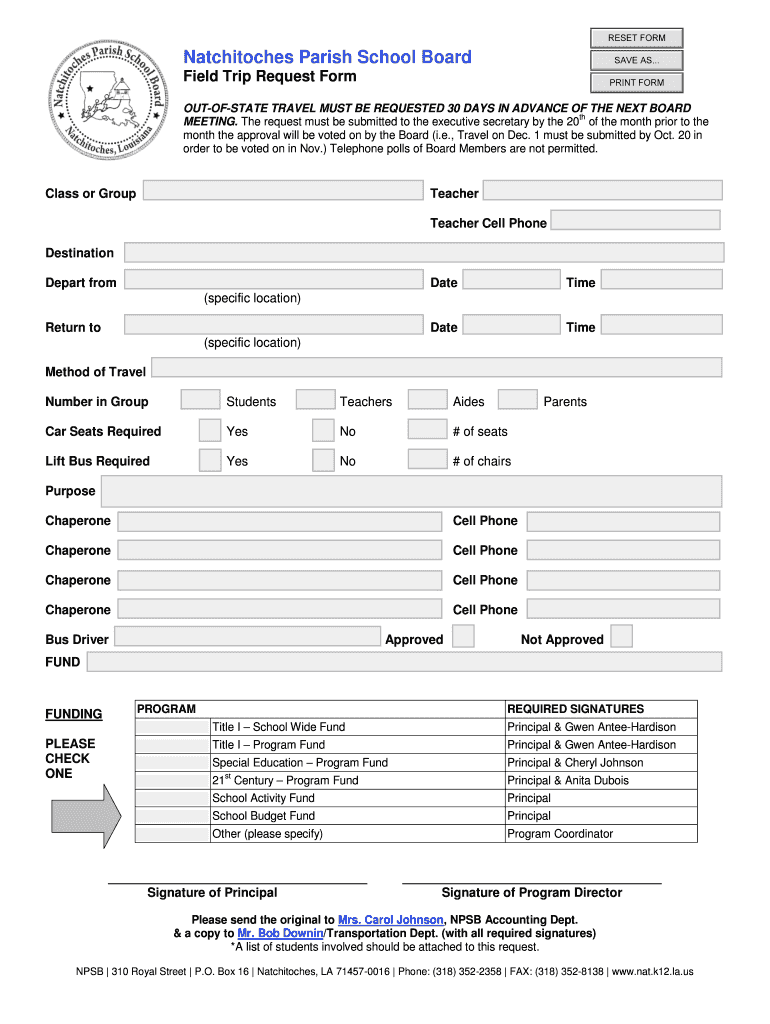
- Begin by filling out the 'Class or Group' section, entering the name of the class and the teacher's details, including their cell phone number.
- Next, specify the 'Destination' and provide both departure and return locations along with the corresponding dates and times.
- Indicate the 'Method of Travel' and enter the total number of participants in each category: students, teachers, aides, and parents. Don’t forget to check if car seats or lift buses are required.
- In the 'Purpose' section, briefly describe the reason for the field trip. Then list chaperones along with their cell phone numbers.
- Select the appropriate funding option from those provided and ensure all required signatures are obtained before submission.
- Finally, attach a list of students involved in the trip and send the original form to Mrs. Carol Johnson at NPSB Accounting Dept., keeping a copy for your records.
Start using our platform today to streamline your field trip request process for free!
It's free
See more Natchitoches Parish School Board Field Trip Request Form versions
| Versions | Form popularity | Fillable & printable |
|---|---|---|
| 2011 | 4 Satisfied (48 Votes) |
Got questions?
Can I draw my eSignature to approve my Natchitoches Parish School Board Field Trip Request Form?
Sure, electronically drawing your signature is acceptable, but only if you use a tool that complies with industry laws and regulations. Try DocHub, which guarantees eSignature validity under ESIGN and UETA requirements. All you need to approve your Natchitoches Parish School Board Field Trip Request Form electronically is an account with DocHub and an internet connection. Once you open your file in our editor, click Sign and select the Draw option.
Can I sign my Natchitoches Parish School Board Field Trip Request Form while I edit it?
When you edit your Natchitoches Parish School Board Field Trip Request Form with DocHub, you will not need to look for other applications or solutions to eSign it. An electronic signature is a component of DocHub’s extensive editing toolset, which enables you to implement changes in your form without switching between platforms. Simply complete your form, double-check the correctness of the data and put your electronic signature at the end to make it submission-ready within a few minutes.
When was Natchitoches Central High school built?
What school district is Natchitoches Louisiana?
What school district is Natchitoches Louisiana?
Security and compliance
At DocHub, your data security is our priority. We follow HIPAA, SOC2, GDPR, and other standards, so you can work on your documents with confidence.
Learn more




