




Here's how it works



How to use or fill out CR9164 Donor Milk Record Sheet0316 with our platform

- Click ‘Get Form’ to open the CR9164 Donor Milk Record Sheet0316 in the editor.
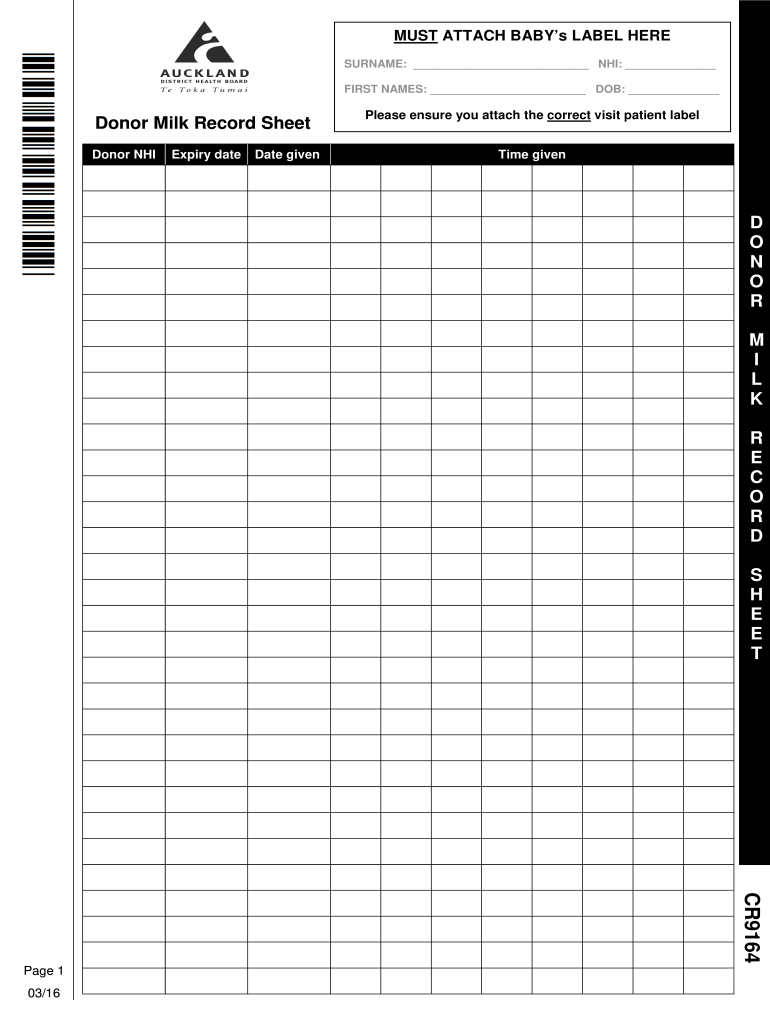
- Begin by attaching the baby’s label at the designated area at the top of the form. This is crucial for accurate identification.
- Fill in the surname and first names of the baby in the respective fields, ensuring correct spelling for proper record keeping.
- Enter the NHI (National Health Index) number and date of birth (DOB) in their corresponding fields to maintain comprehensive records.
- In the 'Donor Milk Record' section, input the donor's NHI and expiry date of the milk. This information is vital for tracking and safety.
- Record the date and time when the donor milk was given to ensure accurate documentation of feeding times.
- Finally, review all entries for accuracy before saving or exporting your completed form.
Start using our platform today to streamline your document editing and form completion process for free!
It's free
See more CR9164 Donor Milk Record Sheet0316 versions
Got questions?
How can I eSign my CR9164 Donor Milk Record Sheet0316 in Word?
Microsoft Word doesn’t have signing tools to generate valid electronic signatures and enforceable paperwork. Fortunately, DocHub is an online eSignature-compliant editor that works with various document formats, including .doc files. Sign in to your account and add the Word edition of your CR9164 Donor Milk Record Sheet0316 from your device and cloud, or URL - our editor will automatically convert it into an editable PDF. Make all essential modifications in your form and click Sign to generate your own legally-binding eSignature. You will find four signing options from which to choose.
How to complete and sign CR9164 Donor Milk Record Sheet0316 online?
You may quickly complete, modify, and even eSign your CR9164 Donor Milk Record Sheet0316 using DocHub. Create a new profile and start your free trial. After that, you can upload the document with the form and easily make all the necessary edits. No need to print on paper or use a third-party application to sign it, as you can put your electronic signature on your document quicker via DocHub.
Security and compliance
At DocHub, your data security is our priority. We follow HIPAA, SOC2, GDPR, and other standards, so you can work on your documents with confidence.
Learn more


