Az cover sheet 2026

Get Form
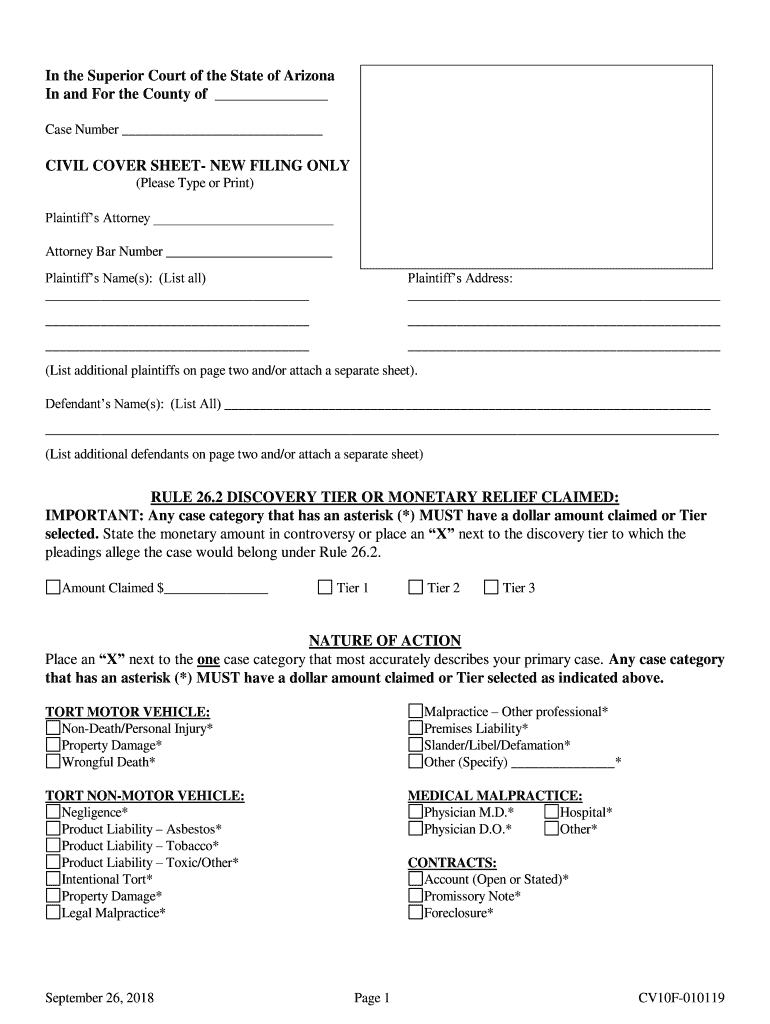
az cover sheet Preview on Page 1

Here's how it works

01. Edit your form online
Type text, add images, blackout confidential details, add comments, highlights and more.
02. Sign it in a few clicks
Draw your signature, type it, upload its image, or use your mobile device as a signature pad.
03. Share your form with others
Send it via email, link, or fax. You can also download it, export it or print it out.

How to use or fill out az cover sheet with our platform

Form edit decoration
9.5
Ease of Setup
DocHub User Ratings on G2
9.0
Ease of Use
DocHub User Ratings on G2
  1. Click ‘Get Form’ to open the az cover sheet in the editor.
  2. Begin by entering the County and Case Number at the top of the form. This information is crucial for identifying your case.
  3. In the Plaintiff’s Attorney section, type or print the attorney's name and bar number. Ensure accuracy as this will be used for official correspondence.
  4. List all plaintiffs' names and addresses in the designated fields. If there are more than one, continue on a separate sheet as needed.
  5. For defendants, follow a similar process by listing their names in the provided space. Additional defendants can also be noted on a separate page.
  6. Indicate the monetary relief claimed or select a discovery tier under Rule 26.2 by placing an 'X' next to your choice.
  7. Select one case category that best describes your primary case by marking an 'X'. Ensure it aligns with any monetary claims made earlier.
  8. If applicable, specify any emergency orders sought at the bottom of the form before finalizing your document.

Start using our platform today to easily complete your az cover sheet online for free!

See more az cover sheet versions

We've got more versions of the az cover sheet form. Select the right az cover sheet version from the list and start editing it straight away!
Versions Form popularity Fillable & printable
2018 4.8 Satisfied (41 Votes)
2012 4.4 Satisfied (241 Votes)
be ready to get more

Complete this form in 5 minutes or less

Get form

Got questions?

We have answers to the most popular questions from our customers. If you can't find an answer to your question, please contact us.
Contact us

According to eSignature laws, documents approved electronically have the same validity as traditionally approved ones. You can eSign almost any business and personal documentation. Four types of paperwork still demand wet signatures only - wills and testamentary trusts, court orders and other court forms, state statutes governing divorce, adoption, or other family law, and notice of cancellation of utility services. If you adhere to the regulations and use a trustworthy and compliant software solution, like DocHub, you can eSign your az cover sheet without printing it.

You may complete and sign your az cover sheet on the internet, even on a tight deadline. All you need to access high quality editing instruments on any device is a DocHub profile, which you can register within a couple of moments. After you sign up, add your file or find what you are searching for in our catalog, complete it utilizing the editing instruments you want, and put your electronic signature on it at the end.

In general, the process of dissolving an LLC in Arizona involves several steps, including holding a meeting with all members to discuss and vote on dissolution, winding up the affairs of the LLC, filing Articles of Dissolution with the Arizona Corporation Commission, canceling all permits, licenses, and registrations,
A faxing cover letter may include any of the following sections: Contact info. Recipients name. Date and number of pages. Confidentiality statement. Fax contents. Fax purpose. Relevant notes. Write professionally and clearly.
You should be able to create a fax cover page with a template. Click on File - New - Faxes (choose and download fax cover sheet), Insert a picture into the template by double clicking anywhere on the page to insert a paragraph mark.

Security and compliance

At DocHub, your data security is our priority. We follow HIPAA, SOC2, GDPR, and other standards, so you can work on your documents with confidence.

Learn more
ccpa2
pci-dss
gdpr-compliance
hipaa
soc-compliance

People also ask

A cover page is the first page of a paper or report that lists basic information, such as the title, author(s), course name, instructor, date, and sometimes the name of the institution.
Technically, HIPAA does not require a fax cover sheet. The guidelines released by the US Department of Health and Human Services did not specifically state that healthcare providers and any other companies that regularly deal with transmitting PHIs must include a cover sheet when they send a fax.
Its quick and easy to make a fax cover sheet like this while youre online. Choose one of our fax templates, and open it in Word for the web to make it yours. Tip: If youre already in Word for the web, get to the fax templates by going to File New Browse templates.
If you are forming an LLC, you will submit Articles of Organization. If you are forming a corporation, you will submit Articles of Incorporation. All forms and filing options are available at . Your entitys formation documentation must be examined and approved by A.C.C.
A fax cover sheet typically includes the recipients name and fax number, the senders name and fax number, the number of pages being sent, and a brief message or subject line. It may also include the date, the fax machines phone number, and any additional information or instructions.

Related links