Patient Registration Form - The Retina Group of Washington 2026

Get Form
retina group of washington patient portal Preview on Page 1

Here's how it works

01. Edit your retina group of washington patient portal online
Type text, add images, blackout confidential details, add comments, highlights and more.

02. Sign it in a few clicks
Draw your signature, type it, upload its image, or use your mobile device as a signature pad.

03. Share your form with others
Send rgw patient portal via email, link, or fax. You can also download it, export it or print it out.

How to use or fill out Patient Registration Form - The Retina Group of Washington

Form edit decoration
9.5
Ease of Setup
DocHub User Ratings on G2
9.0
Ease of Use
DocHub User Ratings on G2
  1. Click ‘Get Form’ to open it in the editor.
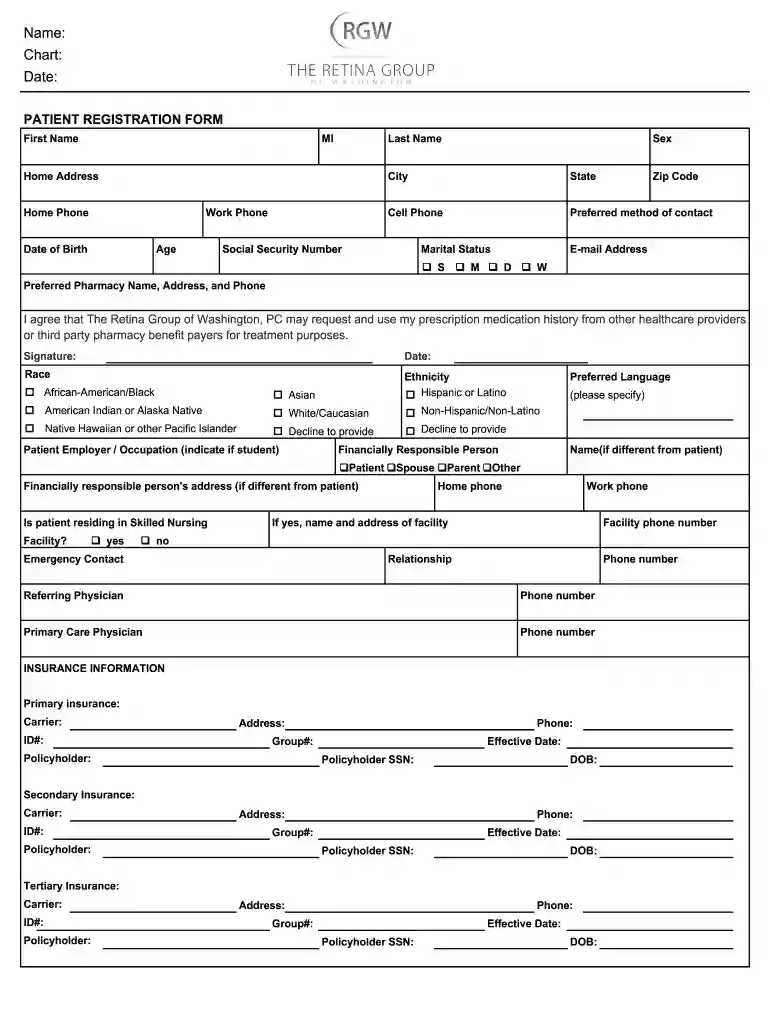
  2. Begin by entering your personal information in the designated fields. Fill in your first name, middle initial, and last name. Ensure accuracy as this information is crucial for your medical records.
  3. Next, provide your home address, phone numbers (home, work, and cell), date of birth, age, sex, and preferred method of contact. This section helps the practice reach you effectively.
  4. Complete the sections regarding your social security number, marital status, race, ethnicity, and preferred pharmacy details. These fields are important for administrative purposes and insurance processing.
  5. Fill out the insurance information carefully. Include details for primary, secondary, and tertiary insurance if applicable. Make sure to enter policyholder information accurately to avoid billing issues.
  6. Finally, review all entered information for completeness and accuracy before signing the form at the bottom. Your signature confirms that you agree with the terms outlined in the financial policy statement.

Start filling out your Patient Registration Form today using our platform for a seamless experience!

See more Patient Registration Form - The Retina Group of Washington versions

We've got more versions of the Patient Registration Form - The Retina Group of Washington form. Select the right Patient Registration Form - The Retina Group of Washington version from the list and start editing it straight away!
Versions Form popularity Fillable & printable
2020 4.1 Satisfied (36 Votes)
2015 4.3 Satisfied (54 Votes)
be ready to get more

Complete this form in 5 minutes or less

Get form

Got questions?

We have answers to the most popular questions from our customers. If you can't find an answer to your question, please contact us.
Contact us
With AidaForm, you can create fully customizable free registration pages in just minutes no coding skills needed.
6 Steps to Create a Patient Registration Form Step 1: Locate your Practice at the Top of the Registration Form. Step 2: Include Patient Detail Section. Step 3: Add Insurance Detail Section. Step 4: Comprise In Case of Emergency Section. Step 5: Insert Consent For Treatment Section. Step 6: Composing the Registration Form.
How to create a registration form in 7 steps Determine form length. Set clear fields. Set up a confirmation message. Add a payment option (if applicable) Check for accessibility. Embed the form for easy completion. Create your own registration form with SurveyMonkey.
Essential Information to Include in a Patient Registration Form Personal Information. Full Name (First and Last Name) Emergency Contact Information. Emergency Contact Name. Medical History Current Health Status. Existing Medical Conditions. Insurance and Payment Information. Appointment Preferences. Terms and Agreements.
Open a template or use a blank document Go to File New from Template. In Search, type form. Double-click the template you want to use. Select File Save As, and pick a location to save the form. In Save As, type a file name and then select Save.

Security and compliance

At DocHub, your data security is our priority. We follow HIPAA, SOC2, GDPR, and other standards, so you can work on your documents with confidence.

Learn more
ccpa2
pci-dss
gdpr-compliance
hipaa
soc-compliance

People also ask

The first step in any healthcare journey is the patient registration. It includes collecting, verifying and recording patient information. This comprises personal details, medical history, insurance coverage and consent to administer treatment.

the retina group of washington patient portal