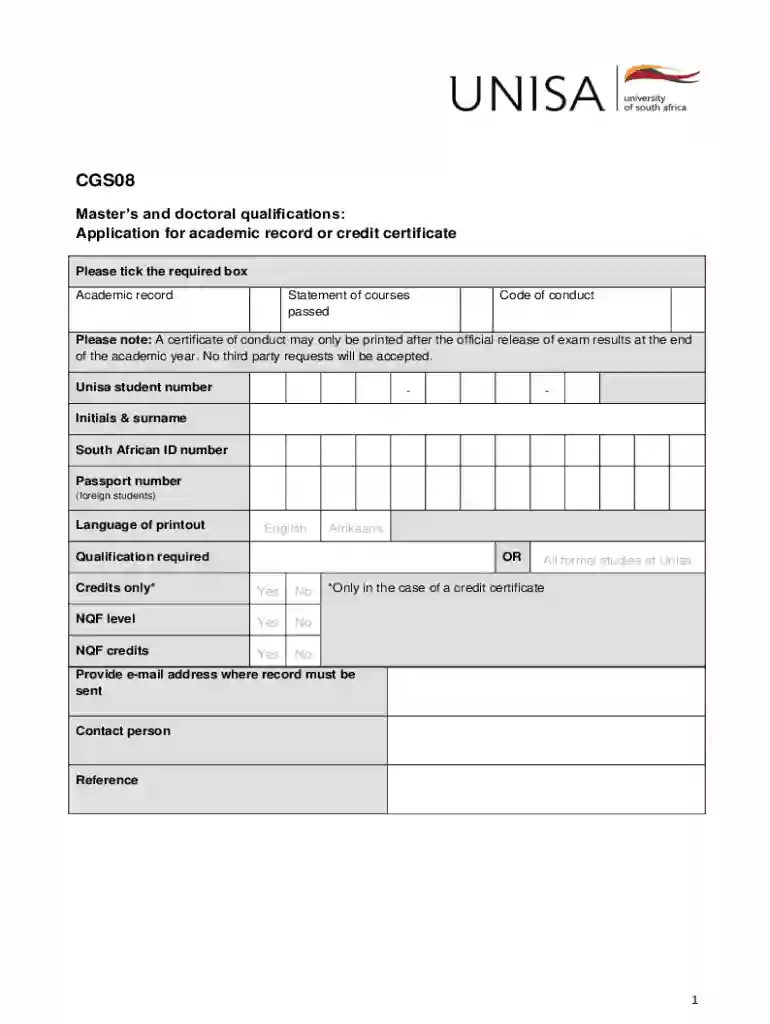
Cgs08 2026

Get Form
unisa contact centre for an official academic record Preview on Page 1

Here's how it works

01. Edit your unisa contact centre for an official academic record online
Type text, add images, blackout confidential details, add comments, highlights and more.

02. Sign it in a few clicks
Draw your signature, type it, upload its image, or use your mobile device as a signature pad.

03. Share your form with others
Send unisa academic record via email, link, or fax. You can also download it, export it or print it out.

How to use or fill out cgs08 with our platform

Form edit decoration
9.5
Ease of Setup
DocHub User Ratings on G2
9.0
Ease of Use
DocHub User Ratings on G2
  1. Click ‘Get Form’ to open the CGS08 in the editor.
  2. Begin by entering your Unisa student number, initials, surname, and South African ID or passport number if you are a foreign student.
  3. Select your preferred language for the printout by ticking either 'English' or 'Afrikaans'.
  4. Indicate whether you require an academic record or a credit certificate by checking the appropriate box.
  5. If requesting a credit certificate, confirm if you have completed all formal studies at Unisa by selecting 'Yes' or 'No'.
  6. Provide an email address where the record should be sent and include a contact person’s details for reference.
  7. Review the consent section regarding personal information and ensure you understand its implications before signing.
  8. Once completed, submit the form via email to MandD@unisa.ac.za, ensuring to include your student number and form name in the subject line.

Start using our platform today to streamline your CGS08 form completion for free!

See more cgs08 versions

We've got more versions of the cgs08 form. Select the right cgs08 version from the list and start editing it straight away!
Versions Form popularity Fillable & printable
2021 4.8 Satisfied (81 Votes)
2015 4 Satisfied (32 Votes)
be ready to get more

Complete this form in 5 minutes or less

Get form

Got questions?

We have answers to the most popular questions from our customers. If you can't find an answer to your question, please contact us.
Contact us
Should you wish to cancel your registration within 10 calendar days of your registration being activated, you may apply for a full refund in line with Unisas cooling-off period. To apply for a possible refund complete the relevant refund form and submit to finan@unisa.ac.za after the cancellation has been processed.
If you are already registered and would like to add additional modules, login to myUnisa, choose the myAdmin link, click on Student Admin and then on Register Additional Modules.
You can request your academic record via myUnisa. Login to myUnisa. Click on Academic Record and Code. Your academic record will be sent to your myLife e-mail account.
Go to myUnisa. Click on myAdmin, Student Admin and Biographical Details. Check the contact information on record. If you need to update an address, click on Update address details.

Security and compliance

At DocHub, your data security is our priority. We follow HIPAA, SOC2, GDPR, and other standards, so you can work on your documents with confidence.

Learn more
ccpa2
pci-dss
gdpr-compliance
hipaa
soc-compliance