Get Methodist Church Internal Organisations Report Form 2025

Get Form
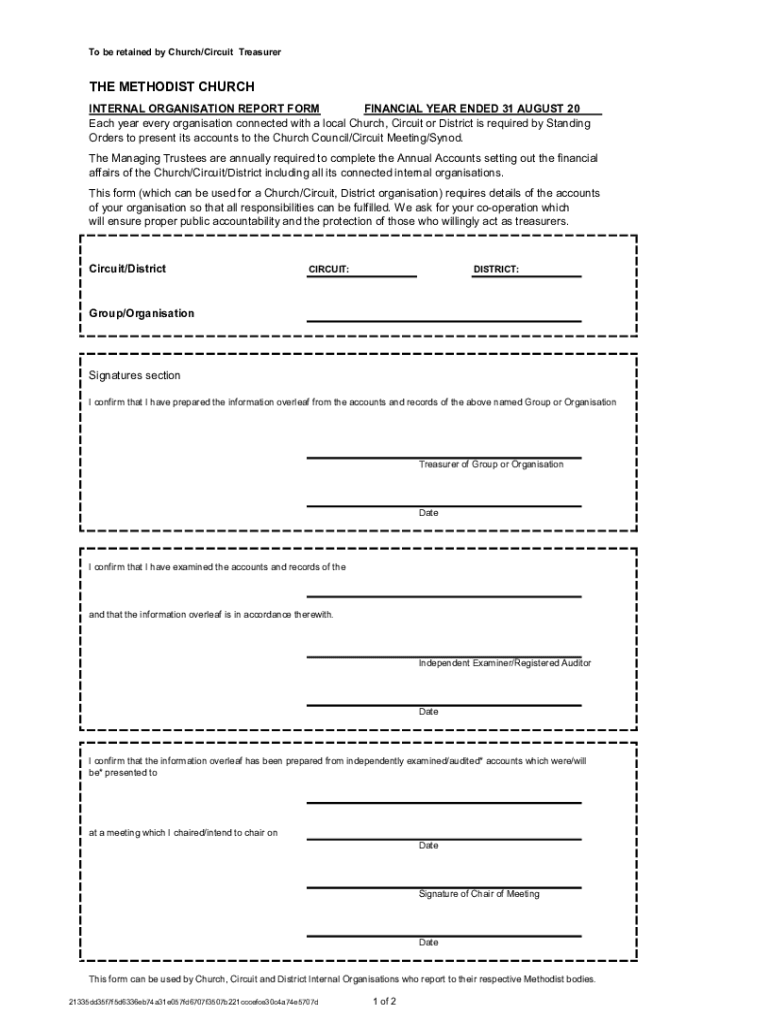
circuit internal organisation report form Preview on Page 1

Here's how it works

01. Edit your circuit internal organisation report form online
Type text, add images, blackout confidential details, add comments, highlights and more.
02. Sign it in a few clicks
Draw your signature, type it, upload its image, or use your mobile device as a signature pad.
03. Share your form with others
Send uk internal organisation form via email, link, or fax. You can also download it, export it or print it out.

How to use or fill out Get Methodist Church Internal Organisations Report Form with our platform

Form edit decoration
9.5
Ease of Setup
DocHub User Ratings on G2
9.0
Ease of Use
DocHub User Ratings on G2
  1. Click ‘Get Form’ to open it in the editor.
  2. Begin by filling in the Circuit and District details at the top of the form. This ensures that your report is correctly attributed.
  3. In the Group/Organisation section, specify the name of your internal organisation. This is crucial for identification purposes.
  4. Proceed to complete the Receipts and Payments Account sections. For Receipts, list all gifts and donations under Section H, ensuring you calculate the total receipts accurately.
  5. In Section I, detail all payments made by your organisation, including donations and other expenses. Again, ensure you calculate the total payments correctly.
  6. Calculate NET RECEIPTS in Section J by subtracting total payments from total receipts. Also, include opening balances and any adjustments as necessary.
  7. Complete Section K by detailing how funds are held, including cash in hand and bank accounts. Ensure this matches your closing balance from Section J.
  8. Finally, fill out the signatures section at the bottom of the form to confirm accuracy and compliance with reporting requirements.

Start using our platform today to streamline your form completion process for free!

See more Get Methodist Church Internal Organisations Report Form versions

We've got more versions of the Get Methodist Church Internal Organisations Report Form form. Select the right Get Methodist Church Internal Organisations Report Form version from the list and start editing it straight away!
Versions Form popularity Fillable & printable
2023 4.1 Satisfied (49 Votes)
be ready to get more

Complete this form in 5 minutes or less

Get form

Got questions?

We have answers to the most popular questions from our customers. If you can't find an answer to your question, please contact us.
Contact us

Yes, you can utilize DocHub for signing any business and personal paperwork, including your methodist church treasurer internal organisation report. All eSignatures you generate with our service are legally binding and court-admissible, as DocHub complies with standards required by ESIGN and UETA. Save your completed document with a detailed Audit Trail if needed.

If you need to edit your Get Methodist Church Internal Organisations Report Form online swiftly, it does not matter what browser you employ. DocHub’s simple editing instruments are available using any internet browser. Just open the appropriate tab within our editor, add your file, and fill it out without stress.