




Here's how it works



How to use or fill out RETIRED MUNICIPAL TEACHER ENROLLMENT (FORM-RMT)

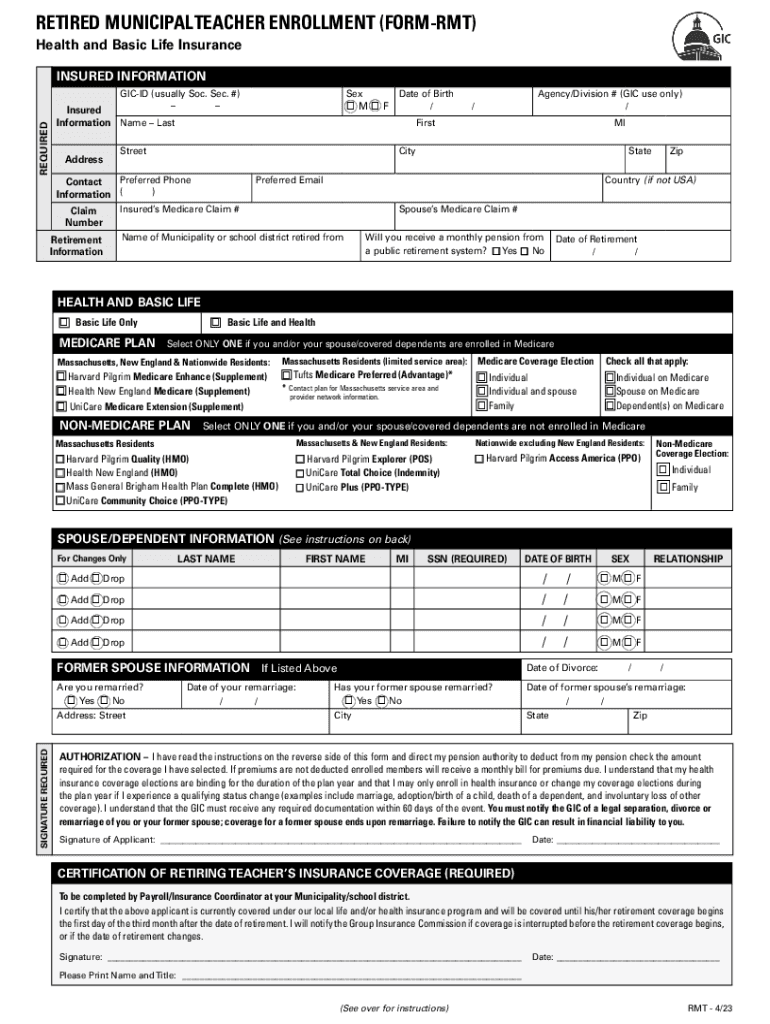
- Begin by clicking ‘Get Form’ to open the RETIRED MUNICIPAL TEACHER ENROLLMENT (FORM-RMT) in our editor.
- Fill in your GIC-ID, which is typically your Social Security number, along with your sex and insured information including your name, address, and date of birth.
- Provide your retirement information, including the agency/division number and the name of the municipality or school district you retired from. Indicate whether you will receive a monthly pension from a public retirement system.
- Select your health and basic life insurance options. Choose between Basic Life Only or Basic Life and Health based on your needs.
- If applicable, select your Medicare plan by checking only one option that applies to you or your spouse/covered dependents.
- Complete the spouse/dependent information section if changes are necessary. Ensure all required fields are filled accurately.
- Sign and date the authorization section to confirm that you understand the terms regarding coverage elections.
Start filling out your form today for free using our platform!
It's free
See more RETIRED MUNICIPAL TEACHER ENROLLMENT (FORM- versions
| Versions | Form popularity | Fillable & printable |
|---|---|---|
| 2023 | 4.8 Satisfied (28 Votes) |
Got questions?
Can I sign my RETIRED MUNICIPAL TEACHER ENROLLMENT (FORM- with my mobile phone?
Sure, it is possible with DocHub. This secure and compliant online solution features a phone-based signing option. When you log in to your DocHub account and import your RETIRED MUNICIPAL TEACHER ENROLLMENT (FORM- to our editor, complete all blank areas and use the Sign feature on the top barf. Click on Create your signature and select Phone from the available choices. Here, you scan a QR code using your smartphone and draw your signature on your phone screen, as you normally do when approving hard copies. If you access DocHub right from your mobile device, you can eSign your paperwork by drawing your eSignature, uploading its picture, or simply with a typed name.
How do you edit RETIRED MUNICIPAL TEACHER ENROLLMENT (FORM- on Android?
Document editing with DocHub is equally convenient on desktop and mobile devices. You only need an internet browser to modify your RETIRED MUNICIPAL TEACHER ENROLLMENT (FORM- on Android. Open our site and sign in to access the tools you require. Add your file and introduce your intended changes. Next, you can keep your form in your file storage or send it out immediately.
Security and compliance
At DocHub, your data security is our priority. We follow HIPAA, SOC2, GDPR, and other standards, so you can work on your documents with confidence.
Learn more


