Type text, add images, blackout confidential details, add comments, highlights and more.
02. Sign it in a few clicks
Draw your signature, type it, upload its image, or use your mobile device as a signature pad.
03. Share your form with others
Send it via email, link, or fax. You can also download it, export it or print it out.
How to use or fill out the Pre-Assessment Form online with our platform
Ease of Setup
DocHub User Ratings on G2
Ease of Use
DocHub User Ratings on G2
Click ‘Get Form’ to open it in the editor.
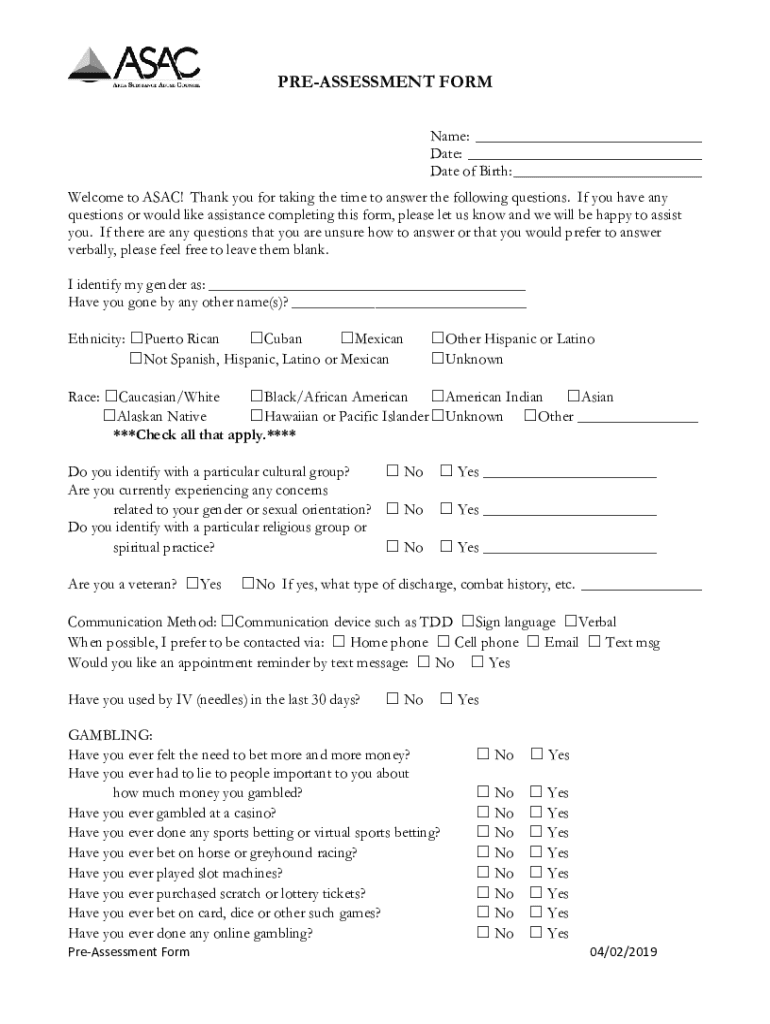
Begin by entering your name and date at the top of the form. This personal information is essential for identification purposes.
Proceed to fill in your date of birth and gender identity. If you have gone by any other names, please include that information as well.
Next, check the appropriate boxes under ethnicity and race. You can select multiple options if applicable.
Continue through the sections regarding health information, communication preferences, and any concerns related to gambling or substance use. Be honest in your responses for accurate assessment.
Complete the sections on education, finances, and living situation. Provide details about your current healthcare providers if relevant.
Finally, review all entries for accuracy before submitting the form. Ensure that all required fields are filled out completely.
Start filling out your Pre-Assessment Form today for free using our platform!
We've got more versions of the Pre-Assessment Form form. Select the right Pre-Assessment Form version from the list and start editing it straight away!
III-A. Assessing Learner Needs in the Adult ESL Classroom
by T Guide This workshop module contains detailed instructions and all of the materials necessary to con- duct a training session on assessing learner needs in theRead more
Pre-assessments can allow you to set students expectations for a course, and make informed choices about which activities will support students learning.Read more
Cookie consent notice
This site uses cookies to enhance site navigation and personalize your experience.
By using this site you agree to our use of cookies as described in our Privacy Notice.
You can modify your selections by visiting our Cookie and Advertising Notice.