Safety, Health, and Environment Regulation PT Chandra 2026

Get Form
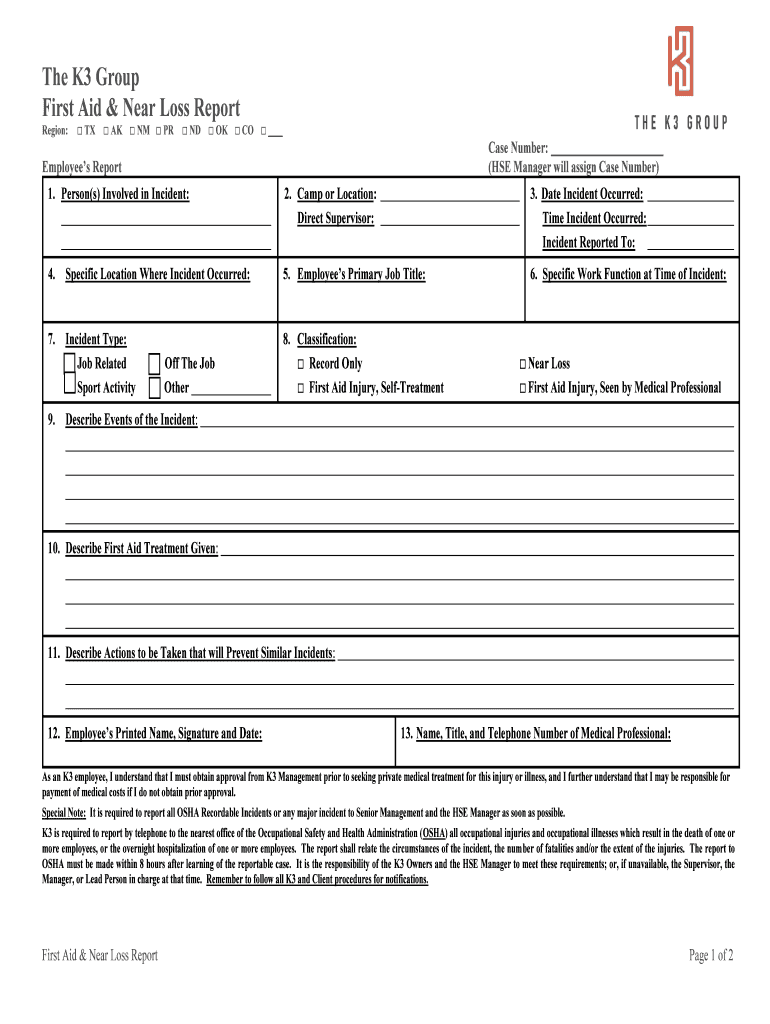
Safety, Health, and Environment Regulation PT Chandra Preview on Page 1

Here's how it works

01. Edit your form online
Type text, add images, blackout confidential details, add comments, highlights and more.
02. Sign it in a few clicks
Draw your signature, type it, upload its image, or use your mobile device as a signature pad.
03. Share your form with others
Send it via email, link, or fax. You can also download it, export it or print it out.

How to use or fill out Safety, Health, and Environment Regulation PT Chandra with our platform

Form edit decoration
9.5
Ease of Setup
DocHub User Ratings on G2
9.0
Ease of Use
DocHub User Ratings on G2
  1. Click ‘Get Form’ to open it in the editor.
  2. Begin by filling out the 'Employee’s Report' section. Enter the names of all persons involved in the incident, along with the camp or location and direct supervisor's name.
  3. Record the date and time of the incident, as well as who it was reported to. Specify the exact location where the incident occurred.
  4. Provide details about the employee's primary job title and specific work function at the time of the incident.
  5. Select the type of incident from options such as 'Job Related' or 'Off The Job', and classify it accordingly (e.g., 'First Aid Injury').
  6. Describe events leading up to the incident and any first aid treatment given. Outline actions that will prevent similar incidents in the future.
  7. Complete sections for both employee and supervisor signatures, ensuring all necessary information is filled out accurately.

Start using our platform today to streamline your form completion process for free!

See more Safety, Health, and Environment Regulation PT Chandra versions

We've got more versions of the Safety, Health, and Environment Regulation PT Chandra form. Select the right Safety, Health, and Environment Regulation PT Chandra version from the list and start editing it straight away!
Versions Form popularity Fillable & printable
2018 4.7 Satisfied (30 Votes)
be ready to get more

Complete this form in 5 minutes or less

Get form

Got questions?

We have answers to the most popular questions from our customers. If you can't find an answer to your question, please contact us.
Contact us

Electronic document signing demands a software solution that complies with data protection and eSignature regulations. DocHub is a great tool for that, as it fulfills all the previously mentioned requirements. Whatever method you prefer to sign your Safety, Health, and Environment Regulation PT Chandra in DocHub, your eSignature will be legally binding and court-admissible.

If you need to edit your Safety, Health, and Environment Regulation PT Chandra on the internet easily, it does not matter what web browser you employ. DocHub’s straightforward editing tools are accessible using any internet browser. Simply open the appropriate tab in the editor, add your document, and fill it out without stress.

Security and compliance

At DocHub, your data security is our priority. We follow HIPAA, SOC2, GDPR, and other standards, so you can work on your documents with confidence.

Learn more
ccpa2
pci-dss
gdpr-compliance
hipaa
soc-compliance
be ready to get more

Complete this form in 5 minutes or less

Get form