Type text, add images, blackout confidential details, add comments, highlights and more.

02. Sign it in a few clicks
Draw your signature, type it, upload its image, or use your mobile device as a signature pad.

03. Share your form with others
Send 1316 form via email, link, or fax. You can also download it, export it or print it out.

How to use or fill out home army milwestpointapplicationWest Point Local Area Credential Application - United States Army with DocHub
Ease of Setup
DocHub User Ratings on G2
Ease of Use
DocHub User Ratings on G2
Click ‘Get Form’ to open it in the editor.
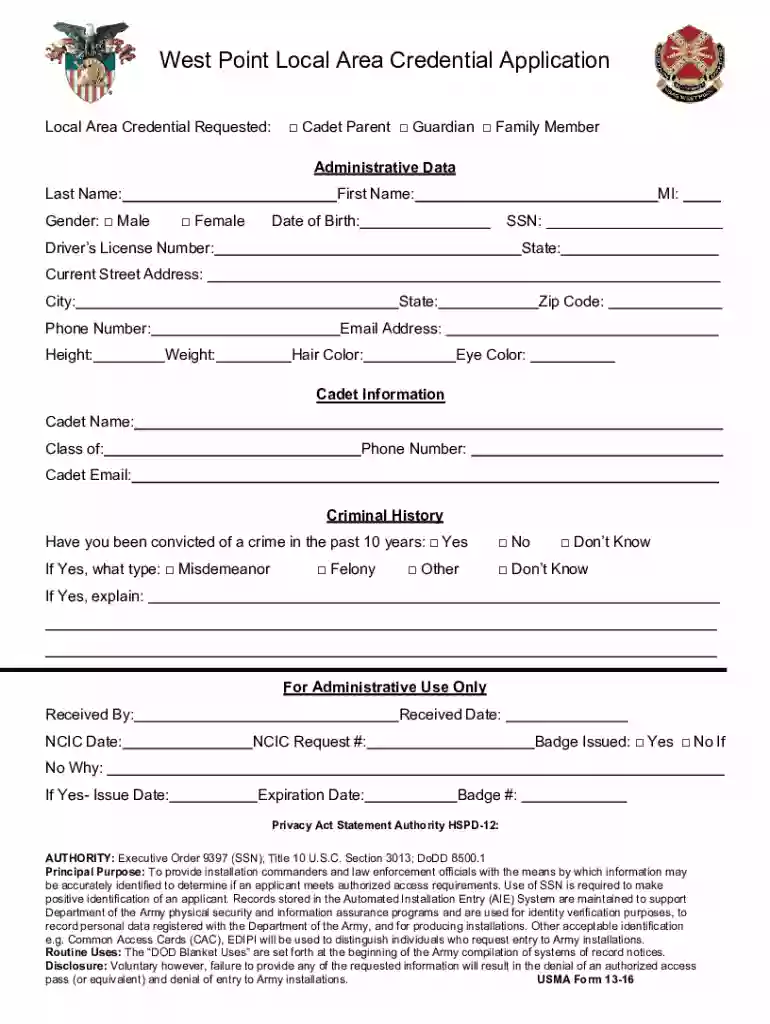
Begin by filling out the 'Administrative Data' section. Enter your last name, first name, middle initial, gender, date of birth, and Social Security Number. Ensure accuracy as this information is crucial for identification.
Continue with your driver's license number and state, followed by your current street address, city, state, zip code, phone number, email address, height, weight, hair color, and eye color.
In the 'Cadet Information' section, provide the cadet's name and class year. Include their phone number and email address for further communication.
Address the 'Criminal History' question honestly. If applicable, specify the type of conviction and provide any necessary explanations.
Review all entered information for accuracy before submitting. Use our platform’s features to save or print a copy for your records.
Start using our editor today to complete your application quickly and efficiently!
Fill out home army milwestpointapplicationWest Point Local Area Credential Application - United States Army online It's free
See more home army milwestpointapplicationWest Point Local Area Credential Application - United States Army versions
We've got more versions of the home army milwestpointapplicationWest Point Local Area Credential Application - United States Army form. Select the right home army milwestpointapplicationWest Point Local Area Credential Application - United States Army version from the list and start editing it straight away!
WEST POINT, N.Y. Starting July 22, 2019, non-Department of Defense visitors will be required to check in at the Visitor Control Center to be issued local access credentials to gain entry to the installation. These changes bring West Point into compliance with Department of the Army access control requirements.
Can anyone get into West Point?
A strong GPA and SAT/ACT score are required to get into West Point. Competitive applicants boast 3.9 GPAs, SAT scores higher than 1311, and ACT scores above 29. Top candidates also showcase exceptional physical aptitude, including achievements such as 75 push-ups (male) and 50 push-ups (female) in two minutes!
Is West Point open to the public?
Entry Requirements: All visitors with DOD Common Access Card, and/or retired military ID can access post through any gate. If visitors (18+) do not have a DOD Common Access Card or retired military ID they must to go to Visitor Control Center with U.S. ID in the form of a Real ID and/or Enhanced DL.
Can civilians go into West Point?
To qualify academically at West Point, you should have an above-average high school or college academic record. A complete transcript of your academic achievement will be evaluated to determine your qualifications. You should perform well on the ACT or the SAT.
What are the new rules for West Point?
If visitors do not have Real ID/Enhanced drivers license, retired military ID, DoD Common Access Card, or a service-connected Veterans Card, they must bring another form of U.S. ID, such as a passport, Social Security card, or birth certificate. Failure to bring these documents will result in denial of access.
west point local area credential
West Point Visitor passWest Point Visitor pass formWest Point Visitors Center phone numberWest Point Gate access2107 New South Post Road West Point NY 10996West Point visitor center gift shopWest Point ID card OfficeStony Lonesome Gate West Point
Security and compliance
At DocHub, your data security is our priority. We follow HIPAA, SOC2, GDPR, and other standards, so you can work on your documents with confidence.
Cookie consent notice
This site uses cookies to enhance site navigation and personalize your experience.
By using this site you agree to our use of cookies as described in our Privacy Notice.
You can modify your selections by visiting our Cookie and Advertising Notice.