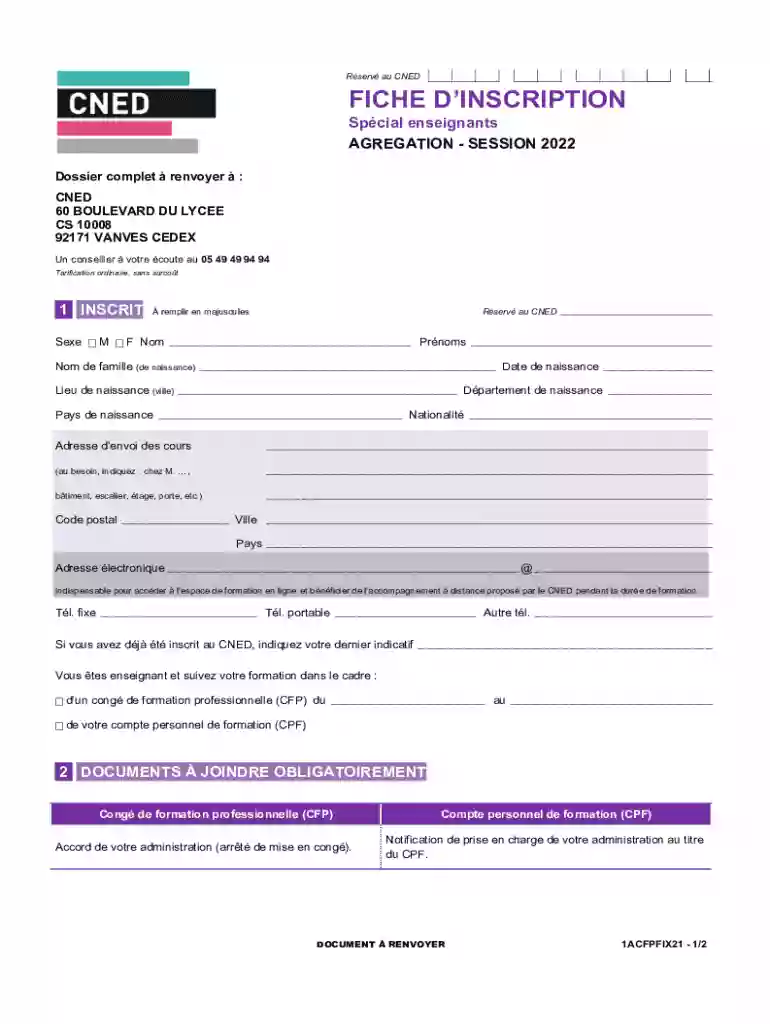
Fiche d'inscription - CNED 2026

Get Form
cned espace inscrit Preview on Page 1

Here's how it works

01. Edit your cned espace inscrit online
Type text, add images, blackout confidential details, add comments, highlights and more.

02. Sign it in a few clicks
Draw your signature, type it, upload its image, or use your mobile device as a signature pad.

03. Share your form with others
Send espace inscrit cned via email, link, or fax. You can also download it, export it or print it out.

How to use or fill out fiche d'inscription - CNED with our platform

Form edit decoration
9.5
Ease of Setup
DocHub User Ratings on G2
9.0
Ease of Use
DocHub User Ratings on G2
  1. Click ‘Get Form’ to open the fiche d'inscription - CNED in the editor.
  2. Begin by filling out the 'INSCRIT' section. Indicate your gender by selecting either 'M' for male or 'F' for female. Ensure all information is entered in uppercase letters.
  3. Complete your personal details, including your first name, last name (maiden name), place of birth, and nationality. Make sure to provide accurate information as this is essential for your registration.
  4. In the 'Adresse d’envoi des cours' section, enter the address where you would like to receive course materials. Include any necessary details such as building number or floor.
  5. Fill in your contact information, including email and phone numbers. Your email is crucial for accessing online training resources.
  6. Select your chosen training program from the options provided under 'FORMATION CHOISIE'. Be sure to check the box next to your preferred subject area.
  7. Finally, review all entries for accuracy before signing and dating the form at the bottom. This confirms that you accept the terms outlined by CNED.

Start filling out your fiche d'inscription - CNED today using our platform for a seamless experience!

See more fiche d'inscription - CNED versions

We've got more versions of the fiche d'inscription - CNED form. Select the right fiche d'inscription - CNED version from the list and start editing it straight away!
Versions Form popularity Fillable & printable
2023 4.5 Satisfied (46 Votes)
2022 4.9 Satisfied (25 Votes)
be ready to get more

Complete this form in 5 minutes or less

Get form

Got questions?

We have answers to the most popular questions from our customers. If you can't find an answer to your question, please contact us.
Contact us

With DocHub, it’s quite simple. The editor offers users an add-on called DocHub for Gmail, which you can locate in the Google Workspace Marketplace without being charged. Install it and give it access to your Google account. Open your email with your cned inscrit attached and click on the add-on button in the right-side panel. Log in to your DocHub account, and upload the form to our editor, where you can complete it and sign.

If you edit your cned 360 espace inscrit with DocHub, you simply will not need to look for other software or solutions to sign it. An electronic signature is part of DocHub’s comprehensive editing toolset, which enables you to implement changes in your form without switching between websites. Just complete your form, double-check the correctness of the data and place your electronic signature at the end to make it submission-ready within minutes.

Attention : cette demande dinscription concerne la session 2022-2023. Si vous souhaitez vous inscrire la session 2023-2024, consultez cned.fr partir du mois davril 2023. ▶Joignez cette fiche dinscription votre rglement et les pices indiques en fonction du moyen de paiement choisi.
Votre attestation dinscription et/ou votre certificat de scolarit sont disponibles sur votre espace CNED360 Documents Documents CNED Intitul de la classe Documents de scolarit.
5.1 - GNRALITS La Commande est possible soit en ligne sur le Site cned.fr, soit par lenvoi dun dossier dinscription sign. Toute validation dune Commande en ligne ou signature dun dossier dinscription vaut inscription ferme et dfinitive.

Security and compliance

At DocHub, your data security is our priority. We follow HIPAA, SOC2, GDPR, and other standards, so you can work on your documents with confidence.

Learn more
ccpa2
pci-dss
gdpr-compliance
hipaa
soc-compliance

People also ask

Le document attendu est le modle Cned Avis favorable du DASEN ou une autorisation dinstruction dans la famille valable pour lanne 2023-2024 prcisant la possibilit du recours au Cned. Un avis favorable du DASEN autre que le modle Cned peut tre accept sous rserve quil soit dat et sign du DASEN.
Les documents administratifs sont consultables depuis votre espace CNED360 Documents Documents CNED Intitul de la classe Documents de scolarit (un double clic est ncessaire pour ouvrir les documents).
Elle ouvre droit dlivrance dun certificat de scolarit, de relevs de notes (ou livret de comptences en primaire) et dun avis dorientation en fin danne scolaire.
Linscription sous statut rglement au Cned est soumise validation de pices justificatives qui vous seront demandes lors de votre inscription, en fonction de votre situation. La totalit de la scolarit est suivie distance. Les inscriptions sont gnralement ouvertes entre juin et novembre.
Le document attendu est le modle Cned Avis favorable du DASEN ou une autorisation dinstruction dans la famille valable pour lanne 2023-2024 prcisant la possibilit du recours au Cned. Un avis favorable du DASEN autre que le modle Cned peut tre accept sous rserve quil soit dat et sign du DASEN.

inscrit cned