Sickness Benefits Claim Guide 2026

Get Form
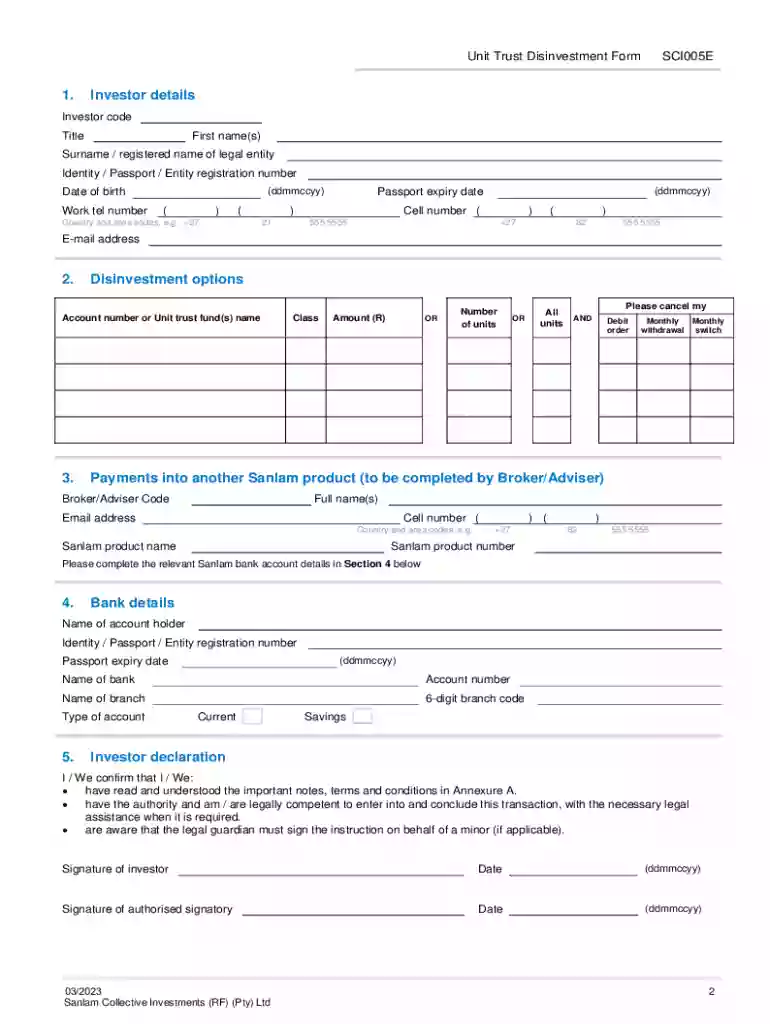
sanlam unit trust disinvestment Preview on Page 1

Here's how it works

01. Edit your sanlam unit trust disinvestment online
Type text, add images, blackout confidential details, add comments, highlights and more.

02. Sign it in a few clicks
Draw your signature, type it, upload its image, or use your mobile device as a signature pad.

03. Share your form with others
Send unit trust disinvestment form via email, link, or fax. You can also download it, export it or print it out.

How to use or fill out Sickness Benefits Claim Guide with our platform

Form edit decoration
9.5
Ease of Setup
DocHub User Ratings on G2
9.0
Ease of Use
DocHub User Ratings on G2
  1. Click ‘Get Form’ to open the Sickness Benefits Claim Guide in the editor.
  2. Begin by filling in your personal details in the 'Investor details' section. Ensure that your name, ID number, and contact information are accurate to avoid processing delays.
  3. In the 'Disinvestment options' section, specify your account number or the name of the unit trust fund you wish to disinvest from. Choose whether you want to withdraw a specific amount, a number of units, or all units.
  4. Complete the 'Bank details' section with your bank account information. Double-check that all details are correct to ensure smooth transactions.
  5. Review and sign the 'Investor declaration' at the end of the form. Make sure to date your signature appropriately.
  6. Once completed, submit only page 2 along with any required verification documents via email as specified in the instructions.

Start using our platform today for free and streamline your Sickness Benefits Claim process!

See more Sickness Benefits Claim Guide versions

We've got more versions of the Sickness Benefits Claim Guide form. Select the right Sickness Benefits Claim Guide version from the list and start editing it straight away!
Versions Form popularity Fillable & printable
2023 4.7 Satisfied (36 Votes)
2016 4.2 Satisfied (37 Votes)
be ready to get more

Complete this form in 5 minutes or less

Get form

Got questions?

We have answers to the most popular questions from our customers. If you can't find an answer to your question, please contact us.
Contact us

Microsoft Word doesn’t have signing tools to generate legitimate electronic signatures and enforceable documents. Fortunately, DocHub is an online eSignature-compliant editor that supports different document formats, such as .doc files. Sign in to your account and upload the Word edition of your sanlam unit trust disinvestment form from your device and cloud, or URL - our editor will automatically transform it into an editable PDF. Make all essential changes in your form and click Sign to generate your own legally-binding eSignature. You will find four signing methods from which to choose.

You may complete and sign your unit trust disinvestment online, even on a tight deadline. All you need to access top-notch editing tools on any device is a DocHub account, that you can register within a few moments. When you register, upload your document or find what you are looking for in our catalog, complete it using the editing tools you want, and put your electronic signature on it at the end.

Documentary Requirements for Sickness Notification and Sickness Benefit Application SSS Medical Certificate (Med 01688) indicating the following: Complete diagnosis. Supporting medical documents for prolonged confinement/sickness, if any: Laboratory, X-ray, ECG, and other diagnostic results.
The SSS Sickness Benefit Program is a daily cash allowance paid for the number of days a qualified member cannot work due to sickness or injury, including workers infected by COVID-19. Members can avail of up to a maximum of 120 days in sickness benefit in one (1) calendar year.
be ordinarily resident in New Zealand when they first apply for the benefit; and. be both permanently and severely restricted in their capacity for work because of sickness, injury, or disability, or be totally blind.

Security and compliance

At DocHub, your data security is our priority. We follow HIPAA, SOC2, GDPR, and other standards, so you can work on your documents with confidence.

Learn more
ccpa2
pci-dss
gdpr-compliance
hipaa
soc-compliance

People also ask

To qualify for Illness Benefit, you must: Be under pension age. Be medically certified as unfit for work by a medical doctor (GP) Have enough social insurance (PRSI) contributions see below.
What are the documents needed for SSS Sickness Benefit? Duly accomplished Sickness Benefit Application form (SBA) SSS ID or UMID card or any of the following valid primary IDs: Drivers license. Passport. Voters ID. NBI clearance. Postal ID. Supporting medical documents: Laboratory. Xray. ECG. Other diagnostic results.
Compute ADSC: Divide the total MSC by 180 days to get the average daily salary credit. Determine Daily Allowance: Multiply the ADSC by 90% to calculate the daily sickness allowance. Calculate Total Benefit: Multiply the daily allowance by the number of approved confinement days (up to 120 days per calendar year).
Sickness benefits. ⦁ The Sickness Benefit is granted up to a maximum of 120 days in one (1) calendar year.
A member is qualified to avail of this benefit if he/she: Is unable to work due to sickness or injury and is confined either in a hospital or at home for at least four (4) days. Has paid at least three (3) months of contributions within the 12-month period immediately preceding the semester of sickness or injury.

Related links