Brumfield v Dood - Annual Compliance Report docx 2026

Get Form
Brumfield v Dood - Annual Compliance Report docx Preview on Page 1

Here's how it works

01. Edit your form online
Type text, add images, blackout confidential details, add comments, highlights and more.
02. Sign it in a few clicks
Draw your signature, type it, upload its image, or use your mobile device as a signature pad.
03. Share your form with others
Send it via email, link, or fax. You can also download it, export it or print it out.

How to use or fill out Brumfield v Dood - Annual Compliance Report docx with DocHub

Form edit decoration
9.5
Ease of Setup
DocHub User Ratings on G2
9.0
Ease of Use
DocHub User Ratings on G2
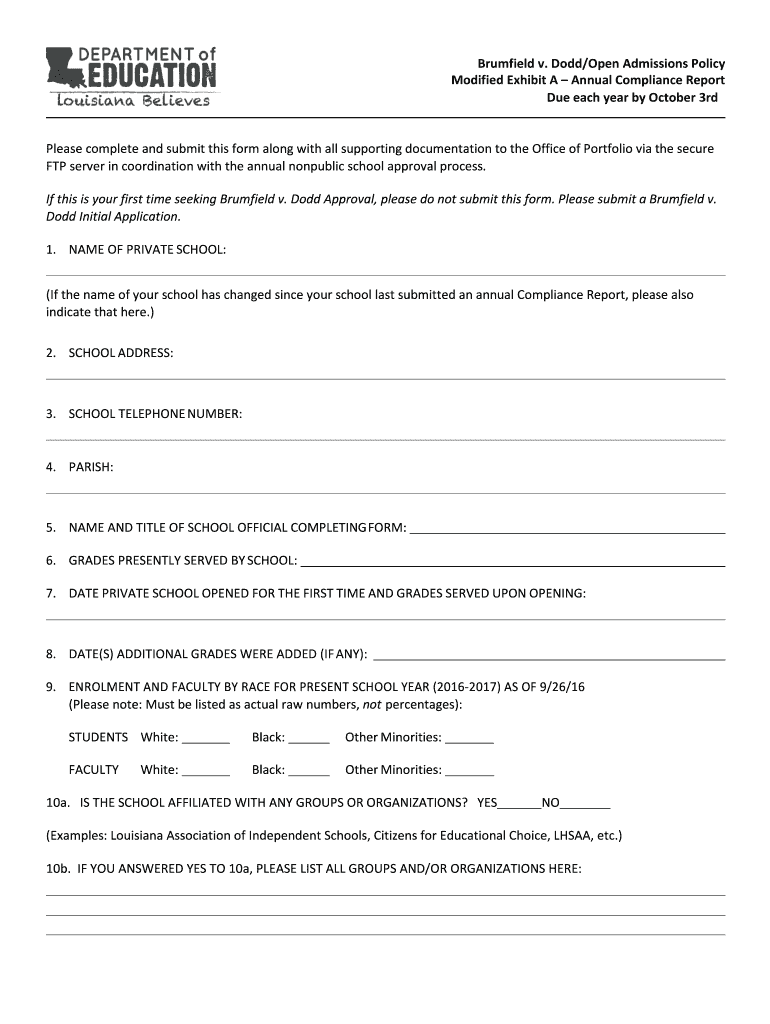
  1. Click ‘Get Form’ to open the Brumfield v Dood - Annual Compliance Report in our editor.
  2. Begin by entering the NAME OF PRIVATE SCHOOL at the top of the form. If your school's name has changed, please indicate that as well.
  3. Fill in the SCHOOL ADDRESS and SCHOOL TELEPHONE NUMBER in the designated fields.
  4. Provide the PARISH where your school is located.
  5. Enter the NAME AND TITLE OF THE SCHOOL OFFICIAL COMPLETING THE FORM.
  6. List the GRADES PRESENTLY SERVED BY YOUR SCHOOL.
  7. Indicate the DATE PRIVATE SCHOOL OPENED FOR THE FIRST TIME and specify the GRADES SERVED UPON OPENING.
  8. If applicable, provide DATE(S) ADDITIONAL GRADES WERE ADDED.
  9. Complete the ENROLLMENT AND FACULTY BY RACE section with actual raw numbers for students and faculty, ensuring accuracy.
  10. Answer whether your school is affiliated with any groups or organizations and list them if applicable.
  11. Attach a copy of your NONDISCRIMINATORY POLICY as required.
  12. Describe efforts made to publicize your nondiscriminatory admissions policy on a separate page, including supporting documentation like advertisements or brochures.

Start using our platform today to complete your Brumfield v Dood - Annual Compliance Report easily and for free!

See more Brumfield v Dood - Annual Compliance Report docx versions

We've got more versions of the Brumfield v Dood - Annual Compliance Report docx form. Select the right Brumfield v Dood - Annual Compliance Report docx version from the list and start editing it straight away!
Versions Form popularity Fillable & printable
2020 4.7 Satisfied (51 Votes)
2016 4.2 Satisfied (33 Votes)
be ready to get more

Complete this form in 5 minutes or less

Get form

Got questions?

We have answers to the most popular questions from our customers. If you can't find an answer to your question, please contact us.
Contact us

According to eSignature laws, forms approved digitally have the same validity as those approved with pen and paper. You can electronically sign almost any business and private documentation. Four types of documents still call for wet signatures only - wills and testamentary trusts, court orders and other court papers, state statutes governing divorce, adoption, or other family law, and notice of cancellation of utility services. If you follow the guidelines and utilize a trustworthy and compliant software solution, like DocHub, you can eSign your Brumfield v Dood - Annual Compliance Report docx without printing it.

When you edit your Brumfield v Dood - Annual Compliance Report docx with DocHub, you merely need a stable web connection and virtually any browser installed on your device. No need to set up any third-party applications or study tutorials. Just open a tab with DocHub, drag and drop your file, and modify it immediately.

How Do You Write a Compliance Report? Understand the Requirements. Data Collection. Conducting a Thorough Compliance Audit. Analyzing Findings and Identifying Non-Compliance Issues. Developing Action Plans for Compliance Improvement. Compiling and Structuring the Report. Review, Revise, and Finalize. Frequently Asked Questions.
The typical structure of a compliance report includes an introduction to the scope of the audit, a detailed description of the assessment methodology, and findings from the compliance review.
A compliance report is a clear, no-fluff document that shows how your company is following the rules. These could include local laws, industry standards, or internal policies, etc.

Security and compliance

At DocHub, your data security is our priority. We follow HIPAA, SOC2, GDPR, and other standards, so you can work on your documents with confidence.

Learn more
ccpa2
pci-dss
gdpr-compliance
hipaa
soc-compliance
be ready to get more

Complete this form in 5 minutes or less

Get form

People also ask

Examples: IT Security Compliance Report: Tracks compliance with internal cybersecurity protocols like access control, encryption, or bdocHub responses. Training Compliance Report: Monitors employee completion of mandatory training modules tied to policy acknowledgment or role-specific risks.
The Annual Declaration on Compliance is a legal requirement for all RTOs in Australia, where the CEO confirms the RTO meets the VET Quality Framework and complies with ASQAs regulations.

Related links