




Here's how it works



How to use or fill out Fylls i av myndigheten with our platform

- Click ‘Get Form’ to open it in the editor.
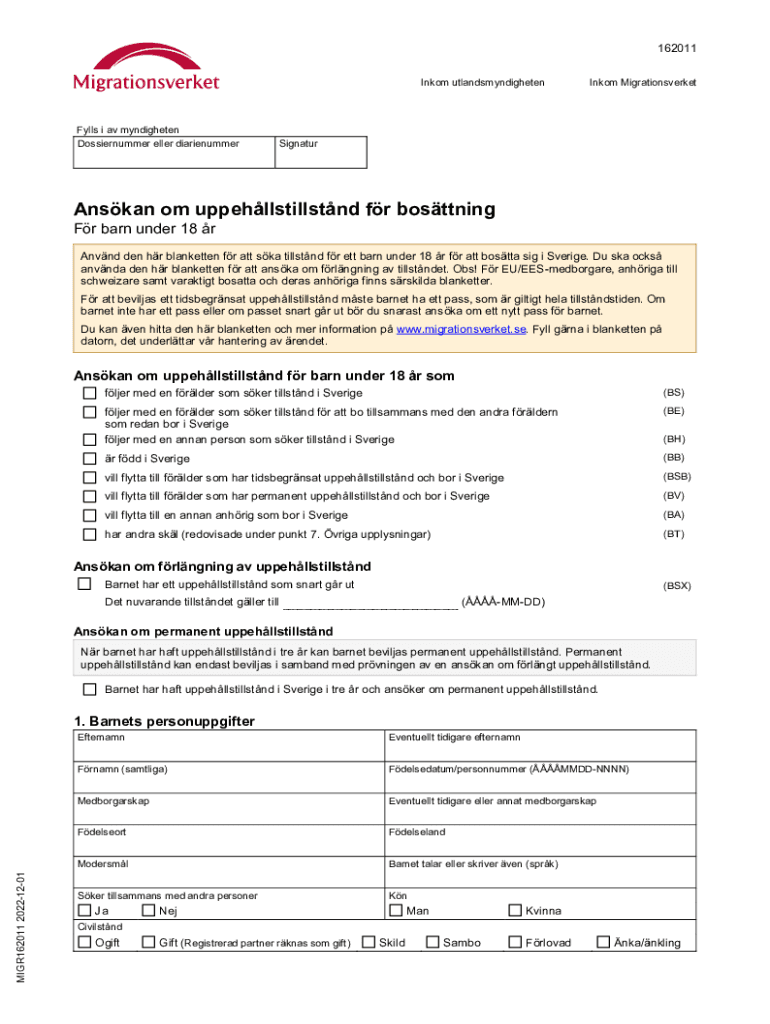
- Begin by filling in the child's personal information, including their last name, first name(s), date of birth, and citizenship. Ensure all details are accurate for a smooth application process.
- Next, provide the child's passport information if applicable. If the child does not have a passport, indicate this clearly. Include details such as passport number and expiration date.
- In the section regarding the person or persons the child will be living with, specify their relationship to the child and complete their personal details as required.
- Fill out the current address where the child resides and any previous addresses if necessary. This helps establish residency status.
- Complete any additional sections regarding special circumstances or other relevant information that may support the application.
- Finally, ensure that all signatures are obtained where required, particularly from guardians or parents, to validate the application.
Start using our platform today for free to simplify your document editing and form completion!
It's free
See more Fylls i av myndigheten versions
Got questions?
How can I eSign my indian bank fd form download from Gmail?
With DocHub, it’s pretty simple. The service offers users an add-on called DocHub for Gmail, which you can locate in the Google Workspace Marketplace free of charge. Install it and give it access to your Google account. Open your email with your indian bank fd form download attached and click on the add-on button in the right-side panel. Sign in to your DocHub account, and upload the file to our editor, where you can complete it and sign.
How to manage my indian bank statement form from Gmail?
In case your go-to email service is Gmail, you can easily incorporate your DocHub editor into your work. Edit your indian bank statement form with DocHub tools and attach it to your drafts in Gmail. See how easy it can be to exchange papers and work together having a swift PDF editing solution at hand.
Security and compliance
At DocHub, your data security is our priority. We follow HIPAA, SOC2, GDPR, and other standards, so you can work on your documents with confidence.
Learn more




