ICS 224 doc 2026

Get Form
ics 224 Preview on Page 1

Here's how it works

01. Edit your ics 224 online
Type text, add images, blackout confidential details, add comments, highlights and more.
02. Sign it in a few clicks
Draw your signature, type it, upload its image, or use your mobile device as a signature pad.
03. Share your form with others
Send it via email, link, or fax. You can also download it, export it or print it out.

How to use or fill out ICS 224 doc with our platform

Form edit decoration
9.5
Ease of Setup
DocHub User Ratings on G2
9.0
Ease of Use
DocHub User Ratings on G2
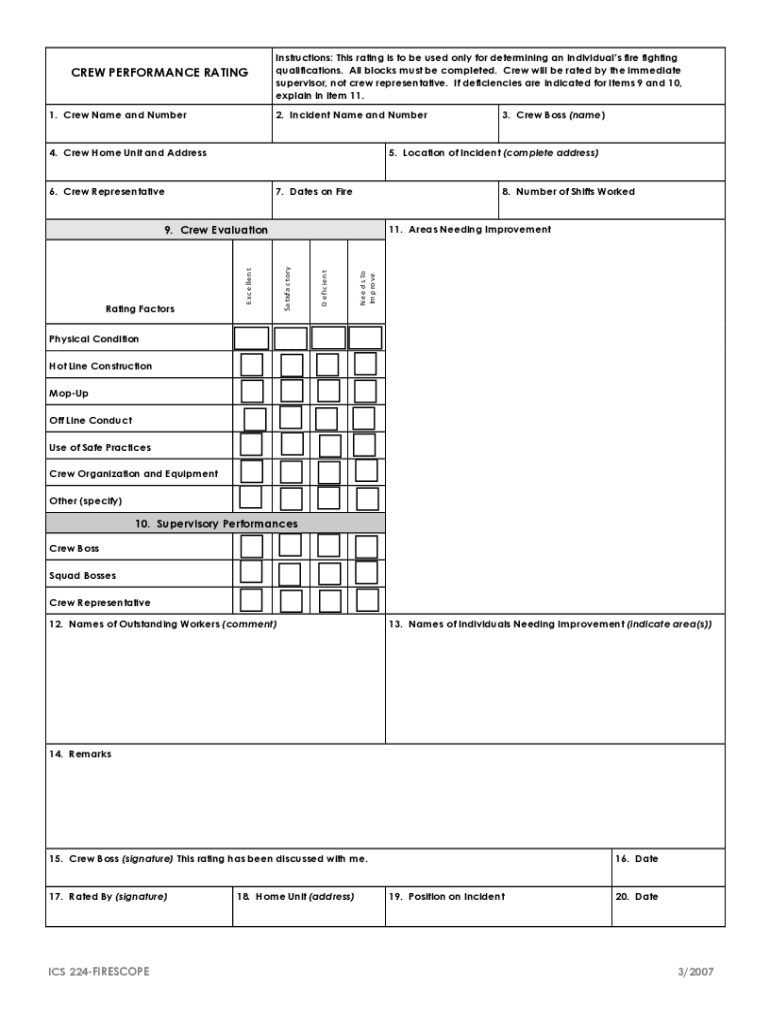
  1. Click ‘Get Form’ to open the ICS 224 document in the editor.
  2. Begin by entering the 'Crew Name and Number' in the designated fields. Ensure accuracy as this is crucial for identifying qualifications.
  3. Fill in the 'Incident Name and Number' along with the 'Location of Incident.' Providing complete addresses helps in proper documentation.
  4. Complete the 'Crew Home Unit and Address' section, followed by details about the 'Crew Representative.'
  5. Record the 'Dates on Fire' and 'Number of Shifts Worked' to reflect crew activity accurately.
  6. Evaluate crew performance by filling out sections 9 and 10, rating factors such as physical condition and safe practices. Use item 11 to explain any deficiencies.
  7. List names of outstanding workers and those needing improvement in sections 12 and 13 respectively, providing comments where necessary.
  8. Finally, ensure that all signatures are completed in sections 15, 17, and date entries are filled out correctly before saving your document.

Start using our platform today for free to streamline your ICS 224 form completion!

See more ICS 224 doc versions

We've got more versions of the ICS 224 doc form. Select the right ICS 224 doc version from the list and start editing it straight away!
Versions Form popularity Fillable & printable
2014 4.1 Satisfied (37 Votes)
2007 4.3 Satisfied (57 Votes)
be ready to get more

Complete this form in 5 minutes or less

Get form

Got questions?

We have answers to the most popular questions from our customers. If you can't find an answer to your question, please contact us.
Contact us
The Assignment List(s) (ICS 204) informs Division and Group supervisors of incident assignments. Once the Command and General Staffs agree to the assignments, the assignment information is given to the appropriate Divisions and Groups. Preparation.
The Incident Command System uses a series of standard forms and supporting documents that convey directions for the accomplishment of the objectives and distributing information. Listed below are some standard ICS form titles and descriptions of each form.
The ICS 202 is part of the IAP and can be used as the opening or cover page. If additional pages are needed, use a blank ICS 202 and repaginate as needed.
The Incident Command System or ICS is a standardized, on-scene, all-risk incident management concept. ICS allows its users to adopt an integrated organizational structure to match the complexities and demands of single or multiple incidents without being hindered by jurisdictional boundaries.
Incident Briefing ICS Form 201: Provides the Incident Commander (and the Command and General Staffs) with basic information regarding the incident situation and the resources allocated to the incident. In addition to a briefing document, the ICS Form 201 also serves as an initial action worksheet.

Security and compliance

At DocHub, your data security is our priority. We follow HIPAA, SOC2, GDPR, and other standards, so you can work on your documents with confidence.

Learn more
ccpa2
pci-dss
gdpr-compliance
hipaa
soc-compliance

People also ask

Purpose. The Activity Log (ICS 214) records details of notable activities at any ICS level, including single resources, equipment, Task Forces, etc. These logs provide basic incident activity documentation, and a reference for any after- action report. Preparation.
The filename extension of ics is to be used for files containing calendaring and scheduling information, ifb for files with free or busy time information consistent with this MIME content type.

Related links