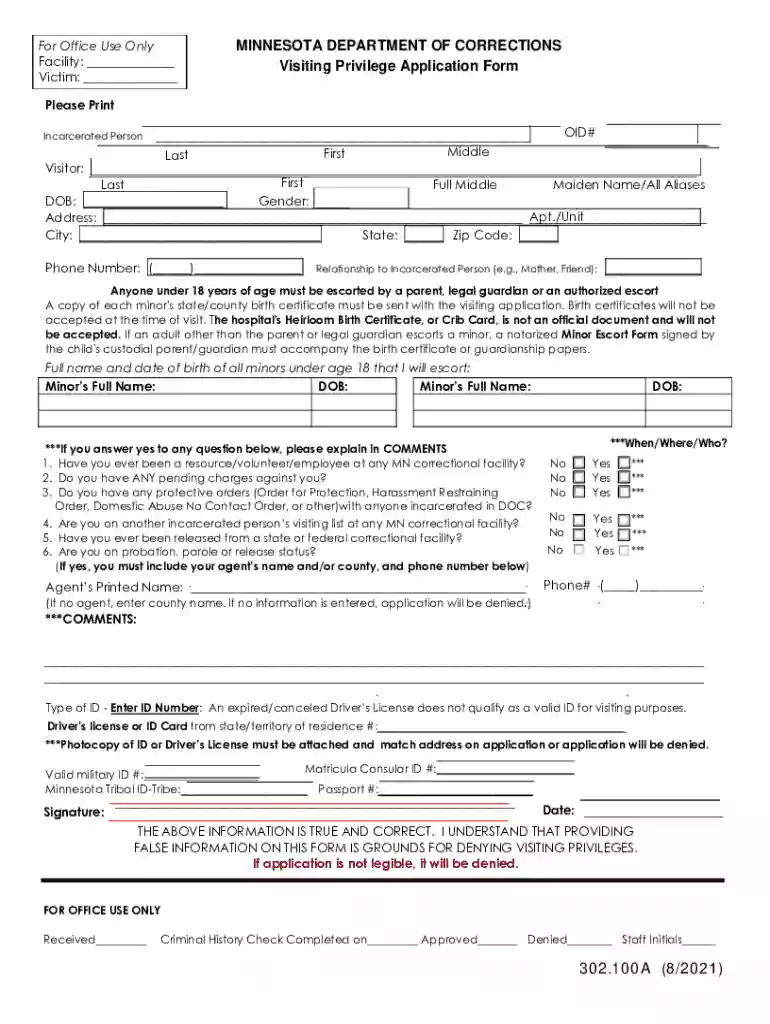
mn soc Preview on Page 1

Mn doc assetsALL FORMS OF COMMUNICATION ARE SUBJECT TO MONITORING - mn 2026

Here's how it works

  • 01. Edit your mn soc online

    Type text, add images, blackout confidential details, add comments, highlights and more.

  • 02. Sign it in a few clicks

    Draw your signature, type it, upload its image, or use your mobile device as a signature pad.

  • 03. Share your form with others

    Send minnesota dept of corrections via email, link, or fax. You can also download it, export it or print it out.

How to use or fill out mn doc assetsALL FORMS OF COMMUNICATION ARE SUBJECT TO MONITORING - mn

Form edit decoration
9.5
Ease of Setup
DocHub User Ratings on G2
9.0
Ease of Use
DocHub User Ratings on G2
  1. Click ‘Get Form’ to open it in the editor.
  2. Begin by filling in your personal information, including your full name, date of birth, and address. Ensure all entries are made in black ink for clarity.
  3. Provide the OID number of the incarcerated person you wish to visit, along with your relationship to them.
  4. If you are escorting minors, list their full names and dates of birth. Remember to attach a copy of each minor's state/county birth certificate.
  5. Answer the questions regarding your history with correctional facilities and any pending charges. If applicable, provide explanations in the comments section.
  6. Enter your identification details and ensure a photocopy of your ID is attached. This must match the address provided on the application.
  7. Review all information for accuracy before signing and dating the form at the bottom.

Start using our platform today to complete your application easily and efficiently!

See more mn soc versions

We've got more versions of the mn soc form. Select the right mn soc version from the list and start editing it straight away!

VersionsForm popularityFillable & printable
20214.2 Satisfied (32 Votes)
20184.8 Satisfied (254 Votes)
20174.4 Satisfied (23 Votes)
20124.4 Satisfied (603 Votes)
20054.4 Satisfied (84 Votes)

be ready to get more

Complete this form in 5 minutes or less

Got questions?

We have answers to the most popular questions from our customers. If you can't find an answer to your question, please contact us.

Electronic document signing requires a software solution that complies with data protection and eSignature laws. DocHub is a great tool for that, because it meets all the previously mentioned requirements. Whatever method you prefer to sign your mn dept of corrections visiting form in DocHub, your eSignature will be legally binding and court-admissible.

In addition to a comprehensive toolset for editing PDFs on mobile devices, DocHub allows you to sign your mn doc visiting application along the way. Open our editor in your internet browser, make modifications using DocHub’s toolset, and finish your editing by eSigning the completed form.

Security and compliance

At DocHub, your data security is our priority. We follow HIPAA, SOC2, GDPR, and other standards, so you can work on your documents with confidence.

rush city visiting form

State of Minnesota GIS Pandemic Needs Analysis Report

Sep 6, 2007 The DOC has units associated with energy, communication, enforcement Log form, which was submitted by the well driller to the Minnesota.Read more

Learn more
fcicfinalreportfull.pdf

This report endeavors to expose the facts, identify responsibility, unravel myths, and help us understand how the crisis could have been avoided.

Learn more
If you believe that this page should be taken down, please follow our DMCA take down process here