Competitive Edge Volleyball 2026

Get Form
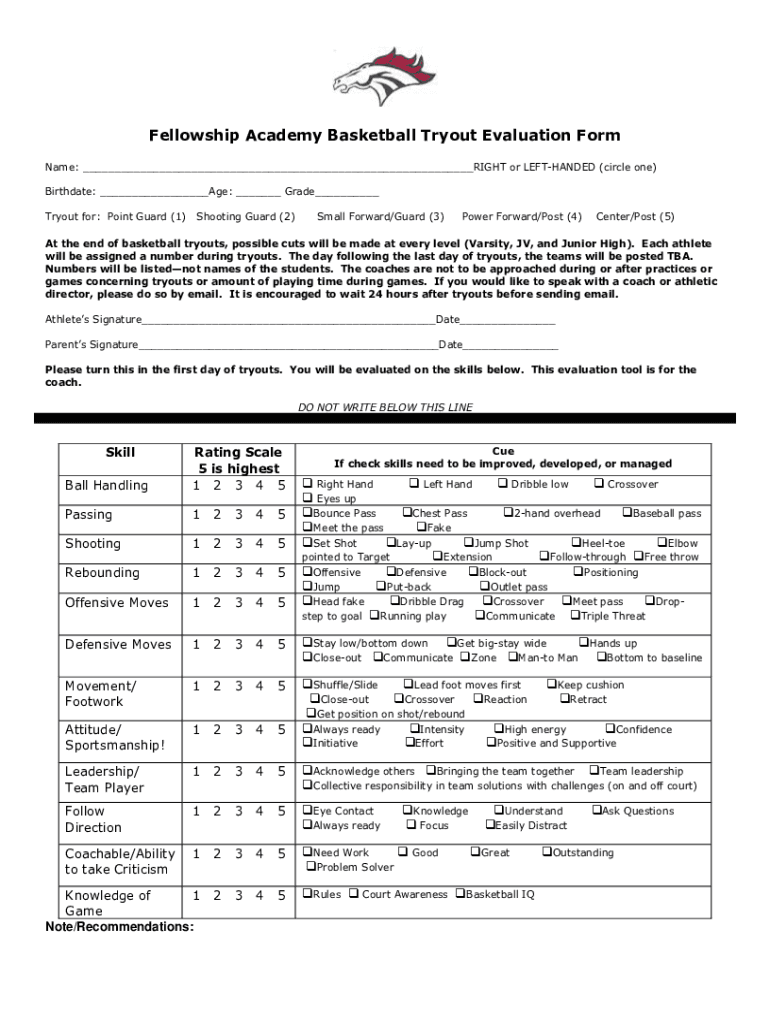
basketball tryout evaluation form Preview on Page 1

Here's how it works

01. Edit your basketball tryout evaluation form online
Type text, add images, blackout confidential details, add comments, highlights and more.
02. Sign it in a few clicks
Draw your signature, type it, upload its image, or use your mobile device as a signature pad.
03. Share your form with others
Send basketball tryout evaluation form word via email, link, or fax. You can also download it, export it or print it out.

How to use or fill out Competitive Edge Volleyball with our platform

Form edit decoration
9.5
Ease of Setup
DocHub User Ratings on G2
9.0
Ease of Use
DocHub User Ratings on G2
  1. Click ‘Get Form’ to open the Competitive Edge Volleyball document in the editor.
  2. Begin by entering your name and indicating whether you are right or left-handed. This information is crucial for coaches to understand your playing style.
  3. Fill in your birthdate, age, and grade. This helps categorize athletes appropriately during tryouts.
  4. Select the position you are trying out for by marking the corresponding box (e.g., Point Guard, Shooting Guard).
  5. Sign and date the form at the bottom to confirm your participation. Ensure both athlete and parent signatures are included.
  6. Review the evaluation criteria listed below the signature section. Familiarize yourself with the skills that will be assessed during tryouts.

Start using our platform today to streamline your form completion process for free!

See more Competitive Edge Volleyball versions

We've got more versions of the Competitive Edge Volleyball form. Select the right Competitive Edge Volleyball version from the list and start editing it straight away!
Versions Form popularity Fillable & printable
2020 4.3 Satisfied (55 Votes)
2015 4.7 Satisfied (59 Votes)
be ready to get more

Complete this form in 5 minutes or less

Get form

Got questions?

We have answers to the most popular questions from our customers. If you can't find an answer to your question, please contact us.
Contact us

Sure, a typed name is accepted as a valid electronic signature when you create it on your form using a compliant solution like DocHub. Simply add your basketball tryout evaluation form pdf to our editor, click Sign in the top tool pane → Create your signature → Type your name in the appropriate tab, and choose how it will appear on your document.

As a comprehensive document editing platform, DocHub is accessible on smart phones. Open DocHub in your choice of mobile browser and use our intelligent mobile-friendly toolset to fill out your basketball tryout evaluation form free.

Security and compliance

At DocHub, your data security is our priority. We follow HIPAA, SOC2, GDPR, and other standards, so you can work on your documents with confidence.

Learn more
ccpa2
pci-dss
gdpr-compliance
hipaa
soc-compliance
be ready to get more

Complete this form in 5 minutes or less

Get form