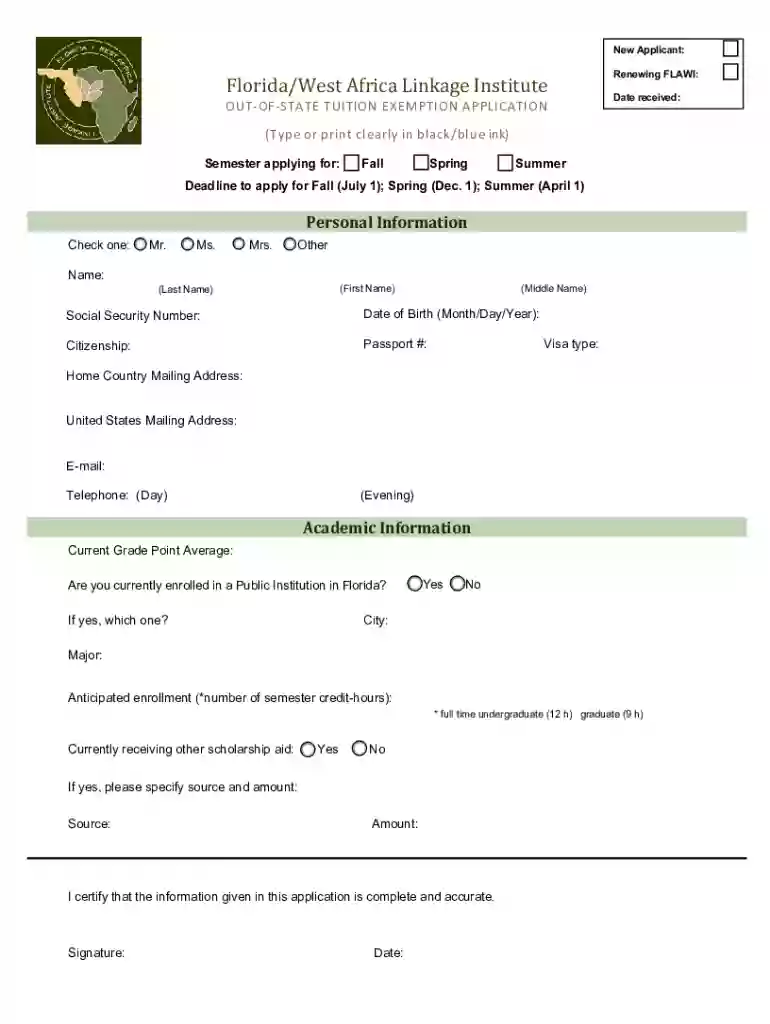
flawi Preview on Page 1

FLAWI Application 2026

Here's how it works

  • 01. Edit your flawi online

    Type text, add images, blackout confidential details, add comments, highlights and more.

  • 02. Sign it in a few clicks

    Draw your signature, type it, upload its image, or use your mobile device as a signature pad.

  • 03. Share your form with others

    Send flawi scholarship via email, link, or fax. You can also download it, export it or print it out.

How to use or fill out FLAWI Application with our platform

Form edit decoration
9.5
Ease of Setup
DocHub User Ratings on G2
9.0
Ease of Use
DocHub User Ratings on G2
  1. Click ‘Get Form’ to open the FLAWI Application in the editor.
  2. Begin by filling out your personal information. Clearly indicate your name, selecting from Mr., Ms., Mrs., or Other. Ensure you provide your first, last, and middle names accurately.
  3. Enter your Social Security Number and Date of Birth in the specified format (Month/Day/Year). Complete the Citizenship section and provide your Passport number and Visa type if applicable.
  4. Fill in your home country mailing address and United States mailing address. Don’t forget to include your email and telephone numbers for contact purposes.
  5. In the Academic Information section, input your current Grade Point Average and indicate whether you are enrolled in a Public Institution in Florida. If yes, specify which institution.
  6. Provide details about your major and anticipated enrollment hours. Indicate if you are currently receiving other scholarship aid, specifying the source and amount if applicable.
  7. Finally, review all information for accuracy before signing and dating the application at the bottom of the form.

Start using our platform today to complete your FLAWI Application online for free!

See more flawi versions

We've got more versions of the flawi form. Select the right flawi version from the list and start editing it straight away!

VersionsForm popularityFillable & printable
20224.6 Satisfied (20 Votes)
20114 Satisfied (20 Votes)

be ready to get more

Complete this form in 5 minutes or less

Got questions?

We have answers to the most popular questions from our customers. If you can't find an answer to your question, please contact us.

Electronic document signing demands a software solution that works in compliance with data protection and eSignature regulations. DocHub is an excellent tool for that, because it meets all the aforementioned requirements. Whatever method you like to sign your FLAWI Application in DocHub, your electronic signature will be legally binding and court-admissible.

If you are searching for a state-specific FLAWI Application sample, you can find it in our DocHub Forms & Templates catalog. Use the search field, enter your form’s name, and search through the results for your state. You can also filter out irrelevant results while searching our catalog by categories.

Security and compliance

At DocHub, your data security is our priority. We follow HIPAA, SOC2, GDPR, and other standards, so you can work on your documents with confidence.

Related links

FLAWI Application

Florida/West Africa Linkage Institute. OUT-OF-STATE TUITION EXEMPTION APPLICATION. (Type or print clearly in black/blue ink). New Applicant: Renewing FLAWI:.Read more

Learn more
Application

HomeMy WebLinkAboutApplication w u Tingley, Connie S From: Sent: To: Cc: Subject: Dobosiewicz, Jon C Monday. February 17, 2003 2:03 PM Tingley,

Learn more
If you believe that this page should be taken down, please follow our DMCA take down process here