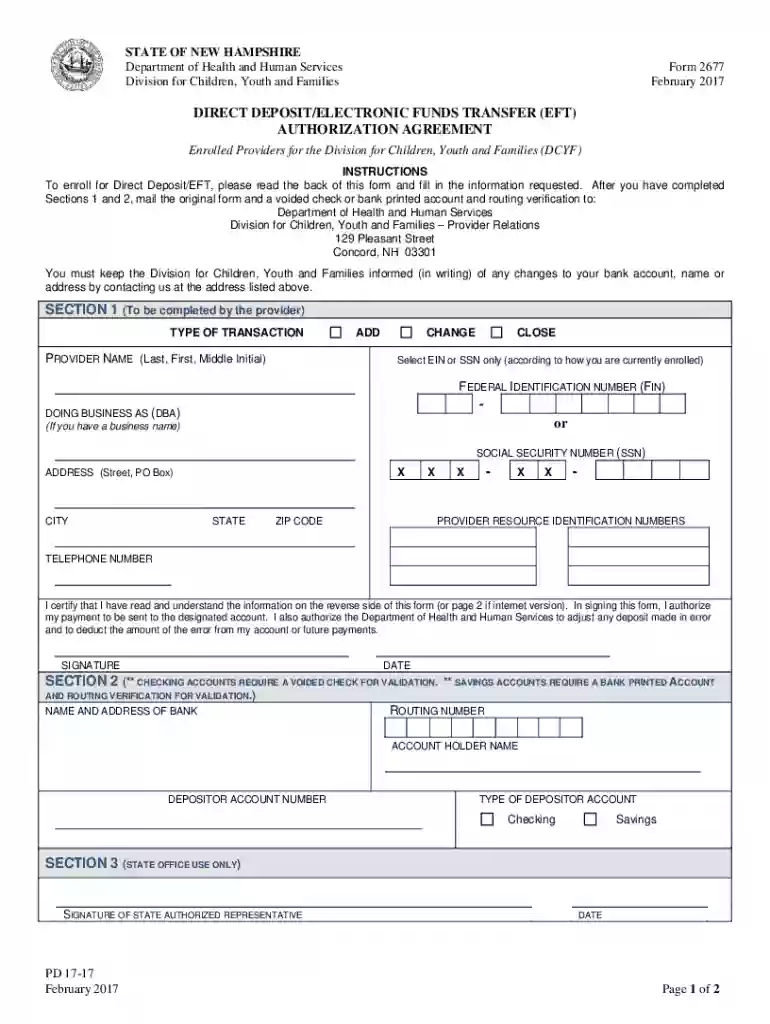
DIRECT DEPOSIT ELECTRONIC FUNDS TRANSFER (EFT) AUTHORIZATION 2026

Get Form
direct transfer Preview on Page 1

Here's how it works

01. Edit your direct transfer online
Type text, add images, blackout confidential details, add comments, highlights and more.

02. Sign it in a few clicks
Draw your signature, type it, upload its image, or use your mobile device as a signature pad.

03. Share your form with others
Send nh electronic via email, link, or fax. You can also download it, export it or print it out.

How to use or fill out DIRECT DEPOSIT ELECTRONIC FUNDS TRANSFER (EFT) AUTHORIZATION

Form edit decoration
9.5
Ease of Setup
DocHub User Ratings on G2
9.0
Ease of Use
DocHub User Ratings on G2
  1. Click ‘Get Form’ to open it in the editor.
  2. In Section 1, select the type of transaction: Add, Change, or Close. Fill in your provider name and choose either EIN or SSN based on your enrollment.
  3. Enter your Federal Identification Number (FIN) or Social Security Number (SSN), along with your address details including city, state, and zip code.
  4. Provide your telephone number and certify that you understand the form's information by signing and dating it.
  5. In Section 2, enter the name and address of your bank. Include the routing number and account holder name, then specify whether it's a checking or savings account.
  6. Attach a voided check for checking accounts or a bank printed account verification for savings accounts before submitting the form to the specified address.

Start using our platform today to complete your Direct Deposit EFT Authorization easily and for free!

See more DIRECT DEPOSIT ELECTRONIC FUNDS TRANSFER (EFT) AUTHORIZATION versions

We've got more versions of the DIRECT DEPOSIT ELECTRONIC FUNDS TRANSFER (EFT) AUTHORIZATION form. Select the right DIRECT DEPOSIT ELECTRONIC FUNDS TRANSFER (EFT) AUTHORIZATION version from the list and start editing it straight away!
Versions Form popularity Fillable & printable
2017 4.6 Satisfied (28 Votes)
2011 4.9 Satisfied (52 Votes)
be ready to get more

Complete this form in 5 minutes or less

Get form

Got questions?

We have answers to the most popular questions from our customers. If you can't find an answer to your question, please contact us.
Contact us
6:51 9:36 Contractor. A good practice is to double check that the account holder. Name the routing number andMoreContractor. A good practice is to double check that the account holder. Name the routing number and the account number match what is on the supporting.
An electronic funds transfer (EFT), or direct deposit, is a digital money movement from one bank account to another. These transfers take place independently from bank employees. As a digital transaction, there is no need for paper documents.
Youve likely made an EFT payment if youve ever sent money electronically to a friend or paid a monthly bill over the phone or online. Many transactions can be considered EFTs. P2P payments are a common type of EFT. And Zelle is a popular platform that supports EFTs.
Electronic funds transfers (EFTs) are transactions that move funds electronically between different financial institutions, bank accounts, or individuals. EFTs are frequently referred to as electronic bank transfers, e-checks, or electronic payments.
The term electronic fund transfer or EFT means any transfer of funds that is initiated through an electronic terminal, telephone, computer, or magnetic tape for the purpose of ordering, instructing, or authorizing a financial institution to debit or credit a consumers account. 12 CFR 1005.3(b)(1).

Security and compliance

At DocHub, your data security is our priority. We follow HIPAA, SOC2, GDPR, and other standards, so you can work on your documents with confidence.

Learn more
ccpa2
pci-dss
gdpr-compliance
hipaa
soc-compliance
be ready to get more

Complete this form in 5 minutes or less

Get form

People also ask

An electronic funds transfer (EFT), also known as a direct deposit, is the digital transfer of money between bank accounts. As digital transfers, they reduce the need for manual input and paper documents.

Related links