Cdn cocodoc cocodoc-form-pdfpdfRABIES VACCINATION CERTIFICATE - cdn cocodoc 2026

Get Form
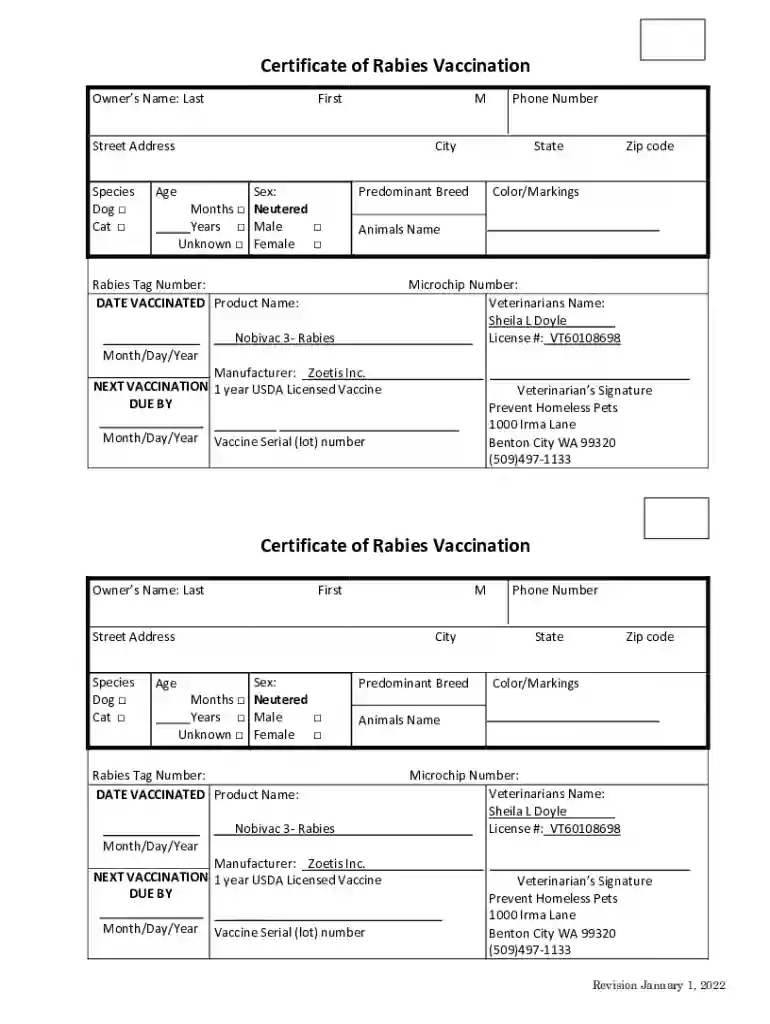
cdn cocodoc cocodoc-form-pdfpdfRABIES VACCINATION CERTIFICATE - cdn cocodoc Preview on Page 1

Here's how it works

01. Edit your form online
Type text, add images, blackout confidential details, add comments, highlights and more.

02. Sign it in a few clicks
Draw your signature, type it, upload its image, or use your mobile device as a signature pad.

03. Share your form with others
Send it via email, link, or fax. You can also download it, export it or print it out.

How to use or fill out cdn cocodoc cocodoc-form-pdfpdfRABIES VACCINATION CERTIFICATE - cdn cocodoc

Form edit decoration
9.5
Ease of Setup
DocHub User Ratings on G2
9.0
Ease of Use
DocHub User Ratings on G2
  1. Click ‘Get Form’ to open it in the editor.
  2. Begin by entering the owner's name in the designated fields for Last, First, and MI. This ensures accurate identification of the pet owner.
  3. Fill in the street address, city, state, and zip code to provide complete contact information.
  4. Select the species of your pet by checking either 'Dog' or 'Cat'.
  5. Indicate the age of your pet and select its sex by checking the appropriate boxes for Male, Female, Neutered, or Unknown.
  6. Provide details about your pet's predominant breed and color/markings for identification purposes.
  7. Enter your pet's name and rabies tag number as required.
  8. Fill in the date vaccinated and product name (Nobivac 3-Rabies) along with the veterinarian’s name and license number.
  9. Lastly, ensure that you have a signature from the veterinarian and note down any additional information such as microchip number and vaccine serial number.

Start using our platform today to easily fill out your Rabies Vaccination Certificate for free!

See more cdn cocodoc cocodoc-form-pdfpdfRABIES VACCINATION CERTIFICATE - cdn cocodoc versions

We've got more versions of the cdn cocodoc cocodoc-form-pdfpdfRABIES VACCINATION CERTIFICATE - cdn cocodoc form. Select the right cdn cocodoc cocodoc-form-pdfpdfRABIES VACCINATION CERTIFICATE - cdn cocodoc version from the list and start editing it straight away!
Versions Form popularity Fillable & printable
2022 4.9 Satisfied (35 Votes)
2017 4.8 Satisfied (47 Votes)
be ready to get more

Complete this form in 5 minutes or less

Get form

Got questions?

We have answers to the most popular questions from our customers. If you can't find an answer to your question, please contact us.
Contact us

If you regularly work with documents stored in your Google Drive, DocHub is a perfect option for you to easily and quickly complete, modify, and sign them. This editor integrates properly with Google services, so you can export your cdn cocodoc cocodoc-form-pdfpdfRABIES VACCINATION CERTIFICATE - cdn cocodoc from your Google Drive to the editor without the need of downloading and re-uploading it. Right-click on your file, select Open With → DocHub PDF Sign and Edit. In our editor, add and assign Signature Fields for all people involved, then click on the Menu option above → Send → decide on how you want to share your form.

If you need to edit your cdn cocodoc cocodoc-form-pdfpdfRABIES VACCINATION CERTIFICATE - cdn cocodoc online easily, it does not matter what browser you employ. DocHub’s straightforward editing tools are available using any internet browser. Just open the appropriate tab in the editor, add your file, and fill it out without stress.

The Rabies Vaccination Tracker (RVT) is a tool that enables you to rapidly track and monitor a rabies vaccination campaign in real time. The tool captures vaccination data from the field and immediately generates outputs that allows you to monitor and direct the campaign in real-time.
And, Tennessee state law requires you to vaccinate all of your cats and dogs over the age of six months against rabies.
The Sample Certificate of Rabies Vaccination must report information such as the animals name, breed, age, sex, vaccination date, rabies vaccine manufacturers name, lot number, and the veterinarians name and contact information.

Security and compliance

At DocHub, your data security is our priority. We follow HIPAA, SOC2, GDPR, and other standards, so you can work on your documents with confidence.

Learn more
ccpa2
pci-dss
gdpr-compliance
hipaa
soc-compliance

People also ask

So the Rabies vaccination certificate must be complete and feature: The vaccine manufacturer (e.g., Merial or Zoetis) The Serial/Lot number of the vaccine (usually a five- or six-digit number) The date the vaccine was administered to your pet. The duration of vaccine protection, typically 1-year or 3-years.
What is proof of rabies? The rabies vaccination certificate is formal proof that your dog has been vaccinated against rabies. As of March 1, 2023, the CDC Rabies Vaccination and Microchip Record is the only rabies vaccination certificate that CDC will accept from dogs that were vaccinated outside of the United States.
Rabies vaccination proof is essential for pet care and services. If records are lost, contact your veterinarian or local animal health department to request digital copies. Many clinics use online portals or databases for vaccine records.
Nonetheless, you should be able to obtain another copy of the rabies certificate by requesting it from the veterinarian who administered the vaccine or by contacting the veterinary hospital where the vaccination took place.
Rabies Vaccine Validity Overview Vaccine ValidityDetails Standard UK Validity 3 years from date of primary or booster vaccination Some Country Rules May require annual boosters or antibody titre tests Booster Due Must be administered before expiry to retain travel eligibility1 more row Jun 12, 2025