Core FacilitiesUTSA College of Sciences 2026

Get Form
Core FacilitiesUTSA College of Sciences Preview on Page 1

Here's how it works

01. Edit your form online
Type text, add images, blackout confidential details, add comments, highlights and more.

02. Sign it in a few clicks
Draw your signature, type it, upload its image, or use your mobile device as a signature pad.

03. Share your form with others
Send it via email, link, or fax. You can also download it, export it or print it out.

How to use or fill out Core FacilitiesUTSA College of Sciences with our platform

Form edit decoration
9.5
Ease of Setup
DocHub User Ratings on G2
9.0
Ease of Use
DocHub User Ratings on G2
  1. Click ‘Get Form’ to open the Core FacilitiesUTSA College of Sciences form in the editor.
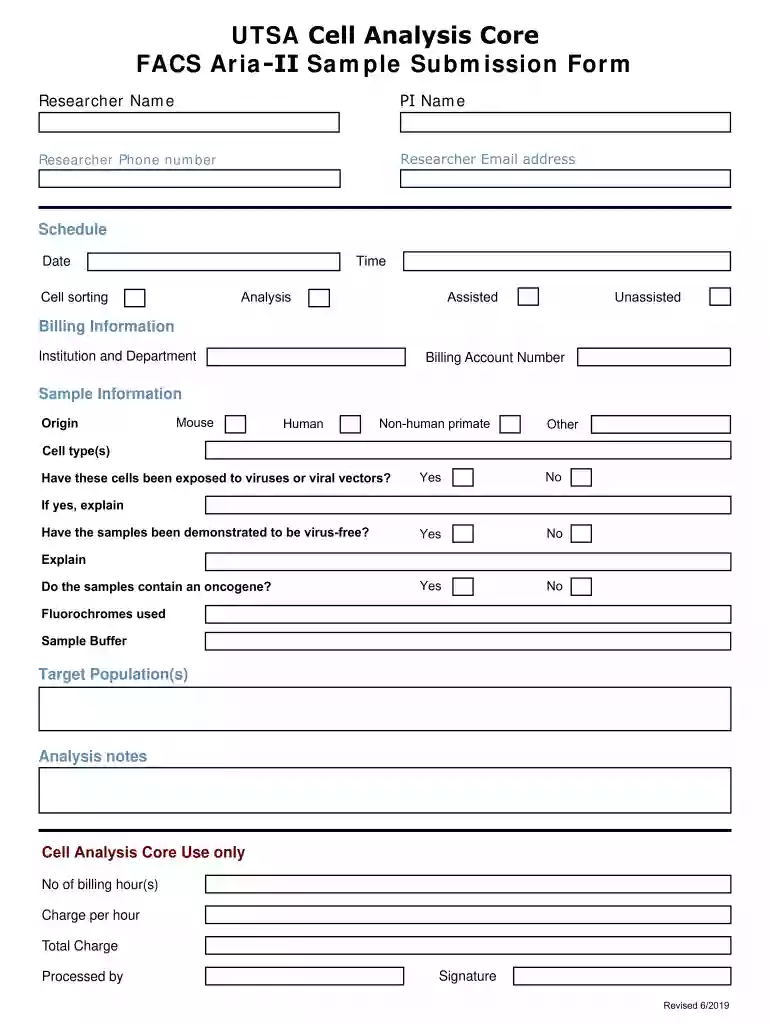
  2. Begin by entering your details in the 'Researcher Name', 'PI Name', 'Researcher Phone Number', and 'Researcher Email Address' fields. Ensure all contact information is accurate for effective communication.
  3. In the 'Schedule' section, specify the desired 'Time' and 'Date' for your cell sorting or analysis. Choose between 'Unassisted' or 'Assisted' options based on your needs.
  4. Fill out the 'Billing Information' with your institution and department details, along with the billing account number to ensure proper invoicing.
  5. Provide sample information by selecting the origin (Mouse, Human, Non-human primate, Other) and detailing the cell type(s). Answer questions regarding virus exposure and oncogenes as applicable.
  6. Complete any additional notes in the 'Analysis notes' section before moving to the final part of the form.
  7. In the 'Cell Analysis Core Use only' section, indicate billing hours, charge per hour, and total charge. Finally, sign and date where indicated.

Start using our platform today to streamline your document editing and form completion process for free!

See more Core FacilitiesUTSA College of Sciences versions

We've got more versions of the Core FacilitiesUTSA College of Sciences form. Select the right Core FacilitiesUTSA College of Sciences version from the list and start editing it straight away!
Versions Form popularity Fillable & printable
2019 4.8 Satisfied (80 Votes)
be ready to get more

Complete this form in 5 minutes or less

Get form

Got questions?

We have answers to the most popular questions from our customers. If you can't find an answer to your question, please contact us.
Contact us

Most eSignature services require users to have a paid subscription. With DocHub, there are two ways for you to create an electronic signature to your Core FacilitiesUTSA College of Sciences without being charged:

  • You can do it during a 7-day trial period;
  • You can sign up for a free plan.

The second option, however, has limitations on the number of signatures, sign requests, emails, and forms for editing available per month. You can check for full details here.

When you edit your Core FacilitiesUTSA College of Sciences with DocHub, you only require a stable internet connection and virtually any web browser installed on your device. No need to install any third-party software or study tutorials. Just open a tab with DocHub, drag and drop your file, and modify it on the spot.

Undergraduate Students Full Time Fall/Spring Undergraduate Resident StudentLiving at Home w/ParentsLiving On CampusHousing Meals (average)$4,212$12,934Transportation (average)$2,688$696Personal/Miscellaneous$1,476$2,088Loan Fees$68$683 more rows
The Center for Research and Training in the Sciences (CRTS) was established within the College of Sciences (COS) in June 2005. The mission of the CRTS is to promote Science, Research, and Education and the center coordinates and administers programs related to all scientific disciplines.
Core facilities can be defined as centralized shared resources that provide access to instruments, technologies, services, as well as expert consultation and other services to scientific and clinical investigators.

Security and compliance

At DocHub, your data security is our priority. We follow HIPAA, SOC2, GDPR, and other standards, so you can work on your documents with confidence.

Learn more
ccpa2
pci-dss
gdpr-compliance
hipaa
soc-compliance
be ready to get more

Complete this form in 5 minutes or less

Get form

People also ask

On-campus housing is not required for freshmen, but research shows that students living on-campus are: more satisfied with their living and college experience. earn higher grades.
You will need your myUTSA ID to apply. On-campus housing is not required for freshmen, but research shows that students living on-campus are: more satisfied with their living and college experience.
Our fully furnished Texas-sized apartments, exciting amenities, and friendly RAs are all part of the University Oaks Student Village experience. Plus, were the only pet-friendly campus housing option at UTSA.
University Housing at The University of Texas at San Antonio welcomes students of all gender identities and expressions and is committed to providing an equitable and inclusive community for all residents. Please contact studenthousing@utsa.edu to learn about all available housing options.
Service animals are welcome in all buildings on campus and may accompany an individual to any class, meeting or event on or off campus, if the activity pertains to the curriculum.

Related links