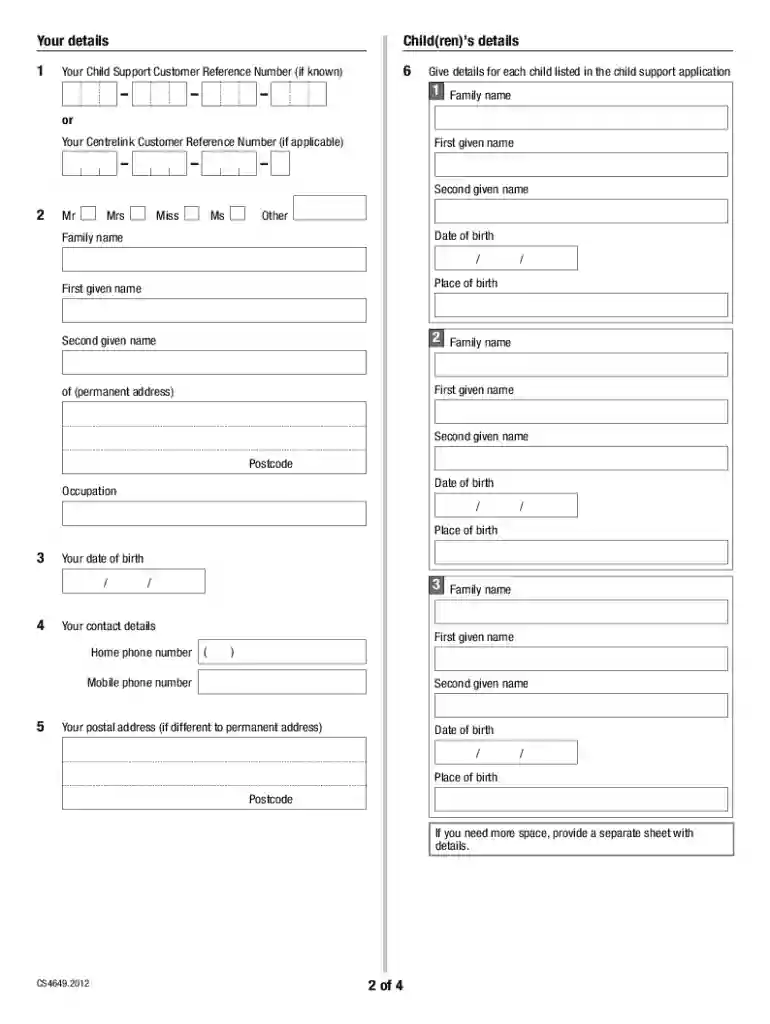
Au dhs statutory declaration 2026

Get Form
au dhs statutory declaration Preview on Page 1

Here's how it works

01. Edit your form online
Type text, add images, blackout confidential details, add comments, highlights and more.

02. Sign it in a few clicks
Draw your signature, type it, upload its image, or use your mobile device as a signature pad.

03. Share your form with others
Send it via email, link, or fax. You can also download it, export it or print it out.

How to use or fill out au dhs statutory declaration with our platform

Form edit decoration
9.5
Ease of Setup
DocHub User Ratings on G2
9.0
Ease of Use
DocHub User Ratings on G2
  1. Click ‘Get Form’ to open the au dhs statutory declaration in the editor.
  2. Begin by entering your details in the 'Your details' section. Include your Family name, First given name, and any additional names as required. Ensure accuracy for a smooth process.
  3. Next, provide the Child(ren)’s details. Fill in each child's Family name, First given name, Date of birth, and Place of birth. If there are multiple children, ensure all information is complete.
  4. In the 'Your contact details' section, input your Home phone number and Mobile phone number. If your postal address differs from your permanent address, include that as well.
  5. Read through the Privacy notice carefully before signing. This ensures you understand how your personal information will be handled.
  6. Finally, print the completed form and sign it where indicated. Remember to have it witnessed by an authorised person as specified in the document.

Start using our platform today to fill out your au dhs statutory declaration easily and for free!

See more au dhs statutory declaration versions

We've got more versions of the au dhs statutory declaration form. Select the right au dhs statutory declaration version from the list and start editing it straight away!
Versions Form popularity Fillable & printable
2020 4.9 Satisfied (46 Votes)
2015 4 Satisfied (51 Votes)
be ready to get more

Complete this form in 5 minutes or less

Get form

Got questions?

We have answers to the most popular questions from our customers. If you can't find an answer to your question, please contact us.
Contact us

With DocHub, it’s pretty simple. The service offers users an add-on called DocHub for Gmail, which you can find in the Google Workspace Marketplace without being charged. Install it and give it access to your Google account. Open your email with your au dhs statutory declaration attached and click on the add-on button in the right-side panel. Log in to your DocHub account, and import the file to our editor, where you can fill it out and sign.

If your go-to electronic mail service is Gmail, you can easily integrate your DocHub editor into your work. Edit your au dhs statutory declaration with DocHub instruments and attach it to your drafts in Gmail. See how easy it is to exchange papers and collaborate having a swift PDF editing solution at hand.

Step 1 - Download and open a Commonwealth statutory declaration form. To make a valid declaration, you must use an approved form. You cannot create your own form.
Commonwealth of Australia STATUTORY DECLARATION Statutory Declarations Act 1959 Insert the name, address and occupation of person making the declaration (required) Set out matter declared to in numbered paragraphs (required) Signature of person making the declaration (required)
No, a pharmacist is generally not a notary public in Australia. In Australia, a notary public is a senior lawyer who has completed further qualifications to be admitted as a notary public. This means they have been a practising lawyer for many years and completed further studies before they can become a notary public.

Security and compliance

At DocHub, your data security is our priority. We follow HIPAA, SOC2, GDPR, and other standards, so you can work on your documents with confidence.

Learn more
ccpa2
pci-dss
gdpr-compliance
hipaa
soc-compliance

People also ask

There are now 3 ways to make a Commonwealth statutory declaration. You can use: the approved form as observed by an approved witness in-person. the approved form as observed by an approved witness remotely using video link (such as over Zoom, Microsoft Teams, Skype or Facetime)
You can: create a digital Commonwealth statutory declaration through myGov using your Digital ID. have your Commonwealth statutory declaration witnessed remotely using a video link. have your Commonwealth statutory declaration witnessed in person.
A statutory declaration is a written statement that you (the declarant) sign and declare to be true and correct in the presence of an authorised witness. By signing it, you agree that the information in it is true.

Related links