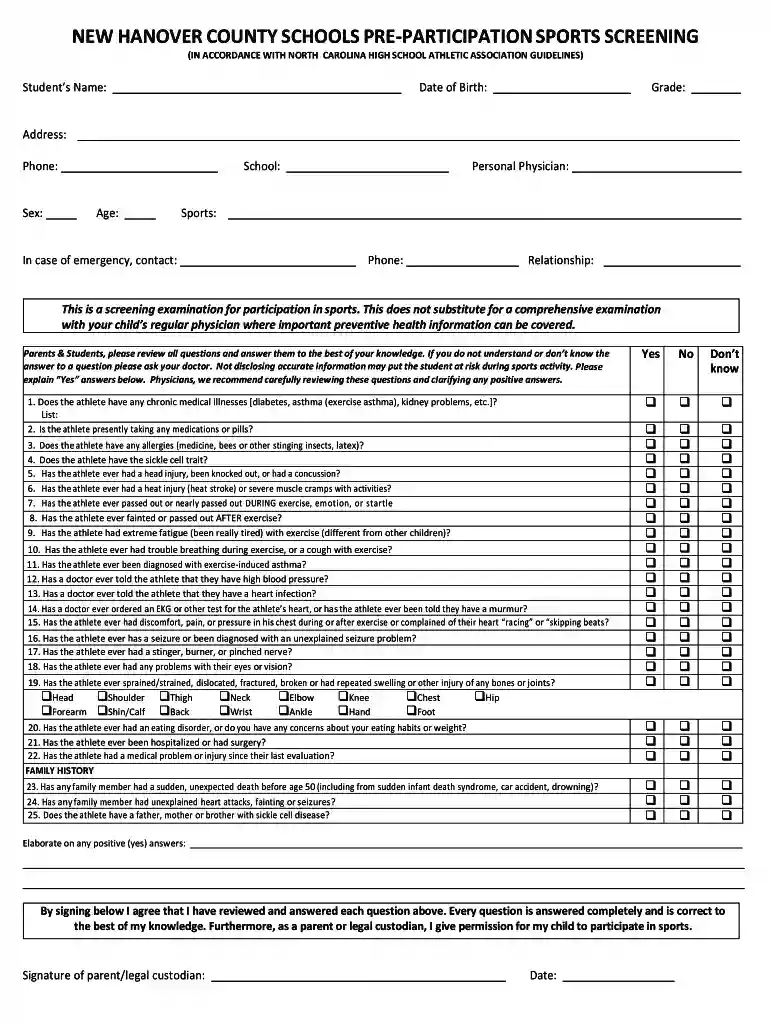
sports physical form Preview on Page 1

Sports physical form 2026

Here's how it works

  • 01. Edit your form online

    Type text, add images, blackout confidential details, add comments, highlights and more.

  • 02. Sign it in a few clicks

    Draw your signature, type it, upload its image, or use your mobile device as a signature pad.

  • 03. Share your form with others

    Send it via email, link, or fax. You can also download it, export it or print it out.

How to use or fill out sports physical form with our platform

Form edit decoration
9.5
Ease of Setup
DocHub User Ratings on G2
9.0
Ease of Use
DocHub User Ratings on G2
  1. Click ‘Get Form’ to open the sports physical form in the editor.
  2. Begin by entering the student's name, date of birth, grade, and address in the designated fields. Ensure all information is accurate for proper identification.
  3. Fill in the contact details including phone number, sex, school, age, and personal physician. This information is crucial for emergency situations.
  4. Carefully review each question regarding medical history. Answer truthfully and provide explanations for any 'Yes' responses in the space provided.
  5. Complete the family history section by indicating any relevant health issues that may affect the athlete's participation in sports.
  6. Once all sections are filled out, ensure a parent or legal custodian signs and dates the form to give permission for participation.
  7. Finally, have a licensed physician complete their section of the form, including necessary examinations and clearance status.

Start filling out your sports physical form online for free today!

See more sports physical form versions

We've got more versions of the sports physical form form. Select the right sports physical form version from the list and start editing it straight away!

VersionsForm popularityFillable & printable
20134.8 Satisfied (133 Votes)
20104 Satisfied (54 Votes)

be ready to get more

Complete this form in 5 minutes or less

Security and compliance

At DocHub, your data security is our priority. We follow HIPAA, SOC2, GDPR, and other standards, so you can work on your documents with confidence.

Related links

PRE-PARTICIPATION PHYSICAL EVALUATION FORM (

The PPE Form must be signed by a physician (MD or DO), nurse practitioner or physician assistant only after the medical history is reviewed, the examination.Read more

Learn more
Sports and Games in the Ancient Mediterranean and Near East

Jul 1, 2021 The volume will address an array of topics pertaining to sports and games in the ancient Mediterranean and Near East.Read more

Learn more
If you believe that this page should be taken down, please follow our DMCA take down process here