




Here's how it works

01. Edit your form online
Type text, add images, blackout confidential details, add comments, highlights and more.

02. Sign it in a few clicks
Draw your signature, type it, upload its image, or use your mobile device as a signature pad.

03. Share your form with others
Send it via email, link, or fax. You can also download it, export it or print it out.
How to use or fill out Rate of Improvement ROI Worksheet - Claiborne County Schools with DocHub

- Click ‘Get Form’ to open the Rate of Improvement ROI Worksheet in our editor.
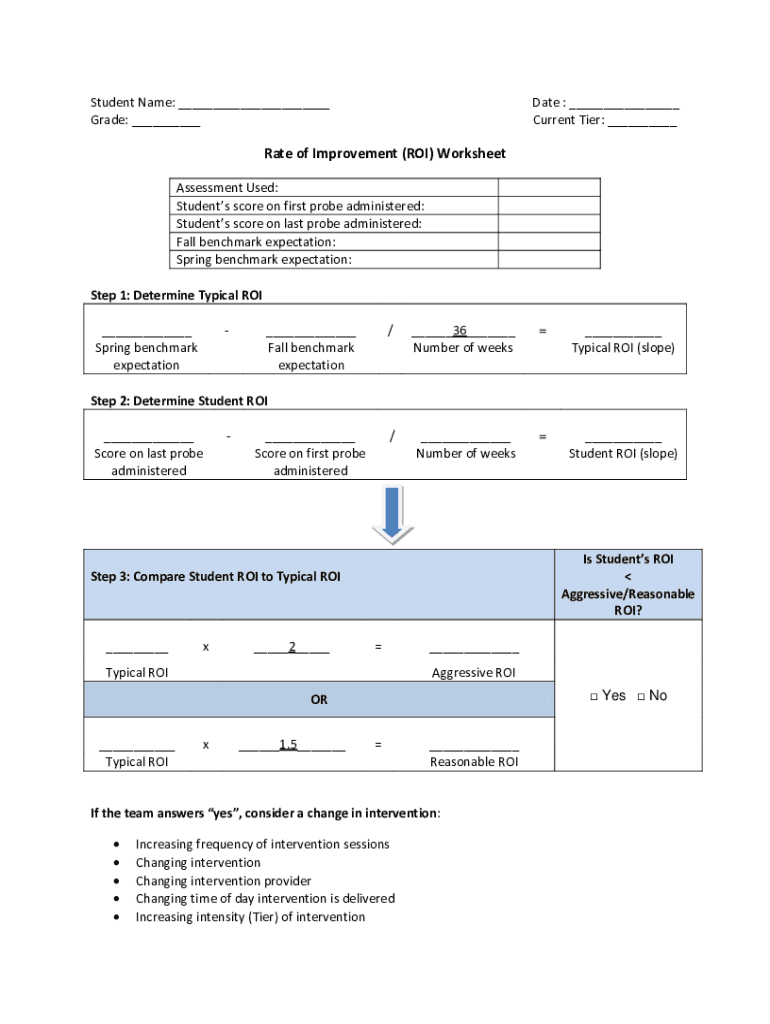
- Begin by entering the student's name and grade at the top of the form. This personalizes the worksheet for accurate tracking.
- Fill in the date and current tier, which helps in assessing the student's progress over time.
- In the 'Assessment Used' section, specify which assessment was administered to provide context for the scores.
- Input the student’s scores from both the first and last probes administered. This data is crucial for calculating improvement.
- Complete the benchmark expectations for fall and spring to set clear goals for student performance.
- Follow steps outlined in sections one through three to calculate Typical ROI and Student ROI, ensuring you compare these values accurately.
- If necessary, review intervention strategies based on your findings, marking any changes directly on the form for clarity.
Start using our platform today to streamline your document editing and enhance your workflow!
Fill out Rate of Improvement ROI Worksheet - Claiborne County Schools online
It's free
It's free
See more Rate of Improvement ROI Worksheet - Claiborne County Schools versions
We've got more versions of the Rate of Improvement ROI Worksheet - Claiborne County Schools form. Select the right Rate of Improvement ROI Worksheet - Claiborne County Schools version from the list and start editing it straight away!
Security and compliance
At DocHub, your data security is our priority. We follow HIPAA, SOC2, GDPR, and other standards, so you can work on your documents with confidence.
Learn more


