
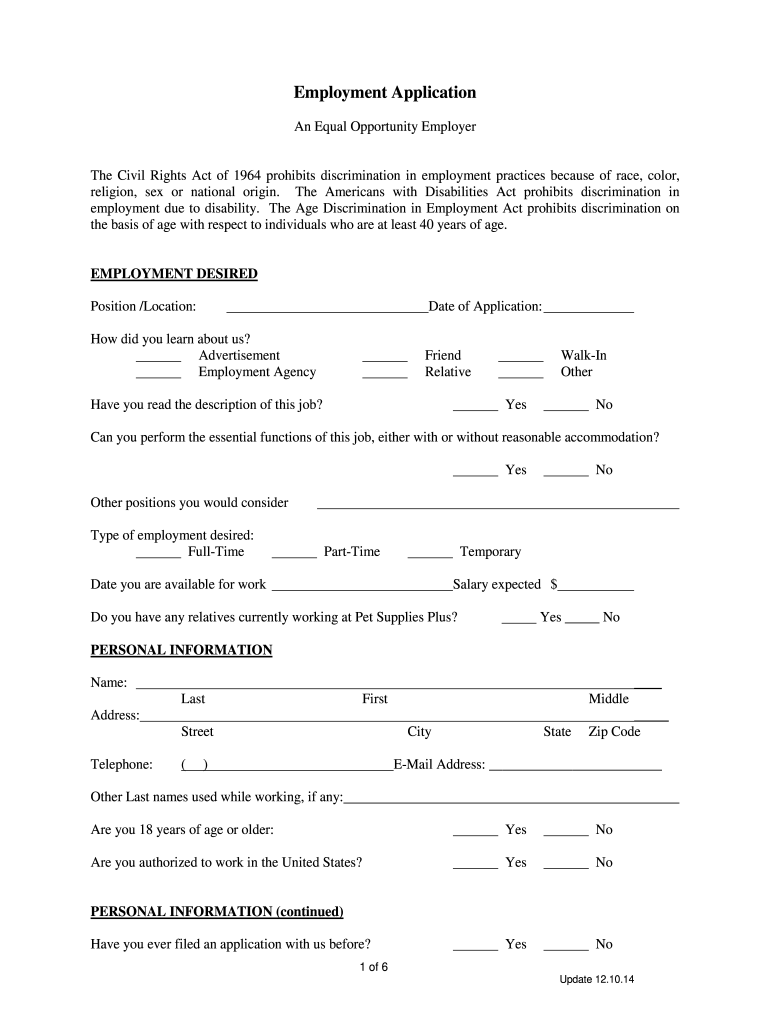







Pet Supplies Plus Application Overview
The Pet Supplies Plus application form is essential for individuals seeking employment at one of the many locations across the United States. This document gathers critical personal and professional information necessary for evaluating candidates. It is designed to comply with U.S. anti-discrimination laws, ensuring a fair hiring process.
Required Information on the Application
The application form includes several sections that candidates must complete accurately:
-
Personal Information: Applicants should provide their full name, current address, phone number, and email address. This ensures that potential employers can easily contact them.
-
Employment History: A comprehensive listing of previous jobs, including job titles, the name of employers, dates of employment, and reasons for leaving, is necessary. This section helps employers assess the applicant's experience and suitability.
-
Education Background: Applicants should detail their educational history, including schools attended, degrees earned, and any relevant certifications. This information aids in determining the candidate's qualifications for specific roles.
-
References: Candidates must provide professional references who can vouch for their skills and character. Typically, this includes names, contact information, and the relationship to the applicant.
Understanding Legal and Compliance Aspects
The application form emphasizes the importance of understanding legal obligations and compliance with employment laws:
-
At-Will Employment: The form clarifies the nature of at-will employment in the United States, meaning either the employer or employee can terminate the employment relationship at any time without cause. This concept should be acknowledged by all applicants.
-
Background Checks: Candidates must consent to background checks, which may include criminal history and previous employment verification. This process assures that Pet Supplies Plus hires trustworthy employees.
-
Equal Opportunity Employer Statement: The form will often include a statement indicating that Pet Supplies Plus is an equal opportunity employer, meaning all hiring decisions are made without regard to race, gender, age, or any other protected status.
Sections for Additional Information
Certain sections of the application allow candidates to disclose more about their skills and availability, further assisting employers:
-
Availability: Applicants can indicate their preferred working hours, including any restrictions regarding days or times. This is crucial for scheduling purposes.
-
Skills and Qualifications: Candidates are encouraged to highlight any specific skills relevant to the job, such as customer service experience, knowledge of pet care, or retail expertise. This helps hiring managers identify strong candidates for the positions.
-
Message to Employers: Some applications offer a space for additional comments or messages that applicants wish to convey to potential employers, allowing for personalized expressions of interest.
Submission Process
Submitting the Pet Supplies Plus application form may vary based on location and availability of technology:
-
Online Submission: Many applicants can complete the form through the Pet Supplies Plus website or employee portal, submitting it electronically for immediate review.
-
In-Person Submission: Alternatively, candidates may print the application and submit it directly at their preferred store location. This can provide a chance for candidates to make a personal impression.
-
Follow-Up: After submission, it is advisable for applicants to follow up on their application status either through direct contact with the store or the employee portal, demonstrating enthusiasm and interest in the position.
Conclusion and Follow-Up Procedures
After submitting their application, candidates may consider taking proactive steps:
-
Interview Preparation: Candidates should prepare for potential interviews by reviewing typical retail and customer service questions, focusing on their experiences with pets and their understanding of the company's culture.
-
Networking: Engaging with current employees or managers at Pet Supplies Plus, either in person or through social media platforms like LinkedIn, may provide an advantage.
-
Job Alerts: Applicants can also sign up for job alerts from Pet Supplies Plus to stay informed about openings that match their qualifications.
By effectively completing the Pet Supplies Plus application form and understanding its requirements, candidates position themselves as desirable job applicants, demonstrating their commitment to joining the team.




