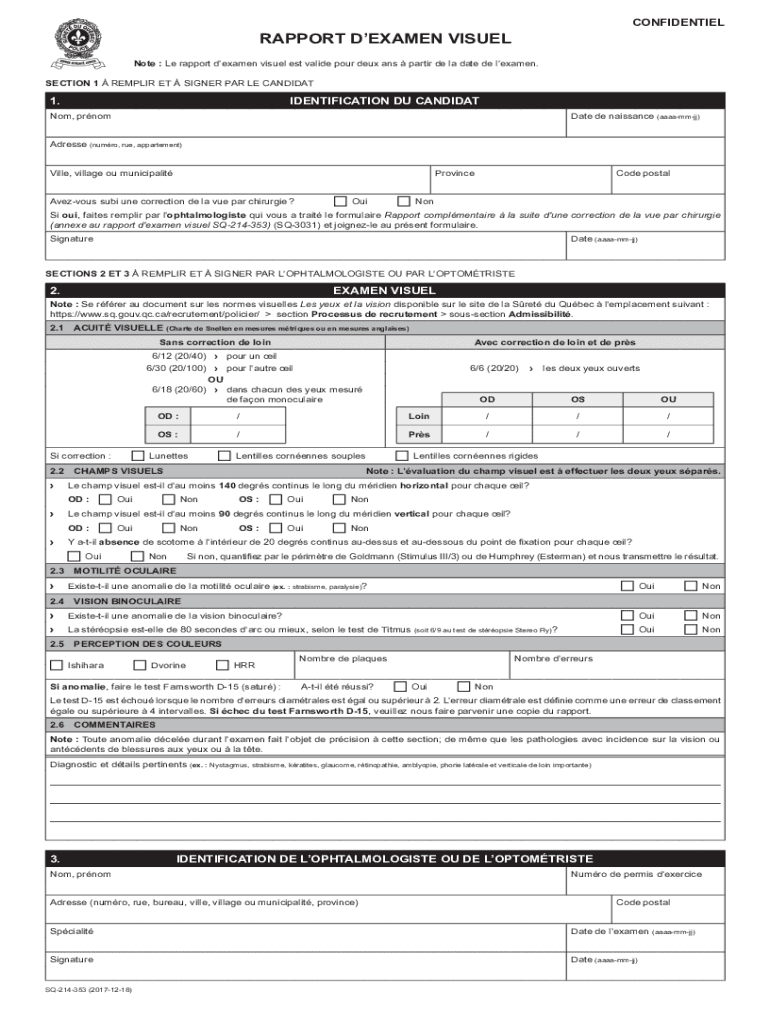
Rapport d'examen visuel SQ-214-353 2026

Get Form
sq 214 353 Preview on Page 1

Here's how it works

01. Edit your sq 214 353 online
Type text, add images, blackout confidential details, add comments, highlights and more.
02. Sign it in a few clicks
Draw your signature, type it, upload its image, or use your mobile device as a signature pad.
03. Share your form with others
Send it via email, link, or fax. You can also download it, export it or print it out.

How to use or fill out Rapport d'examen visuel SQ-214-353 with our platform

Form edit decoration
9.5
Ease of Setup
DocHub User Ratings on G2
9.0
Ease of Use
DocHub User Ratings on G2
  1. Click ‘Get Form’ to open the Rapport d'examen visuel SQ-214-353 in the editor.
  2. Begin with Section 1, where you will fill in your personal identification details. Enter your name, date of birth, address, and postal code. Indicate if you have undergone vision correction surgery by selecting 'Yes' or 'No'. If applicable, ensure to attach the supplementary form completed by your ophthalmologist.
  3. Proceed to sign and date this section at the bottom.
  4. Move on to Sections 2 and 3, which must be filled out by an ophthalmologist or optometrist. In Section 2, they will assess visual acuity using the Snellen chart and document findings for each eye. Ensure they check for visual fields and any ocular motility anomalies.
  5. In Section 3, the ophthalmologist or optometrist should provide their identification details, including their name, address, license number, specialty, and signature along with the examination date.

Start filling out your Rapport d'examen visuel SQ-214-353 online for free today!

See more Rapport d'examen visuel SQ-214-353 versions

We've got more versions of the Rapport d'examen visuel SQ-214-353 form. Select the right Rapport d'examen visuel SQ-214-353 version from the list and start editing it straight away!
Versions Form popularity Fillable & printable
2017 4.7 Satisfied (27 Votes)
2012 4.9 Satisfied (57 Votes)
be ready to get more

Complete this form in 5 minutes or less

Get form

Got questions?

We have answers to the most popular questions from our customers. If you can't find an answer to your question, please contact us.
Contact us

Most eSignature services require users to have a paid subscription. With DocHub, there are two options for you to create an electronic signature to your Rapport d'examen visuel SQ-214-353 free of charge:

  • You can do it during a 7-day trial period;
  • You can subscribe to a free plan.

The second option, though, has limitations on the number of signatures, sign requests, emails, and forms for editing available per month. You can check for full details here.

If you are searching for a state-specific Rapport d'examen visuel SQ-214-353 sample, you can find it in our DocHub Forms & Templates catalog. Use the search field, enter your form’s name, and search through the results for your state. You can also filter out irrelevant results while browsing our catalog by categories.

Security and compliance

At DocHub, your data security is our priority. We follow HIPAA, SOC2, GDPR, and other standards, so you can work on your documents with confidence.

Learn more
ccpa2
pci-dss
gdpr-compliance
hipaa
soc-compliance
be ready to get more

Complete this form in 5 minutes or less

Get form