




Here's how it works



How to use or fill out 2020 WA 224-032 with DocHub

- Click ‘Get Form’ to open the 2020 WA 224-032 in our platform.
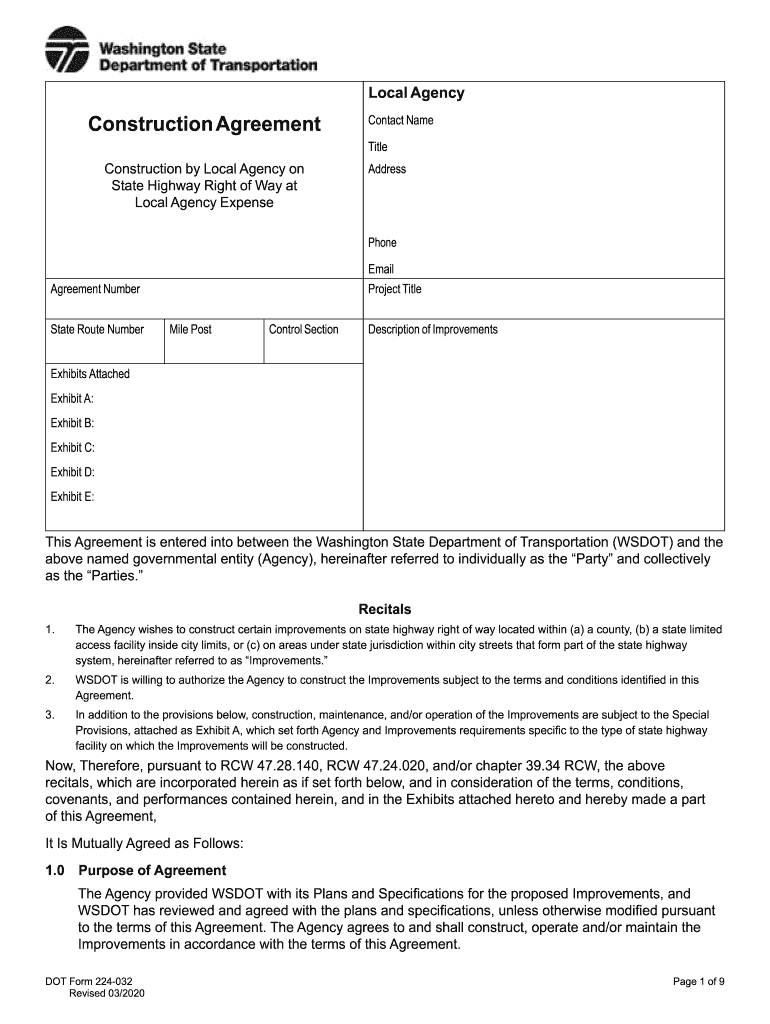
- Begin by filling in the 'Contact Name', 'Title', 'Address', 'Phone', and 'Email' fields at the top of the form. Ensure all information is accurate for effective communication.
- Next, enter the 'Agreement Number' and 'State Route Number'. These identifiers are crucial for tracking your project within WSDOT's system.
- Proceed to input the 'Project Title' and 'Mile Post'. This section helps define the scope of your construction project.
- In the 'Description of Improvements' field, provide a detailed overview of the planned enhancements. Clarity here will facilitate smoother approvals.
- Attach any necessary exhibits by clicking on the designated sections for Exhibit A through E. Make sure to upload relevant documents that support your agreement.
- Review all entered information for accuracy before saving or submitting your form. Utilize our platform’s editing tools to make any necessary adjustments easily.
Start using our platform today to streamline your document editing and form completion process for free!
It's free
See more 2020 WA 224-032 versions
Got questions?
What do I need to sign my 2020 WA 224-032 electronically?
Electronic document signing requires a software solution that complies with data security and eSignature standards. DocHub is a great tool for that, because it meets all the aforementioned requirements. Whatever method you like to sign your 2020 WA 224-032 in DocHub, your electronic signature will be legally binding and court-admissible.
How to manage my 2020 WA 224-032 from Gmail?
If your go-to electronic mail service is Gmail, it is simple to integrate your DocHub editor in your work. Edit your 2020 WA 224-032 with DocHub tools and attach it to your drafts in Gmail. See how effortless it can be to exchange papers and collaborate having a swift PDF editing solution at hand.
Security and compliance
At DocHub, your data security is our priority. We follow HIPAA, SOC2, GDPR, and other standards, so you can work on your documents with confidence.
Learn more




