




Here's how it works



How to use or fill out State of New Jersey - Department of Environmental Protection with our platform

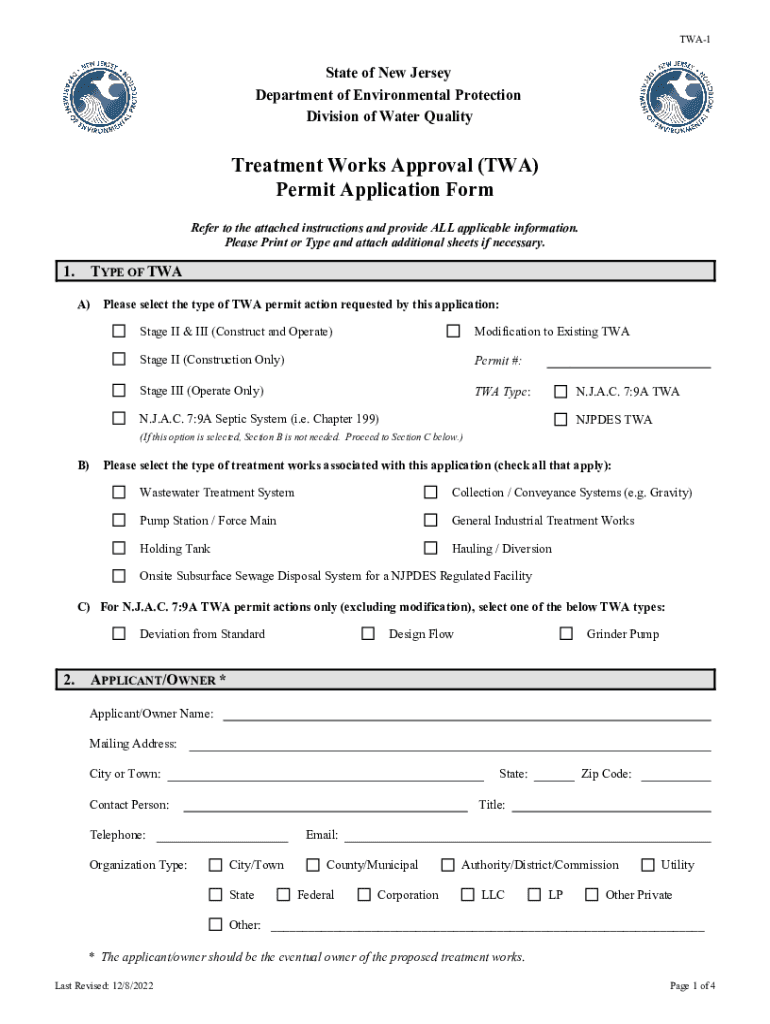
- Click ‘Get Form’ to open the TWA-1 application in the editor.
- In Section A, select the type of TWA permit action you are requesting. If modifying an existing TWA, include the permit number.
- Complete Section B by selecting the types of treatment works associated with your application. If applicable, provide the NJPDES permit information in Section 7.
- Fill out Section C only if you selected 'N.J.A.C. 7:9A Septic System' in Section A. Choose one of the TWA types listed.
- Provide your name and contact details in the Applicant/Owner section, ensuring that all information is accurate and complete.
- In the Location of Activity section, enter the facility's name and address, including municipality and county details.
- For Estimated Construction Costs, detail the total cost and attach a breakdown as required. Include your application fee information.
- Complete any additional sections as necessary, including certifications from property owners and engineers.
Start using our platform today for free to streamline your form completion process!
It's free
See more State of New Jersey - Department of Environmental Protection versions
Got questions?
How can I eSign my State of New Jersey - Department of Environmental Protection from Gmail?
With DocHub, it’s quite simple. The editor offers users an add-on called DocHub for Gmail, which you can find in the Google Workspace Marketplace without being charged. Install it and grant it access to your Google account. Open your email with your State of New Jersey - Department of Environmental Protection attached and click on the add-on button in the right-side panel. Log in to your DocHub account, and upload the form to our editor, where you can complete it and sign.
How do you fill out State of New Jersey - Department of Environmental Protection on iOS?
You need only an internet connection and a browser to complete your State of New Jersey - Department of Environmental Protection by using an iOS phone. Open the DocHub website and authenticate. Then, add your file or select it from the list in your dashboard. Then use our editing tools to complete your form and preserve all your changes. You may also send it to a specified recipient straight away.
Security and compliance
At DocHub, your data security is our priority. We follow HIPAA, SOC2, GDPR, and other standards, so you can work on your documents with confidence.
Learn more




