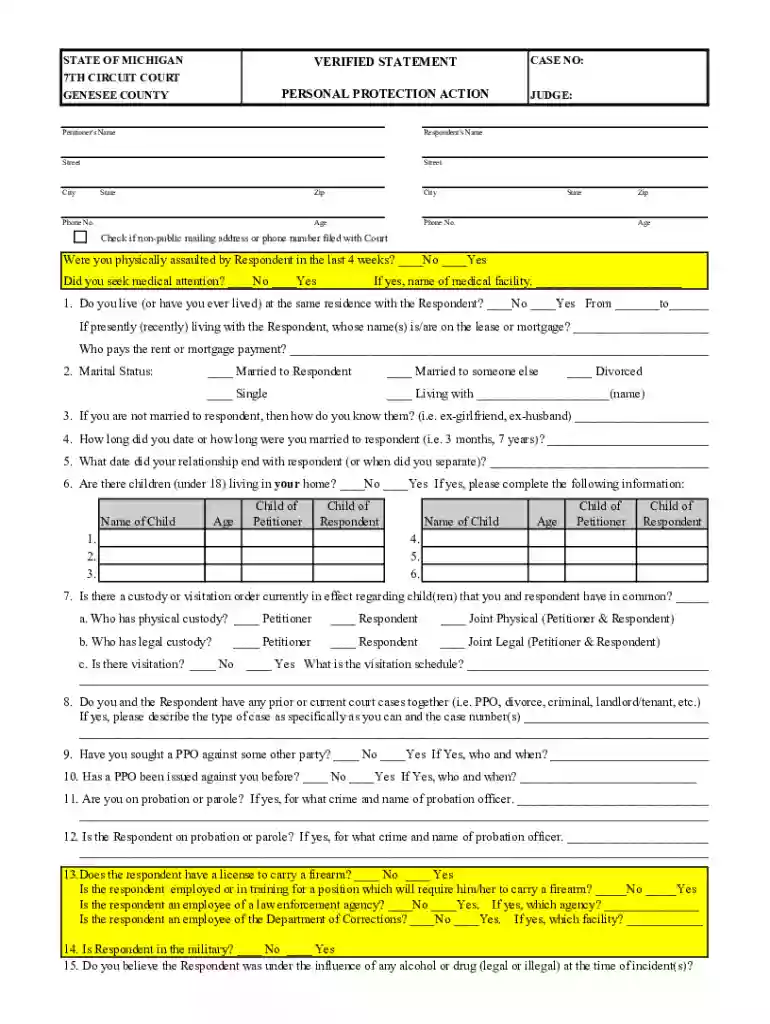
genesee county ppo Preview on Page 1

Michigan Personal Protection Action Form 2026

Here's how it works

  • 01. Edit your genesee county ppo online

    Type text, add images, blackout confidential details, add comments, highlights and more.

  • 02. Sign it in a few clicks

    Draw your signature, type it, upload its image, or use your mobile device as a signature pad.

  • 03. Share your form with others

    Send genesee county ppo via email, link, or fax. You can also download it, export it or print it out.

How to use or fill out the Verified Statement form online

Form edit decoration
9.5
Ease of Setup
DocHub User Ratings on G2
9.0
Ease of Use
DocHub User Ratings on G2
  1. Click ‘Get Form’ to open it in the editor.
  2. Begin by entering your name and contact information in the designated fields, including your address, phone number, and age.
  3. Provide details about the respondent, including their name and contact information. Ensure accuracy as this is crucial for legal proceedings.
  4. Answer the questions regarding any recent physical assault and medical attention sought. If applicable, specify the medical facility visited.
  5. Indicate your living situation with the respondent and provide details about any shared lease or mortgage agreements.
  6. Complete sections regarding marital status, relationship history, children involved, custody arrangements, and any prior court cases.
  7. Detail incidents of concern that led to seeking a personal protection order. Include dates, police involvement, and descriptions of events.
  8. Finally, review all entries for accuracy before signing and submitting your form electronically.

Start filling out your Verified Statement form online today for free!

See more genesee county ppo versions

We've got more versions of the genesee county ppo form. Select the right genesee county ppo version from the list and start editing it straight away!

VersionsForm popularityFillable & printable
20194.8 Satisfied (110 Votes)
20124 Satisfied (29 Votes)

be ready to get more

Complete this form in 5 minutes or less

Security and compliance

At DocHub, your data security is our priority. We follow HIPAA, SOC2, GDPR, and other standards, so you can work on your documents with confidence.

Related links

Personal Protection Proceedings Forms

SCAO-Approved Forms for Use in Personal Protection Proceedings. This set of forms is used to obtain, modify, or terminate a personal protection order.Read more

Learn more
Standard Form 50 (SF-50) Notification of Personnel Action

The eOPF application gives employees the ability to access all the personnel actions processed in regard to their appointments and to download and print copies.Read more

Learn more
If you believe that this page should be taken down, please follow our DMCA take down process here