




Here's how it works

01. Edit your form online
Type text, add images, blackout confidential details, add comments, highlights and more.

02. Sign it in a few clicks
Draw your signature, type it, upload its image, or use your mobile device as a signature pad.

03. Share your form with others
Send it via email, link, or fax. You can also download it, export it or print it out.
How to use or fill out FSSA: DDRS: Developmental Disabilities Services with our platform

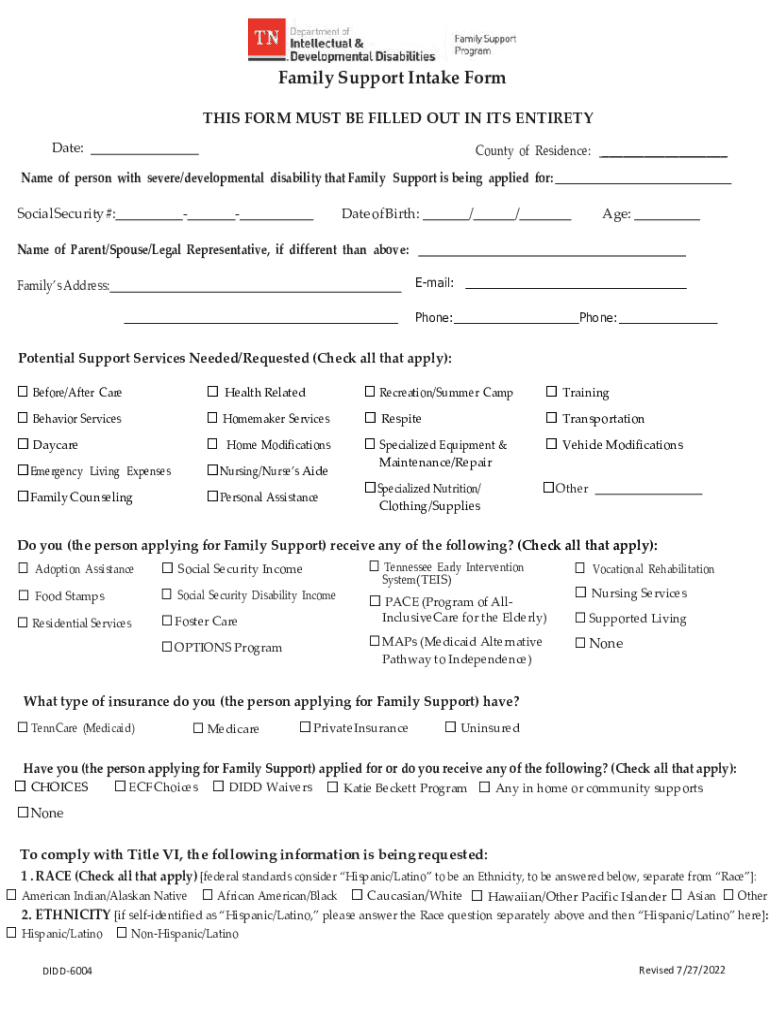
- Click ‘Get Form’ to open the Family Support Intake Form in the editor.
- Begin by entering the date and your county of residence at the top of the form.
- Fill in the name, Social Security number, date of birth, and age of the person with a developmental disability for whom support is being requested.
- If applicable, provide the name and email address of the parent, spouse, or legal representative.
- Complete your family’s address and phone numbers in the designated fields.
- In the 'Potential Support Services Needed/Requested' section, check all relevant services that apply to your situation.
- Indicate any assistance you currently receive by checking all applicable boxes in that section.
- Specify your type of insurance coverage and whether you have applied for other programs as listed.
- Provide information regarding race and ethnicity as required for compliance with Title VI.
- Select the primary disability category that best describes the individual needing services.
- In the notes section, explain how Family Support funds would assist your family. Be detailed about needs and improvements to daily life.
- Finally, sign and date the form to confirm that all information provided is accurate before submitting it through our platform.
Start filling out your Family Support Intake Form today using our platform for free!
Fill out FSSA: DDRS: Developmental Disabilities Services online
It's free
It's free
See more FSSA: DDRS: Developmental Disabilities Services versions
We've got more versions of the FSSA: DDRS: Developmental Disabilities Services form. Select the right FSSA: DDRS: Developmental Disabilities Services version from the list and start editing it straight away!
Security and compliance
At DocHub, your data security is our priority. We follow HIPAA, SOC2, GDPR, and other standards, so you can work on your documents with confidence.
Learn more


