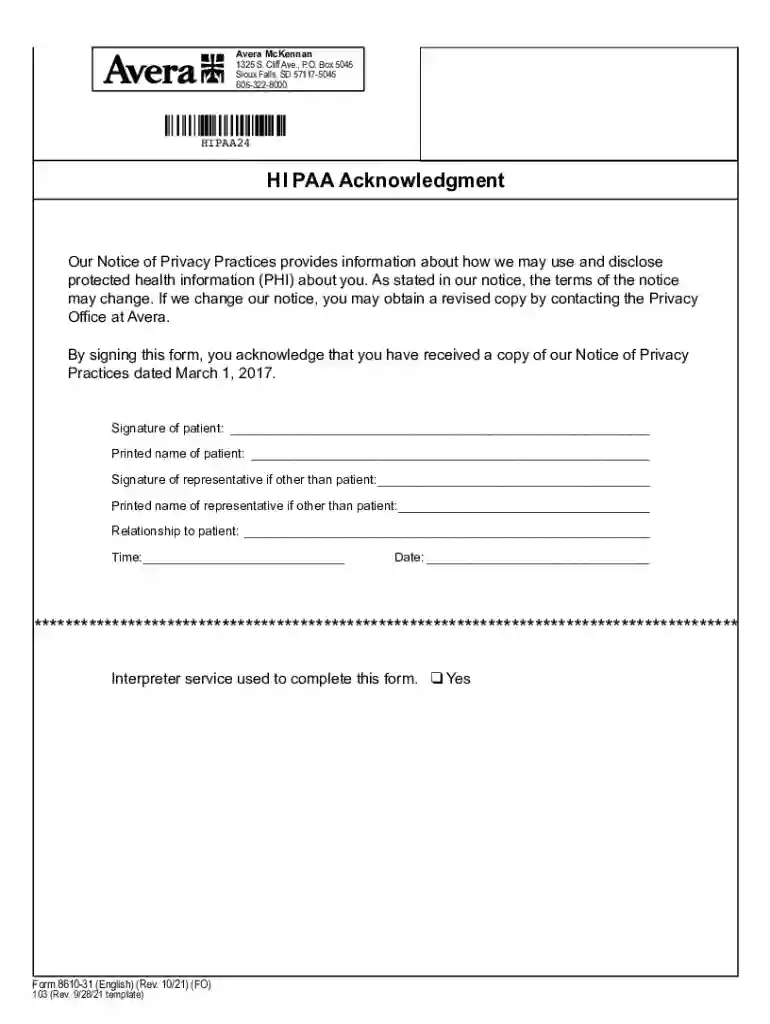
Avera 8610 form-2026

Get Form
avera 8610 form Preview on Page 1

Here's how it works

01. Edit your form online
Type text, add images, blackout confidential details, add comments, highlights and more.

02. Sign it in a few clicks
Draw your signature, type it, upload its image, or use your mobile device as a signature pad.

03. Share your form with others
Send it via email, link, or fax. You can also download it, export it or print it out.

How to use or fill out avera 8610 form with our platform

Form edit decoration
9.5
Ease of Setup
DocHub User Ratings on G2
9.0
Ease of Use
DocHub User Ratings on G2
  1. Click ‘Get Form’ to open the avera 8610 form in the editor.
  2. Begin by reviewing the Notice of Privacy Practices section. This informs you about how your protected health information (PHI) may be used and disclosed.
  3. In the signature fields, enter your name and sign to acknowledge receipt of the privacy notice. If you are a representative, fill in your details as well.
  4. Indicate if an interpreter service was used by checking 'Yes' if applicable.
  5. Complete the date and time fields to finalize your acknowledgment.

Start using our platform today for free to easily fill out and manage your documents!

See more avera 8610 form versions

We've got more versions of the avera 8610 form form. Select the right avera 8610 form version from the list and start editing it straight away!
Versions Form popularity Fillable & printable
2021 4.6 Satisfied (46 Votes)
2019 4.8 Satisfied (80 Votes)
2017 4.4 Satisfied (265 Votes)
2013 4.2 Satisfied (55 Votes)
be ready to get more

Complete this form in 5 minutes or less

Get form

Got questions?

We have answers to the most popular questions from our customers. If you can't find an answer to your question, please contact us.
Contact us

Managing your documents with DocHub this way is extremely easy after you have downloaded its extension for Google Chrome. Navigate to the Chrome Web Store and install DocHub - Sign PDF from Gmail to obtain it. Give our tool access to your Google account, and then open an email containing avera 8610 form as an attachment and point to the file with your cursor - the DocHub extension button will automatically appear there. Click on it to open your form in our editor. Make any required edits, fill out the blanks, and click Sign to create your legally-binding electronic signature.

You may get and modify your avera 8610 form online by using DocHub. Its simple yet feature-rich design enables you to start productive work right after you register your account. Create your account and add your file, then our interface will guide you via our stress-free form completion experience.

EPIC EMR Billing. Learn about UCSDs EPIC Electronic Medical Record system and billing for your clinical research.
How to create a HIPAA compliant medical records release form Provide instructions. Name the patient and individual authorized to use or disclose their PHI. Describe the information. Specify recipients. Specify the purpose of disclosure. Specify the time period. Detail their revocation rights. Obtain the patients signature.
All Avera-owned and leased facilities use AveraChart.

Security and compliance

At DocHub, your data security is our priority. We follow HIPAA, SOC2, GDPR, and other standards, so you can work on your documents with confidence.

Learn more
ccpa2
pci-dss
gdpr-compliance
hipaa
soc-compliance
be ready to get more

Complete this form in 5 minutes or less

Get form

People also ask

The Epic Medical Record System has multiple features to support clinical research at Johns Hopkins.
Emory Healthcare transitioned to using Epic on October 1, 2022. Epic is our electronic health records system, which includes your MyChart patient portal.
Top 10 inpatient hospital EHR vendors by market share RankVendor% of U.S. hospital EHR market share 1 Epic Systems Corporation 41.3% 2 Oracle Cerner 21.8% 3 MEDITECH 11.9% 4 TruBridge 4.8%6 more rows May 7, 2025
As a Catholic health care organization, Avera is committed to promoting and defending human dignity, caring for the whole person, and giving special attention to the needs of the poor and marginalized. Were dedicated to maintaining the health and well-being of the rural communities of our region.

Related links