




01. Edit your express employment time card pdf online
Type text, add images, blackout confidential details, add comments, highlights and more.

Type text, add images, blackout confidential details, add comments, highlights and more.

Draw your signature, type it, upload its image, or use your mobile device as a signature pad.

Send express employment time card via email, link, or fax. You can also download it, export it or print it out.
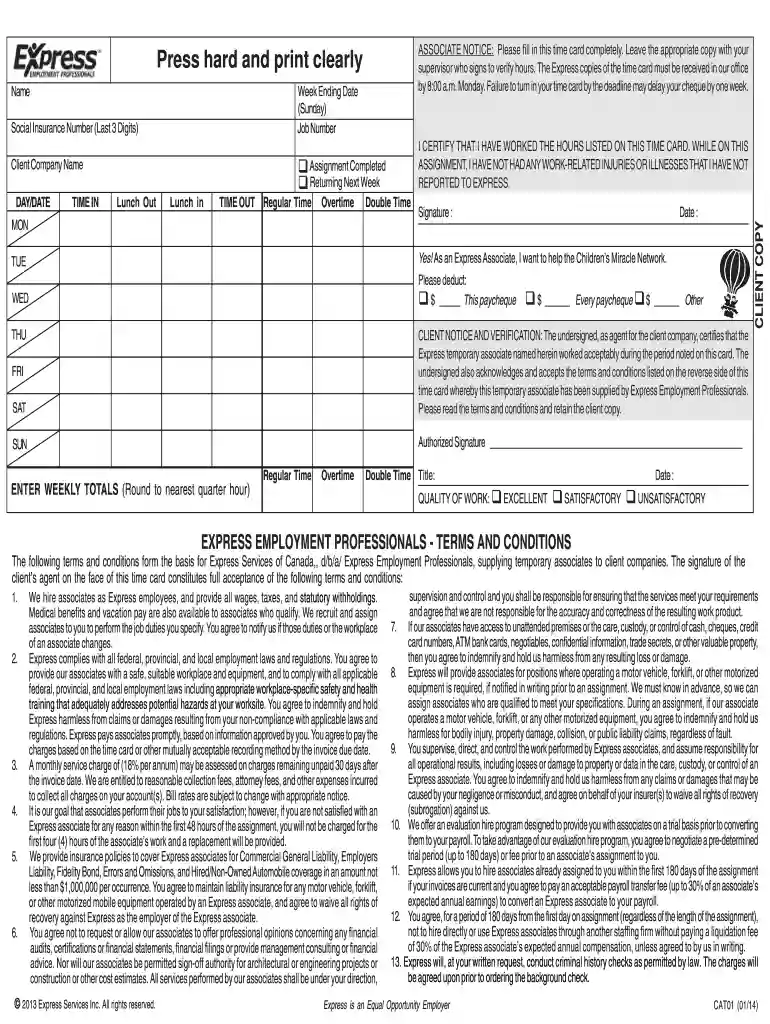
The express employment time card is a crucial document used by associates of Express Employment Professionals to record work hours and certify work completion. This time card is fundamental for ensuring accurate and timely payment for the hours worked. It acts as a communication tool between the employee, the client's company, and Express Employment, verifying the duration and completion of tasks assigned.
Time cards are essential in maintaining transparency in employment relationships by logging actual time spent on workplace tasks, and they're pivotal in mitigating disputes over hours worked. Accurately completing this form is vital to comply with employment terms and to fulfill client company requirements regarding invoicing and payroll processes.
Utilizing an express employment time card involves several steps designed to ensure accuracy and compliance. Employees begin by recording their work hours precisely, marking the start and end times for each shift. It is essential to include specific breaks and any variations from standard hours to provide an accurate picture.
The documented information serves as a basis for payroll calculations and requires meticulous attention to detail to prevent discrepancies between the hours reported and the payment received.
Associates can obtain the express employment time card directly from Express Employment Professionals offices or through their digital platforms if available. The process typically involves:
Having easy access to these forms is crucial as it enables consistent and timely completion of required documentation for all parties involved.
Ensuring the express employment time card is complete and accurate safeguards against payroll mishaps. Follow these steps for efficient completion:
Each step is integral to ensure the form reflects your working hours transparently. Incomplete or incorrect data can lead to processing delays or incorrect payments.
Several elemental components contribute to the effectiveness of the express employment time card:
All these elements combined ensure that the time card accurately reflects the associate's working schedule and performance.
In compliance with labor laws and company policies, the legal use of the express employment time card involves recording all hours accurately and honestly. Misrepresentation of hours worked can lead to disciplinary actions or legal penalties.
Adhering to these legal stipulations ensures fairness and accountability in the employer-employee relationship.
A thorough understanding of critical terms associated with the time card expedites correct usage:
Proficiency in using these terms correctly impacts the accurate processing and reconciliation of work hours against payroll logs.
Varying state laws may dictate specific requirements for time-keeping. For instance, California imposes stringent rules on meal breaks and overtime, which must be reflected in the time card:
Understanding these differences is crucial for Express Employment associates operating in various states to avoid violating labor laws.
We've got more versions of the express employment time card pdf form. Select the right express employment time card pdf version from the list and start editing it straight away!
Yes, it is possible with DocHub. This secure and compliant online editor features a phone-based signing option. After you log in to your DocHub account and add your expresspros timecard to our editor, complete all empty fields and utilize the Sign tool on the upper barf. Click on Create your signature and select Phone from the available choices. Here, you scan a QR code with your smartphone and draw your signature on your phone display, as you normally do when signing physical papers. If you access DocHub right from your mobile device, you can electronically sign your template by drawing your electronic signature, adding its photo, or simply with a typed name.
With DocHub, you have several convenient methods to edit your express time cards online. You can drag and drop the form and edit it directly at the DocHub website or use our browser extension to fill out your form right away. On top of that, you can edit your PDF on your smartphone, as DocHub works with all the available mobile platforms.
At DocHub, your data security is our priority. We follow HIPAA, SOC2, GDPR, and other standards, so you can work on your documents with confidence.
Vacations are used to specify times when individual card holders are taking a period of leave or rest from work. During a vacation, the card holder is not ableRead more
On this page: Timesheets and Leave Reports; Roles; Responsibilities; Timeframes and Deadlines; Payroll Schedules and Deadlines; Training Materials.Read more
the City of Sunnyside and Express Employment Express Employment Professionals is providing You agree to pay the charges based on the time card or other


