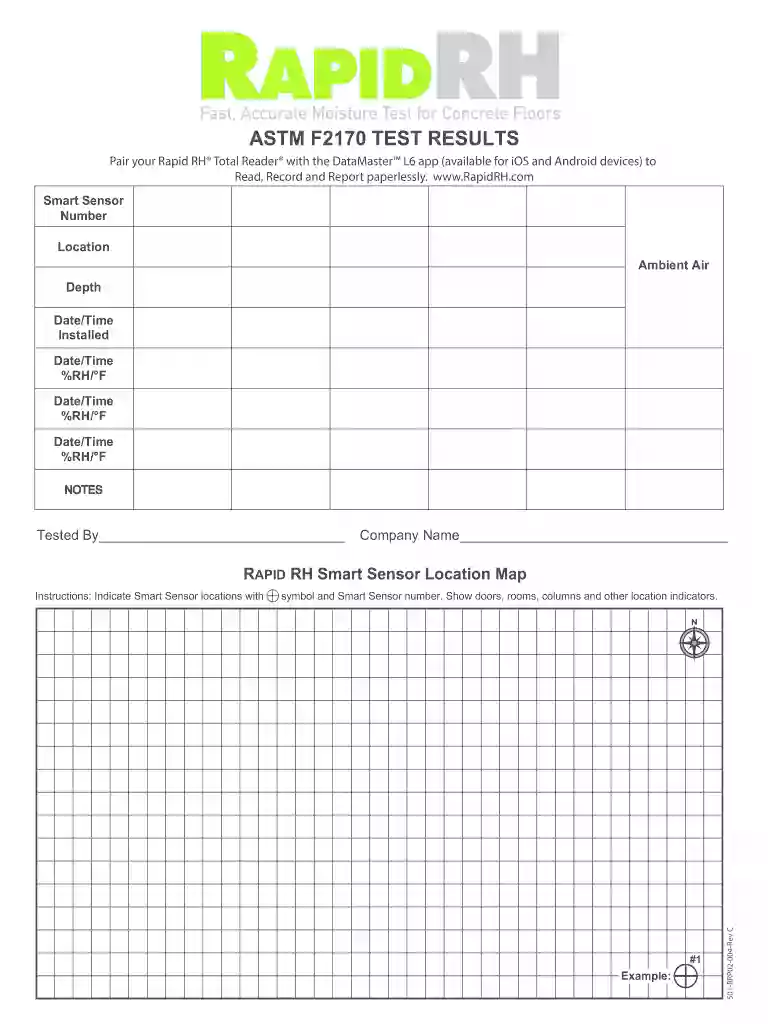
Rapid RHTest Results Form - Wagner Meters 2026

Get Form
Rapid RHTest Results Form - Wagner Meters Preview on Page 1

Here's how it works

01. Edit your form online
Type text, add images, blackout confidential details, add comments, highlights and more.

02. Sign it in a few clicks
Draw your signature, type it, upload its image, or use your mobile device as a signature pad.

03. Share your form with others
Send it via email, link, or fax. You can also download it, export it or print it out.

How to use or fill out Rapid RHTest Results Form - Wagner Meters with our platform

Form edit decoration
9.5
Ease of Setup
DocHub User Ratings on G2
9.0
Ease of Use
DocHub User Ratings on G2
  1. Click ‘Get Form’ to open the Rapid RHTest Results Form in the editor.
  2. Begin by entering the Smart Sensor Number in the designated field. This is crucial for tracking your test results accurately.
  3. Next, specify the Location of the Smart Sensor. Clearly indicate where it was installed to ensure proper documentation.
  4. Fill in the Ambient Air Depth and Date/Time Installed fields. Accurate timestamps are essential for data integrity.
  5. Record the %RH and °F readings along with their corresponding Date/Time entries. Make sure to input all relevant data points for comprehensive results.
  6. Use the NOTES section to add any additional observations or comments that may be pertinent to your testing process.
  7. Finally, indicate who tested the form by filling in your name and company name at the bottom of the document.

Start using our platform today to streamline your Rapid RHTest Results Form completion for free!

See more Rapid RHTest Results Form - Wagner Meters versions

We've got more versions of the Rapid RHTest Results Form - Wagner Meters form. Select the right Rapid RHTest Results Form - Wagner Meters version from the list and start editing it straight away!
Versions Form popularity Fillable & printable
2019 4.6 Satisfied (22 Votes)
2015 4.9 Satisfied (58 Votes)
be ready to get more

Complete this form in 5 minutes or less

Get form

Got questions?

We have answers to the most popular questions from our customers. If you can't find an answer to your question, please contact us.
Contact us
Relative humidity is normally expressed as a percentage; a higher percentage means that the airwater mixture is more humid.
The Humidity Ratio is how much air is in the air versus the amount of water. Relative Humidity on the other hand, takes the humidity ratio, and includes the air temperature, and the maximum amount of water the air can hold, and displays it as a percentage.
What is the RH test for concrete? The in-situ Relative Humidity test for concrete measures the amount of moisture vapor present in a concrete slab. The RH percentage value provides an indication of the moisture content within the concrete.
The ASTM F2170 standard specifies the use of relative humidity (RH) in situ probes to measure the internal moisture condition of a concrete slab.
Too much humidity can also cause damage to the building. Windowsills and skylights are often exposed. In already humid rooms such as the bathrooms, as well as inside very small rooms or closets, high humidity levels can cause damage by collecting and pooling water if ventilation is poor.

Security and compliance

At DocHub, your data security is our priority. We follow HIPAA, SOC2, GDPR, and other standards, so you can work on your documents with confidence.

Learn more
ccpa2
pci-dss
gdpr-compliance
hipaa
soc-compliance
be ready to get more

Complete this form in 5 minutes or less

Get form

People also ask

Put simply, relative humidity (RH) is a measure of the water vapor content of air.

Related links