




01. Edit your form online
Type text, add images, blackout confidential details, add comments, highlights and more.

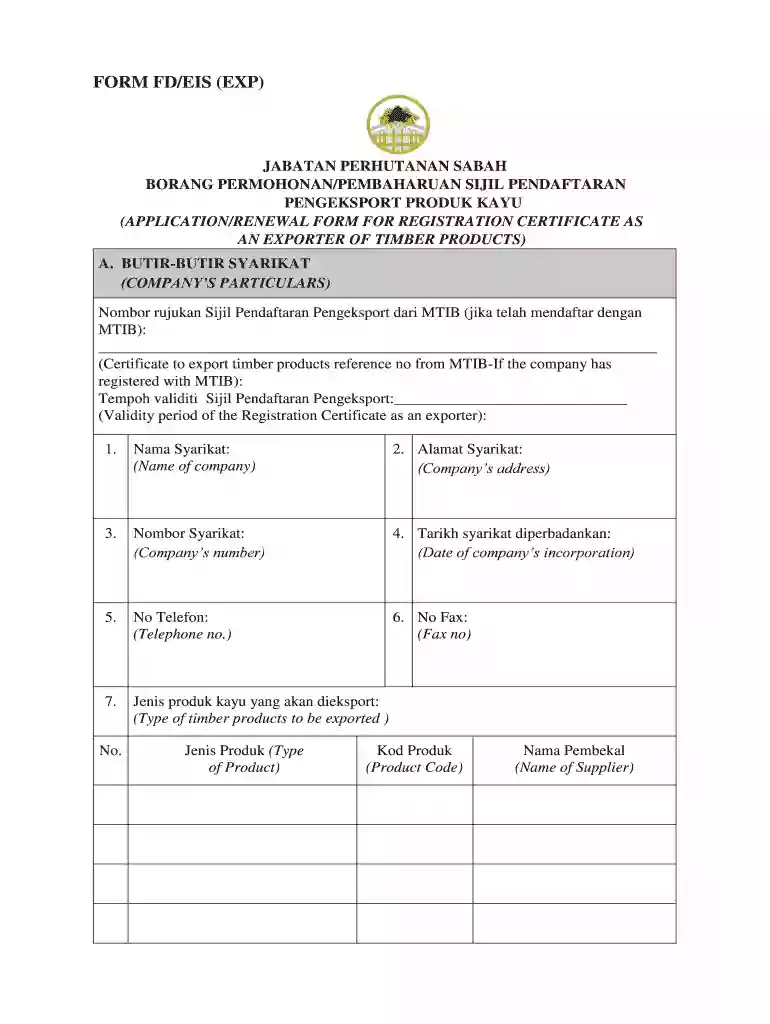
Type text, add images, blackout confidential details, add comments, highlights and more.

Draw your signature, type it, upload its image, or use your mobile device as a signature pad.

Send it via email, link, or fax. You can also download it, export it or print it out.
The "FORM FD EIS (EXP) - forest sabah my" is a crucial document used in Sabah, Malaysia, for registering or renewing a certificate that allows companies to legally export timber products. This form ensures that the timber export operations comply with regional forestry regulations and environmental policies. It is an essential tool for maintaining sustainable forestry practices, aligning with both local and international trade standards.
Using the "FORM FD EIS (EXP) - forest sabah my" involves a precise sequence of steps designed to gather and verify necessary information before granting the export certificate.
Completing this form involves multiple detailed steps to ensure accuracy and compliance with all necessary requirements:
Understanding the core components of the form is essential for proper completion and submission:
The legal use of this form is critical to ensure the sustainability and legality of timber exports from Malaysia:
Filling out this form requires an assortment of documents to verify the authenticity and credibility of the applying entity:
Understanding the submission methods available can streamline the application process:
Failure to adhere to the requirements of the "FORM FD EIS (EXP) - forest sabah my" can lead to severe consequences:
By offering these comprehensive sections, this structure provides a detailed understanding of the "FORM FD EIS (EXP) - forest sabah my," ensuring that stakeholders have the necessary information to comply with export regulations effectively.
We've got more versions of the FORM FD EIS (EXP) - forest sabah my form. Select the right FORM FD EIS (EXP) - forest sabah my version from the list and start editing it straight away!
| Versions | Form popularity | Fillable & printable |
|---|---|---|
| 2017 | 4.7 Satisfied (20 Votes) |
Electronic document approval demands a software solution that complies with data security and eSignature regulations. DocHub is an excellent tool for that, as it fulfills all the previously mentioned requirements. Whatever method you prefer to sign your FORM FD EIS (EXP) - forest sabah my in DocHub, your eSignature will be legally binding and court-admissible.
If you use Chrome, there are two easy ways to edit your FORM FD EIS (EXP) - forest sabah my online. First, visit the DocHub site, add your document, and edit it using our toolbar. You can also set up our Chrome extension and edit any document by dragging and dropping it in your browser window.
At DocHub, your data security is our priority. We follow HIPAA, SOC2, GDPR, and other standards, so you can work on your documents with confidence.
by SA Gardner 1994 Cited by 3 Technological advancements in facility/equipment design and use, Spill response and recovery equipment, Physical properties of oil and gas, etc.Read more
The Forest Service of the U.S. Department of Agriculture is dedicated to the principle of mul- tiple use management of the Nations forest resources forRead more


