







Definition and Purpose of the Enrollment Packet
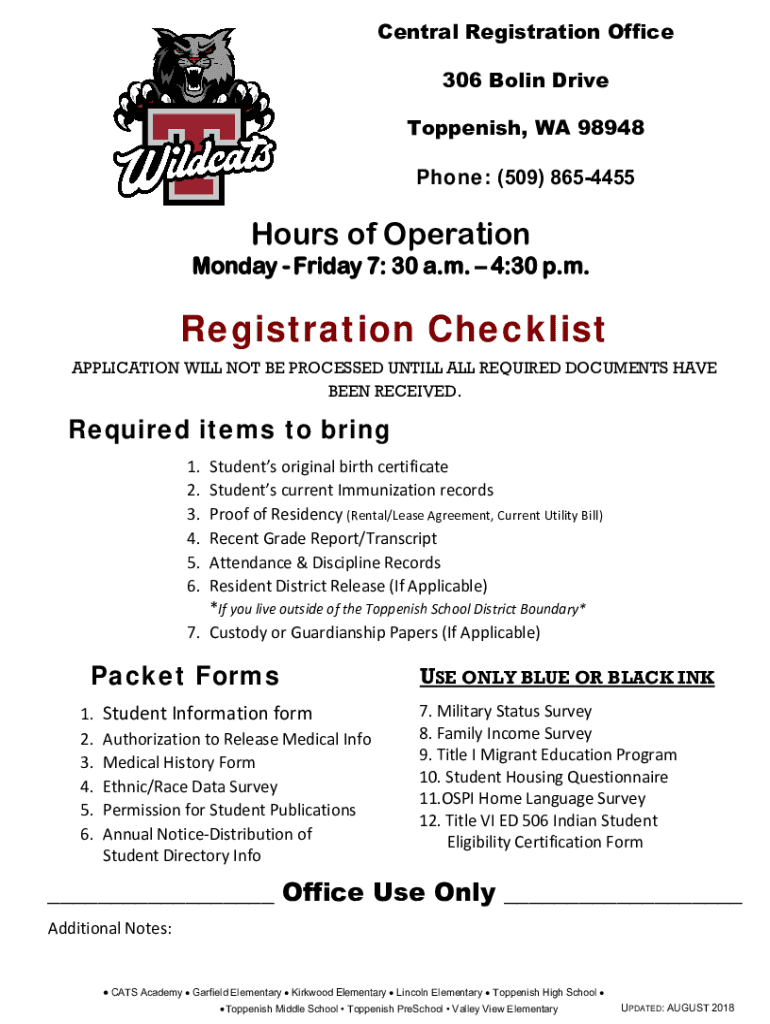
The Enrollment Packet Fillable English for Toppenish School District is a comprehensive set of documents necessary for registering a child in the school district. This packet facilitates the collection of all essential information required for a student's enrolment, including personal data, emergency contacts, and consent forms. The primary goal of this packet is to streamline the enrolment process by ensuring that all necessary information is gathered in a single, organized manner.
How to Use the Enrollment Packet
To effectively use the Enrollment Packet, parents or guardians should follow these steps:
- Download the Packet: Access the fillable PDF directly from the official Toppenish School District website or through affiliated platforms like DocHub.
- Complete Required Fields: Use a computer or mobile device to fill in all mandatory fields, which typically include the student's name, date of birth, address, and guardianship information.
- Attach Supporting Documents: Upload digital copies of required documents such as birth certificates and immunization records.
- Review for Accuracy: Double-check all information for completeness and correctness before submission.
- Submit the Packet: Depending on the instructions, submit the completed packet online, via email, or deliver a printed version to the school's registration office.
Steps to Complete the Enrollment Packet
Completing the Enrollment Packet involves several key steps to ensure all necessary information is captured:
- Identify Required Information: Carefully review what information and documentation are required.
- Gather Supporting Documents: Collect necessary documents such as proof of residence, identification, and health records.
- Fill Out Personal Information: Input data about the child and guardians, including emergency contact details.
- Complete Consent Forms: Fill out and sign any waiver or consent forms related to medical treatment, telehealth services, or media releases.
- Final Review and Submission: Verify that all sections are correctly completed before submitting the packet as directed by the school district.
Required Documents for Enrollment
To ensure a successful enrollment, several documents are typically required:
- Birth Certificate: A certified copy to verify the child’s age and identity.
- Immunization Records: Completed vaccination history to meet state health requirements.
- Proof of Residence: Utility bills or rental agreements indicating residence within the school district.
- Previous School Records: Transcripts or report cards if the student is transferring from another school.
- Parent/Guardian Identification: A government-issued ID for the enrolling adult.
Key Elements of the Enrollment Packet
The Enrollment Packet consists of multiple components, each addressing critical registration requirements:
- Student Information Form: Gathers personal details, including health and emergency contact information.
- Home Language Survey: Determines the primary language spoken at home to support appropriate educational services.
- Consent Forms: Includes medical treatment consent and permissions for participation in school activities.
- Program Sign-Up Sheets: Relevant for students eligible for programs like Title I or special education services.
Who Typically Uses the Enrollment Packet
The Enrollment Packet is primarily utilized by:
- Parents and Guardians: Responsible for completing and submitting documentation for new or transferring students.
- School Administrators: Oversee processing and ensuring all required information is submitted.
- Registrar's Office Personnel: Manage the verification of documents and the finalization of student enrollment.


Legal Use of the Enrollment Packet
The legal framework surrounding the Enrollment Packet ensures compliance with educational and privacy laws:
- FERPA Compliance: The Family Educational Rights and Privacy Act protects students' education records, and the packet handles sensitive information with confidentiality.
- State Education Law: Adheres to Washington state requirements for school enrollment and immunizations.
- Consent and Waiver Forms: Legally binding documents that must be correctly completed to authorize medical care or educational services.
Submission Methods: Online, Mail, In-Person
The Toppenish School District provides multiple options for submitting the Enrollment Packet:
- Online Submission: Through the district's portal or DocHub, ensuring a faster and more efficient process.
- Mail Submission: Physical forms can be sent to the district’s registration office.
- In-Person Drop-Off: Allows stakeholders to directly interact with office staff, which can be particularly helpful if clarification or additional assistance is needed.
Important Terms Related to the Enrollment Packet
Understanding key terms within the Enrollment Packet is crucial:
- Migrant Education Program: Supports students who move frequently due to parents' occupational demands.
- McKinney-Vento Act: Provides rights and services for homeless students, ensuring uninterrupted education.
- Immunization Waiver: A legal form for opting out of vaccinations under certain conditions.
Software Compatibility and Integration
For enhanced ease of use, the Enrollment Packet is compatible with:
- DocHub: Facilitates digital completion and electronic signatures.
- Adobe Acrobat Reader: Allows viewing and filling out PDFs.
- Google Workspace Integration: Supports importing and exporting files from Google Drive, streamlining the digital workflow for school staff and parents alike.




