
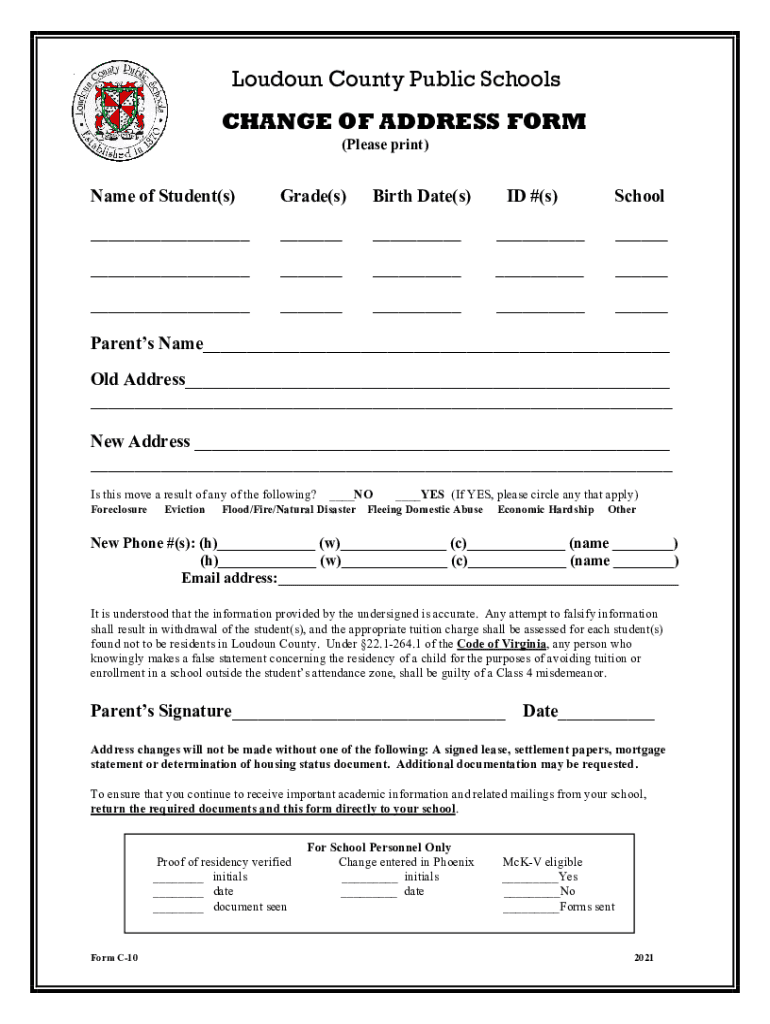







Definition and Purpose of the LCPS Change of Address Form
The Loudoun County Public Schools (LCPS) Change of Address Form is a crucial document utilized by parents and guardians to notify the school system of changes in their child’s residential information. It requires the input of detailed data, including the student's personal information, previous and new addresses, and the reasons for relocating. The primary aim of the form is to ensure that the student records reflect accurate contact information for communication purposes and compliance with school district policies.
Importance of Accurate Information
Providing precise and up-to-date information is imperative to avoid any repercussions. Incorrect data can lead to misunderstandings, interruptions in school communication, and may even affect transportation services. The form underlines the necessity of accuracy by stressing that failure to provide valid information could result in penalties or delayed processing of the address change.
How to Obtain the LCPS Change of Address Form
To acquire the LCPS Change of Address Form, interested parties can access it through the DocHub platform, where it is available as a free resource. The form can be downloaded or filled out directly online. Parents may also contact the school administration office to request a copy or for further assistance. DocHub's platform allows seamless downloading of the document, or directly working within its digital environment for a paperless option.
Accessing Via DocHub
- Navigate to DocHub’s website and use the search functionality to find the "LCPS Change of Address Form."
- Download it directly if you wish to fill it out manually or use DocHub’s editing tools to complete the form digitally.
Steps to Complete the LCPS Change of Address Form
Completing the form involves several straightforward steps, ensuring all necessary details are correctly captured for a smooth transition of information.
- Student Information: Begin by entering the student's full name, date of birth, and student ID number.
- Previous Address: Fill in the old address, including street, city, state, and zip code.
- New Address: Provide the new residential address with the same level of detail.
- Reason for Change: Indicate the reasons for the address change, whether it’s due to family relocation, accommodation adjustments, or other personal circumstances.
- Contact Information: Input updated contact numbers and email addresses for effective communication.
- Document Verification: Attach necessary documentation to verify the new address, which may include utility bills or lease agreements.
- Submit: Once all fields are completed, submit the form through the stipulated submission methods.
Document Submission Methods for LCPS
The LCPS Change of Address Form can be submitted in several ways depending on preference and convenience.
Available Methods
- Online Submission: Utilize the DocHub platform to submit the completed form electronically. This digital process ensures immediate delivery and can be done without visiting the school.
- Mail: For those preferring traditional methods, mailing the form directly to the school administration office is an option. Ensure all required documents are included.
- In-Person: Visit the school directly to hand in the form and consult with staff if additional information or immediate processing is needed.
Required Supporting Documents
When submitting the LCPS Change of Address Form, it is necessary to include documentation supporting the new residential information.
Examples of Acceptable Documents
- Recent utility bill under the guardian's name
- Signed lease or mortgage agreement
- State-issued ID reflecting the new address
- Residency affidavits if applicable
These documents serve to verify the authenticity of the address changes and should be current.
Who Typically Uses the LCPS Change of Address Form
The LCPS Change of Address Form is primarily used by parents or guardians of students enrolled in Loudoun County Public Schools. It is essential when families move to a new residence within or outside of district boundaries to maintain continuity in the student's educational records and services.


Target Groups
- Parents relocating within district lines
- Families moving in or out of Loudoun County
- Guardians needing to update contact details for emergencies and notifications
Legal Implications of the LCPS Change of Address Form
Filing the LCPS Change of Address Form carries legal responsibilities. Parents are obligated to provide true and complete information, aligning with district policies and ensuring compliance with residency requirements stipulated by public schooling regulations in Virginia.
Consequences of Non-Compliance
- Possible review or investigation for providing false information
- Potential penalties including fines or legal action for deliberate misinformation
- Notification delays affecting school correspondence and logistics
Key Elements to Include in the Form
When completing the LCPS Change of Address Form, several critical elements must be provided. These ensure the form meets all necessary criteria for processing.
Essential Information
- Student’s full legal name and existing student ID
- Both old and new residential addresses with detailed information
- Accurate parent or guardian contact numbers and email addresses
This comprehensive content ensures that those utilizing the form, such as parents, school family members, or administration staff, are thoroughly informed on how to effectively use and submit the form without error. The extensive coverage of every critical block enhances clarity and understanding necessary for seamless address update processes within the Loudoun County Public School system.




