



01. Edit your tm 7 online
Type text, add images, blackout confidential details, add comments, highlights and more.

Type text, add images, blackout confidential details, add comments, highlights and more.

Draw your signature, type it, upload its image, or use your mobile device as a signature pad.

Send tm7 form thailand via email, link, or fax. You can also download it, export it or print it out.
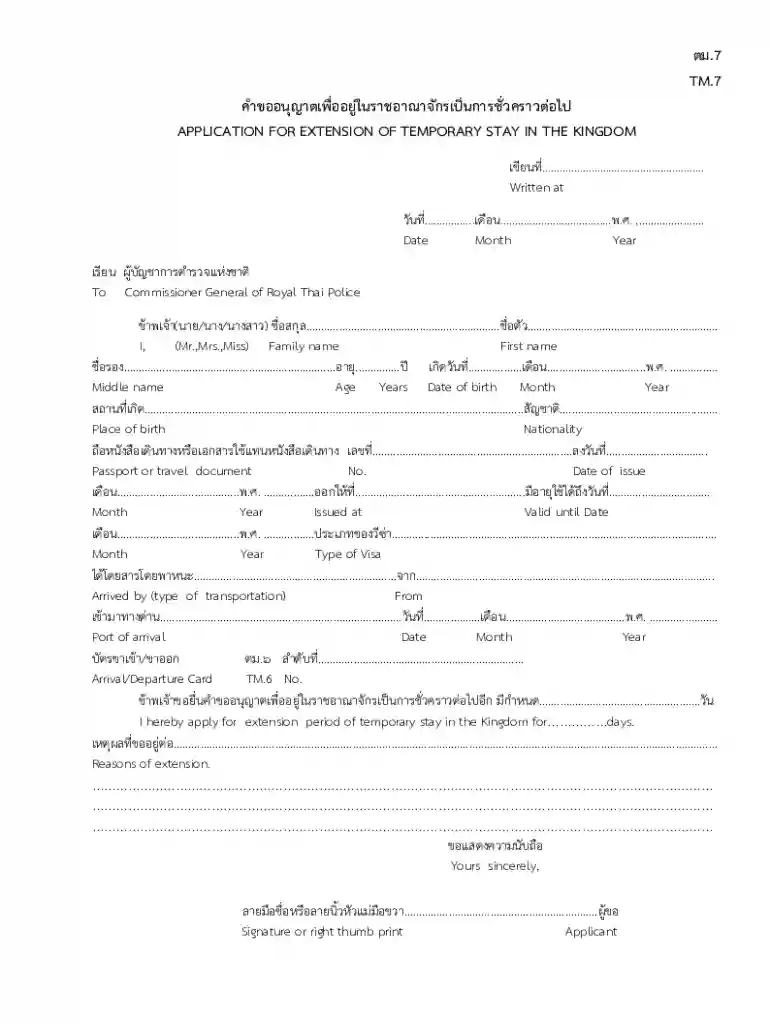
The TM 7 form is a crucial document for individuals seeking an extension of their temporary stay in Thailand. Understanding its components and requirements can ensure a smoother application process.
The TM 7 form, formally known as the "Application for Extension of Temporary Stay in the Kingdom," is used by foreigners in Thailand to request an extension of their current visa status. This form is essential for those whose visas are nearing expiration and who wish to remain in the country for a longer period.
Key points regarding the TM 7 form include:
To fill out the TM 7 form efficiently, specific personal and passport information is required. Each section of the TM 7 form encompasses the following details:
Personal Information
Passport Details
Residence Information
Extension Details
Filling in the TM 7 form involves a systematic approach to ensure all necessary sections are completed accurately. Follow these steps:
Download the Form
Fill in Personal Details
Detail the Reason for Extension
Submit the Application
When filling out the TM 7 form, potential applicants should consider the following:
To navigate the application process more effectively, be aware of common pitfalls that could jeopardize your extension request:
By adhering to these guidelines and being mindful of the distinct requirements of the TM 7 form, applicants can enhance their chances for a successful visa extension in Thailand.
We've got more versions of the tm 7 form. Select the right tm 7 version from the list and start editing it straight away!
Microsoft Word doesn’t have signing tools to create legitimate electronic signatures and enforceable documents. Luckily, DocHub is an online eSignature-compliant editor that supports various document formats, including .doc files. Log in to your account and add the Word edition of your tm7 form example from your device and cloud, or URL - our editor will automatically turn it into an editable PDF. Make all necessary changes in your document and click Sign to create your own legally-binding eSignature. There are four signing options from which to choose.
As a comprehensive document editing service, DocHub is accessible on smart phones. Open DocHub in your choice of mobile browser and use our smart mobile-friendly toolset to complete your tm7 thailand.
At DocHub, your data security is our priority. We follow HIPAA, SOC2, GDPR, and other standards, so you can work on your documents with confidence.


