




01. Edit your form online
Type text, add images, blackout confidential details, add comments, highlights and more.

Type text, add images, blackout confidential details, add comments, highlights and more.

Draw your signature, type it, upload its image, or use your mobile device as a signature pad.

Send it via email, link, or fax. You can also download it, export it or print it out.
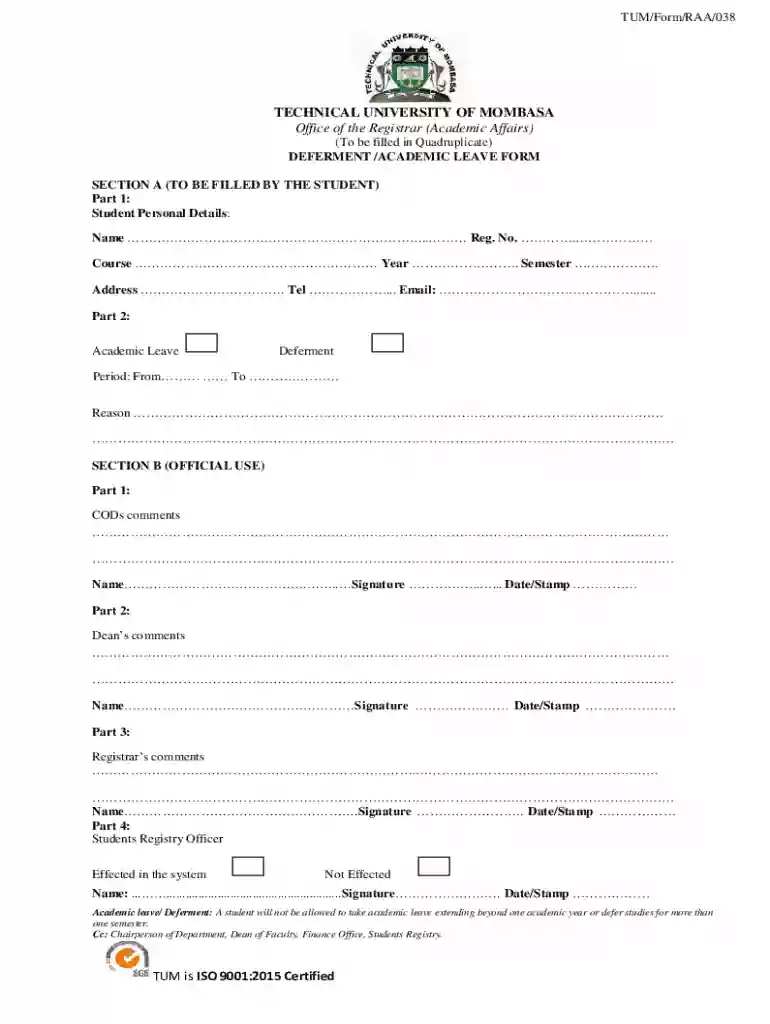
The Tum Deferment Form, also known as the Deferment/Academic Leave Form, is a formal document utilized by students of the Technical University of Mombasa (TUM). This form serves the purpose of facilitating requests for academic leave or deferment of studies. Academic leave refers to a temporary break from academic enrollment, usually not exceeding one academic year, whereas deferment pertains to postponing studies for up to one semester. This form requires students to provide personal details, the reason for the request, and receive endorsements from relevant university authorities.
Access the Template: Begin by locating the Tum Deferment Form on a trusted document management platform, like DocHub.
Fill Out Personal Information: Enter your student identification details, including full name, student ID, and program of study.
Specify the Request Type: Indicate whether you are requesting academic leave or deferment. Each option might have different implications, so choose thoughtfully.
Detail the Reason: Clearly articulate the reason for your request. This field might be assessed critically by university officials, so provide sufficient context and justification.
Gather Necessary Endorsements: Ensure all relevant sections requiring endorsements and comments from university officials are completed. This often includes the department head, faculty dean, and registrar.
Finalize and Submit: Review the completed form for accuracy, print, sign, and submit it to the appropriate university department. When using platforms like DocHub, you can digitally sign and submit the form electronically.
Download the Form: Access the form template from the university's website or a document management platform.
Complete Personal and Academic Details: Carefully input all requested personal and academic information. Double-check spelling and accuracy.
Choose Academic Leave or Deferment: Select the intended action (leave of absence or deferment) and state the intended period you anticipate being away from your studies.
Articulate the Need for Request: Provide a comprehensive explanation for your request. Common reasons include medical conditions, financial constraints, or personal challenges.
Seek Required Authorizations: Approach university personnel for comments and approval signatures. This usually includes necessary endorsements from counselors, academic advisors, or department representatives.
Review and Validate: Ensure the form is detailed accurately and all necessary signatures and comments are present.
Submit the Form: Depending on your institution’s policies, either submit a physical copy to the administrative office or an electronic version through a designated portal.
Primarily, the Tum Deferment Form is used by students enrolled at the Technical University of Mombasa. It is especially relevant for students facing situations that necessitate a temporary break from their studies. Users include:


When submitting the Tum Deferment Form, additional documentation may be required to support your request. These might include:
The Tum Deferment Form is legally binding within the scope of the university’s academic policies. It protects students' rights to resume their studies as agreed upon and ensures that all academic engagements are paused in accordance with institutional guidelines. Misuse or submission of fraudulent information on the form can lead to disciplinary actions as stipulated by university regulations.
We've got more versions of the Tum Deferment Form - Fill and Sign Printable Template form. Select the right Tum Deferment Form - Fill and Sign Printable Template version from the list and start editing it straight away!
Yes, you can use DocHub for signing any business and private paperwork, including your Tum Deferment Form - Fill and Sign Printable Template. All eSignatures you create with our tool are legally binding and court-admissible, as DocHub complies with criteria required by ESIGN and UETA. Save your completed form with a detailed Audit Trail if necessary.
You can get and edit your Tum Deferment Form - Fill and Sign Printable Template online by using DocHub. Its simple but feature-rich design allows you to begin effective work immediately after you sign up your account. Create your profile and add your file, and then our interface will guide you via our stress-free form completion experience.
At DocHub, your data security is our priority. We follow HIPAA, SOC2, GDPR, and other standards, so you can work on your documents with confidence.
NOTE: When you complete the Common Application for URI, you will be asked to answer the following: I would like my test scores (SAT or ACT) to beRead more
Sep 15, 2025 Form 8854 is used by expatriates to DocHub compliance with tax obligations 1040-SR for the year that includes your expatriation date.


