
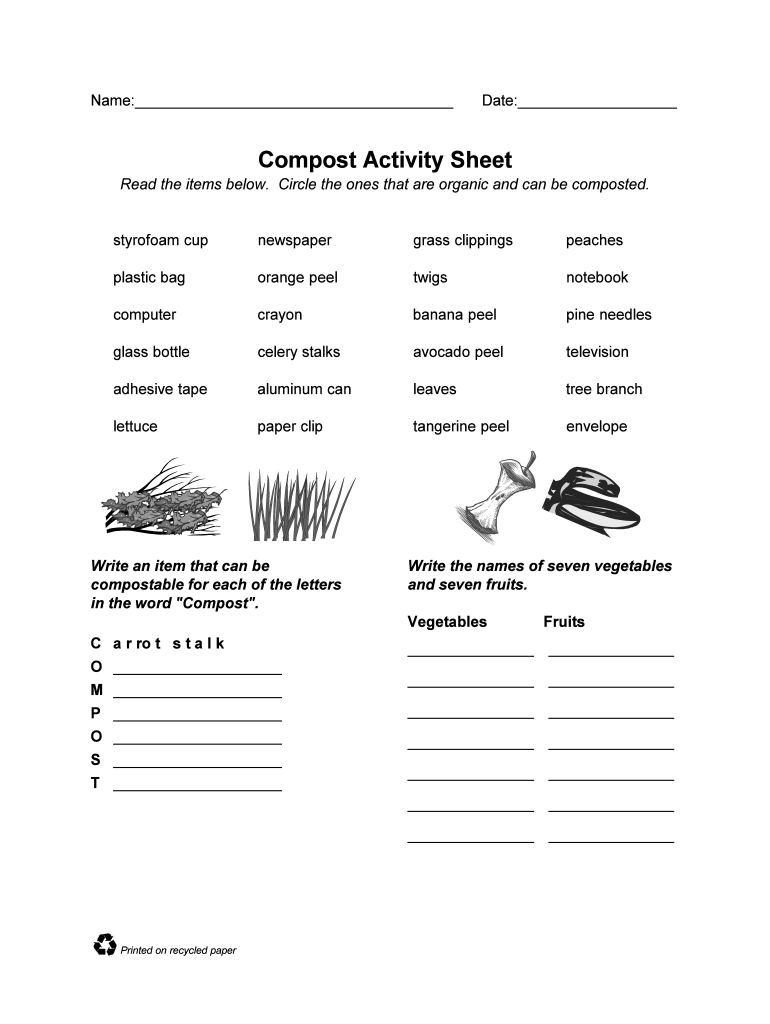




Here's how it works



How to use or fill out compost activity sheet with our platform

- Click ‘Get Form’ to open the compost activity sheet in the editor.
- Begin by filling in your name and the date at the top of the sheet. This personalizes your activity and helps keep track of your progress.
- In the section where you circle items that are organic and can be composted, carefully read through each item listed. Use the editing tools to circle those that apply, such as 'grass clippings' and 'orange peel'.
- Next, for each letter in 'Compost', write down an item that can be composted. Utilize the text fields provided to input your answers clearly.
- Proceed to list seven vegetables and seven fruits in their respective sections. Make sure to type them directly into the designated areas for easy readability.
- Finally, review all entries for accuracy before saving or sharing your completed activity sheet.
Start using our platform today for free to enhance your composting knowledge!
It's free
See more compost activity sheet versions
| Versions | Form popularity | Fillable & printable |
|---|---|---|
| 2005 | 4 Satisfied (52 Votes) |
Got questions?
Is it secure to sign my compost activity sheet electronically?
You should use only trusted software solutions with strong security compliance to sign your documents electronically. DocHub is just the type of service you need! It stores data on Amazon Web Servers and complies with all required security standards and eSignature regulations, so it’s a trusted way to eSign your compost activity sheet or other forms with this tool.
How do you edit compost activity sheet on Android?
Document editing with DocHub is equally convenient on desktop and mobile devices. You only need an internet browser to modify your compost activity sheet on Android. Open our site and sign in to access the instruments you require. Add your document and introduce your intended modifications. Next, you can keep your form in your document storage or send it out right away.
What are the 5 mistakes that people commonly make when composting with worms?
Is there a wrong way to compost?
What should be avoided in compost?
Security and compliance
At DocHub, your data security is our priority. We follow HIPAA, SOC2, GDPR, and other standards, so you can work on your documents with confidence.
Learn more




