




01. Edit your form online
Type text, add images, blackout confidential details, add comments, highlights and more.

Type text, add images, blackout confidential details, add comments, highlights and more.

Draw your signature, type it, upload its image, or use your mobile device as a signature pad.

Send it via email, link, or fax. You can also download it, export it or print it out.
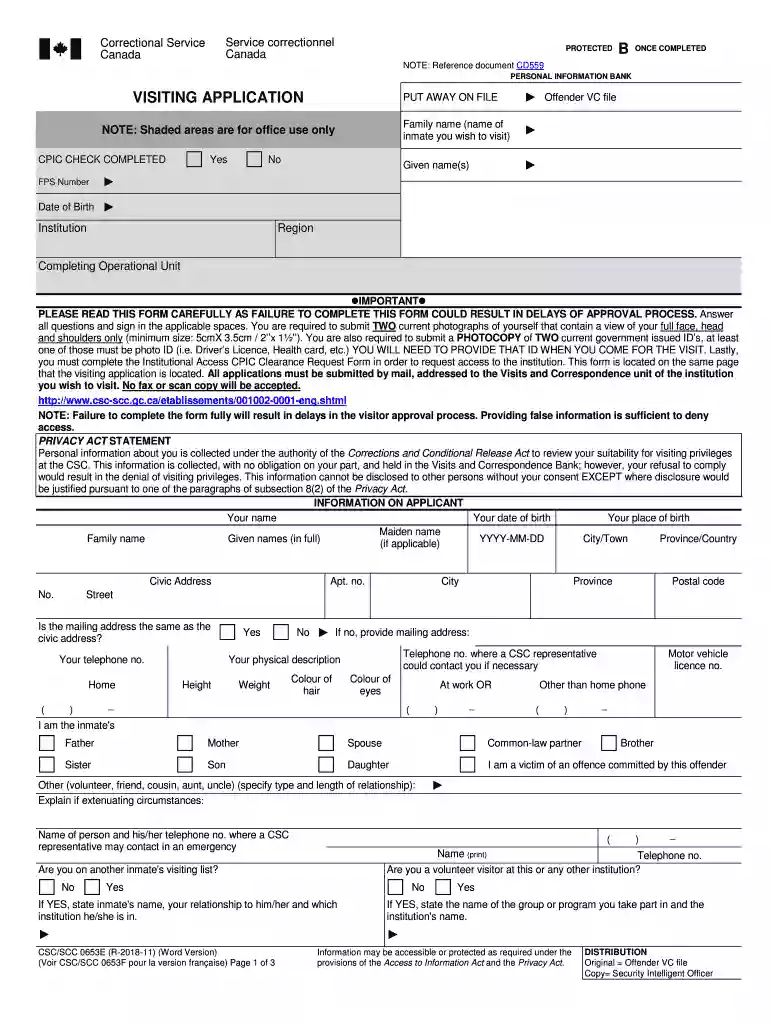
The CSC SCC0653E form is a visiting application used by the Correctional Service of Canada for individuals intending to visit inmates. Its main purpose is to ensure that all visitors are properly identified and vetted, maintaining the security protocols within correctional facilities. This form includes detailed instructions, requiring applicants to provide accurate personal information and comply with regulatory guidelines.
To correctly fill out the CSC SCC0653E form, applicants must follow a series of steps. Begin by carefully reading the instructions to understand all requirements. Next, fill in your personal details such as name, address, and contact information. Make sure to provide accurate information to avoid processing delays. Attach any necessary identification documents as specified. Finally, review the completed form before submission to ensure all information is correct and up-to-date.
Obtaining the CSC SCC0653E form can be done through several channels. You can access the form through the Correctional Service of Canada's official website, where it is available for download in PDF format. Additionally, you can request a physical copy by contacting the facility where the inmate is housed, which ensures you receive the most current version of the form.
The CSC SCC0653E is primarily used by family members, friends, or legal representatives who wish to visit inmates in Canadian correctional facilities. It serves to regulate entry into these secure environments by ensuring that all visitors are identified and authorized, which is critical for maintaining facility safety.


The form must be used in compliance with the legal standards set by the Correctional Service of Canada. Any misrepresentation or false information provided could result in denial of visiting privileges and possible legal action. Compliance with all instructions and regulations is imperative to avoid legal consequences.
Applicants need to submit valid identification documents alongside the form. These can include a driver's license, passport, or government-issued ID. The documentation is essential for verifying the visitor's identity and eligibility to enter the correctional facility.
The CSC SCC0653E form can be submitted through multiple avenues. Applicants may opt to submit the form by mailing it directly to the correctional facility where the inmate is held. In some instances, online submission may be available through the Correctional Service of Canada's secure web portal, providing a faster and more efficient processing option.
We've got more versions of the csc scc0653e form. Select the right csc scc0653e version from the list and start editing it straight away!
Microsoft Word doesn’t have signing tools to generate valid eSignatures and enforceable paperwork. Luckily, DocHub is an online eSignature-compliant editor that works with various file formats, including .doc files. Sign in to your account and upload the Word version of your csc scc0653e from your device and cloud, or URL - our editor will automatically convert it into an editable PDF. Make all essential adjustments in your form and click Sign to generate your own legally-binding eSignature. You will find four signing methods from which to choose.
If you store your documents in Google Drive, there is no need to download your csc scc0653e on your computer and upload it back to our editor. A significantly simpler way is to set up a browser extension developed by DocHub to simplify this flow. The extension allows editing PDFs in your web browser. Alternatively, you can integrate your DocHub and Gmail accounts for more efficient modifying.
At DocHub, your data security is our priority. We follow HIPAA, SOC2, GDPR, and other standards, so you can work on your documents with confidence.


