







Definition and Meaning
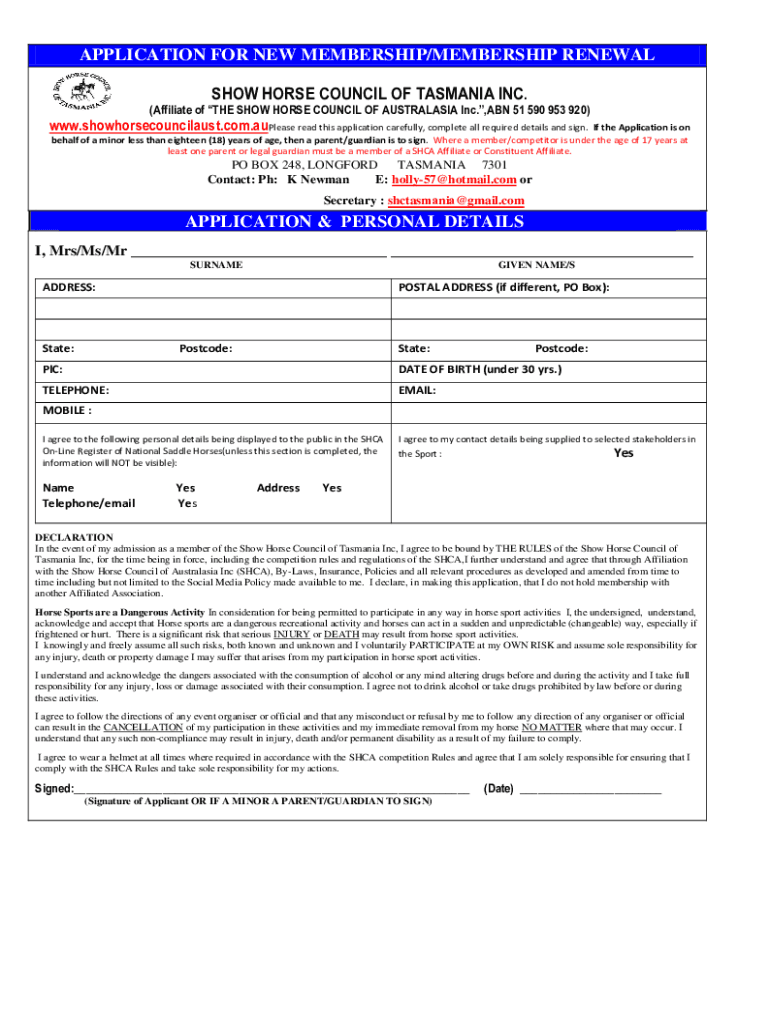
The "tas equestrian aushow-horseShow Horse Tasmania - Equestrian Australia" refers to an official form used for managing membership and compliance with the Show Horse Council of Tasmania Inc., under Equestrian Australia’s governance. This form is specifically designed for individuals seeking membership or renewing their existing membership within the Tasmanian division of the Australian Equestrian community.
Key Functions
- Membership Application: Facilitates new membership requests and renewals.
- Compliance Assurance: Ensures applicants understand and comply with regulations.
- Information Collection: Gathers necessary personal details from applicants.
Steps to Complete the Form
Completing the "tas equestrian aushow-horseShow Horse Tasmania - Equestrian Australia" form is essential for streamlined membership processing. Follow these steps:
- Review the Form: Examine all sections to understand the information required.
- Fill Personal Details: Enter name, address, contact information, and age.
- Select Membership Category: Choose the appropriate category based on eligibility.
- Declaration of Understanding: Sign the declaration acknowledging the risks of equestrian sports.
- Compliance Confirmation: Agree to abide by council regulations and standards.
- Calculate Fees: Determine applicable membership fees based on chosen category.
- Submit Payment: Follow instructions for payment submission.
- Final Review: Double-check all entries for accuracy before submission.
Specific Tips
- Proofreading: Ensure all details are accurately filled in.
- Document Copies: Keep a copy of the completed form for your records.
Key Elements of the Form
Understanding the core components of the form can help streamline the completion process:
- Personal Information Section: Collects contact details and demographic info.
- Membership Categories: Outlines different membership types and associated costs.
- Risk Declaration: Includes a statement for applicants acknowledging the risks involved.
- Regulatory Compliance: Requires acknowledgment of council rules and regulations adherence.
Additional Elements
- Payment Instructions: Clear guidelines for fee submission.
- Age Restrictions: Specific regulations for minors applying for membership.
Required Documents
To ensure a successful application, prepare the following documents:
- Identification Proof: A copy of a valid ID such as a driver’s license or passport.
- Previous Membership Details: If applicable, provide details from past memberships.
- Payment Proof: Evidence of membership fee payment.
Document Verification
- Check Durability: Ensure documents are up-to-date and valid.
- Copy Quality: Use clear and legible photocopies or scans.
Legal Use of the Form
The "tas equestrian aushow-horseShow Horse Tasmania - Equestrian Australia" form is a legal document that binds the applicant to specific responsibilities and rights:
- Compliance Obligation: Ensures that members agree to Equestrian Australia’s standards.
- Legal Protection: Offers legal coverage under the existing equestrian laws in Australia.
Legal Implications
- Breach of Rules: Non-compliance may result in membership suspension.
- Liability Management: Acknowledges the inherent risks involved in horse sports.
Who Typically Uses the Form
The form is primarily used by individuals affiliated with the equestrian community in Tasmania:
- New Members: Prospective members looking to join the council.
- Renewing Members: Current members updating their status.
- Youth Riders: Includes segments for junior riders with added parental consent requirements.


Organization and Club Members
Members affiliated with clubs or organizations can also use this form to verify their association with Show Horse Tasmania.
Examples of Using the Form
Real-world scenarios exemplifying the form’s usage highlight its practical applications:
- New Applicant: John, a Tasmanian resident, fills out the form to join as a new member, selecting his membership category and submitting it along with the required fee.
- Membership Renewal: Susan utilizes the form for renewing her status, updating her personal info and complying with any new regulations stated.
Interactive Workshop Usage
The form can be used during equestrian workshops to facilitate discussions around membership roles and responsibilities.
Form Submission Methods
Submitting the "tas equestrian aushow-horseShow Horse Tasmania - Equestrian Australia" form involves several options:
Online Submission
- Digital Forms: Allows members to fill and submit electronically via the council's official website.
Mail and In-Person Submission
- Postal Options: Members can send completed forms via traditional mail.
- Face-to-Face: Direct submission at council meetings or designated locations.
Submission Verification
- Confirmation Receipts: Request acknowledgment of submission receipt, particularly for mail options, to ensure processing.
This comprehensive guide assists members in successfully navigating the "tas equestrian aushow-horseShow Horse Tasmania - Equestrian Australia" form with effective, detailed insights for all related processes.




