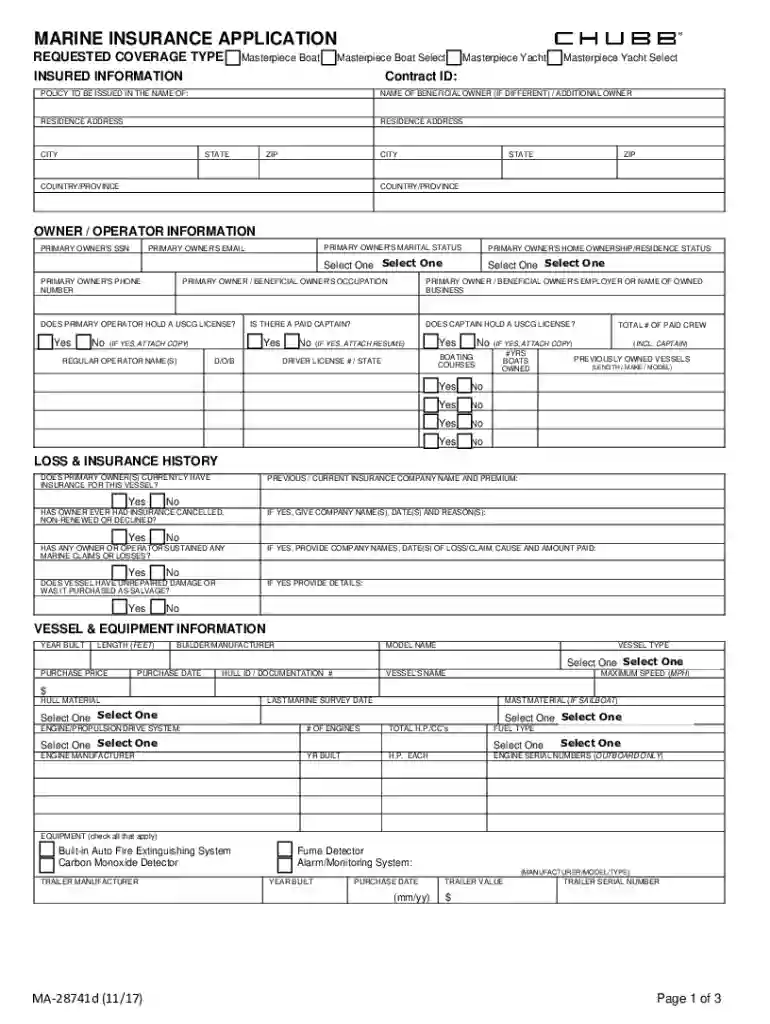
Chubb Marine Insurance Application doc Preview on Page 1

Chubb Marine Insurance Application doc 2026

Here's how it works

  • 01. Edit your form online

    Type text, add images, blackout confidential details, add comments, highlights and more.

  • 02. Sign it in a few clicks

    Draw your signature, type it, upload its image, or use your mobile device as a signature pad.

  • 03. Share your form with others

    Send it via email, link, or fax. You can also download it, export it or print it out.

How to use or fill out Chubb Marine Insurance Application doc with our platform

Form edit decoration
9.5
Ease of Setup
DocHub User Ratings on G2
9.0
Ease of Use
DocHub User Ratings on G2
  1. Click ‘Get Form’ to open the Chubb Marine Insurance Application in the editor.
  2. Begin by selecting the requested coverage type at the top of the form. Choose between options like 'Masterpiece Boat' or 'Masterpiece Yacht'.
  3. Fill in the insured information section, including your name, residence address, and contact details. Ensure accuracy as this information is crucial for policy issuance.
  4. In the owner/operator information section, provide details such as your Social Security Number, email, phone number, and home ownership status. Select appropriate options from dropdown menus where applicable.
  5. Complete the loss & insurance history section by indicating whether you currently have insurance for your vessel and detailing any past claims or cancellations.
  6. Proceed to fill out vessel & equipment information, including year built, length, model name, and engine specifications. Be thorough to avoid delays in processing.
  7. Finally, review all sections for completeness before submitting your application. Use our platform's features to save your progress or print a quick quote if needed.

Start filling out your Chubb Marine Insurance Application today using our platform for free!

See more Chubb Marine Insurance Application doc versions

We've got more versions of the Chubb Marine Insurance Application doc form. Select the right Chubb Marine Insurance Application doc version from the list and start editing it straight away!

VersionsForm popularityFillable & printable
20174.2 Satisfied (63 Votes)
20134.4 Satisfied (48 Votes)
20114 Satisfied (30 Votes)
20104 Satisfied (27 Votes)

be ready to get more

Complete this form in 5 minutes or less

Got questions?

We have answers to the most popular questions from our customers. If you can't find an answer to your question, please contact us.

Electronic document approval requires a software solution that works in compliance with data protection and eSignature regulations. DocHub is a perfect tool for that, because it meets all the previously mentioned requirements. Whatever method you like to sign your Chubb Marine Insurance Application doc in DocHub, your eSignature will be legally binding and court-admissible.

Having a swift editing system like DocHub, you do not require anything but a browser and internet connection to edit your Chubb Marine Insurance Application doc on the internet quickly. Upload your file or find the relevant form in DocHub’s catalog, open our editor with one click, and finish it digitally. To revise your forms at any time, sign up a free profile with DocHub.

Security and compliance

At DocHub, your data security is our priority. We follow HIPAA, SOC2, GDPR, and other standards, so you can work on your documents with confidence.

Related links

Chubb At A Glance

Users can download policy forms, apply for insurance and receive quotes online, view the status of a claim or bill and more. 16. AB. OUT. CHUBB. Page 24Read more

Learn more
DFC, Chubb Announce Additional American Reinsurance

Apr 3, 2026 The facility will provide War Marine Risk Insurance for Hull Liability as well as Cargo. Coverage will be offered for War Hull Risk Insurance,Read more

Learn more
If you believe that this page should be taken down, please follow our DMCA take down process here