




Here's how it works



How to use or fill out Grand Jury Complaint Form: Kern County Grand Jury with our platform

- Click ‘Get Form’ to open the Grand Jury Complaint Form in the editor.
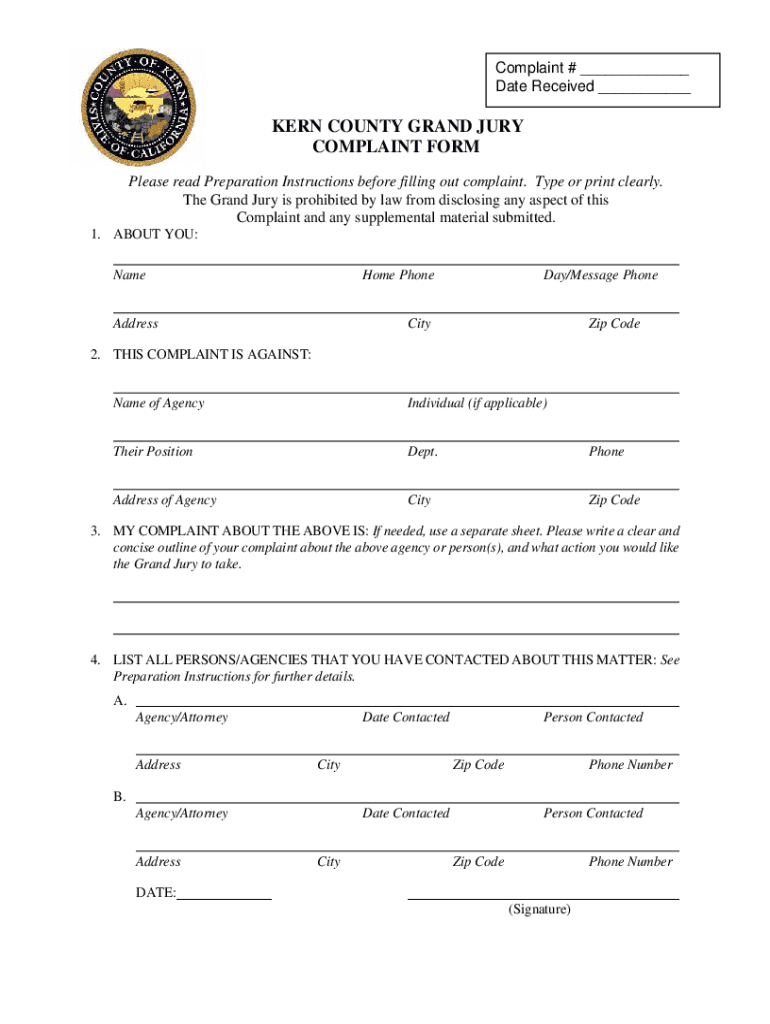
- Begin by filling out the 'ABOUT YOU' section. Enter your name, home phone, address, city, and zip code clearly. This information is crucial for the Grand Jury to contact you regarding your complaint.
- Next, move to 'THIS COMPLAINT IS AGAINST'. Provide the name of the agency or individual involved, their position, department, and contact details. Ensure all spellings are accurate for effective processing.
- In 'MY COMPLAINT ABOUT THE ABOVE IS', outline your complaint clearly and concisely. If necessary, use a separate sheet for additional details. Remember to attach copies of any supporting documents as instructed.
- Complete the section listing all persons/agencies contacted about this matter. Include their addresses and phone numbers along with a summary of each interaction.
- Finally, sign and date the form at the bottom before submitting it through our platform.
Start using our platform today to fill out your Grand Jury Complaint Form easily and securely!
It's free
See more Grand Jury Complaint Form: Kern County Grand Jury versions
Got questions?
Can I complete and sign my grand jury complaint online?
Yes, and it’s really easy! DocHub is an online PDF editor with advanced document management functions that allow you quickly modify your paperwork, complete blank fields and insert new ones for others to fill out, and create eSignatures in several ways. Add your grand jury complaint, give information as requested, and select how you want to eSign your template - by typing your name, drawing your signature, uploading its picture, or utilizing a QR code.
How to manage my kern county complaint form from Gmail?
In case your go-to electronic mail service is Gmail, you can easily integrate your DocHub editor into your work. Modify your kern county complaint form with DocHub instruments and attach it to your drafts in Gmail. See how easy it can be to exchange papers and collaborate having a swift PDF editing solution at hand.
Security and compliance
At DocHub, your data security is our priority. We follow HIPAA, SOC2, GDPR, and other standards, so you can work on your documents with confidence.
Learn more


