



01. Edit your form online
Type text, add images, blackout confidential details, add comments, highlights and more.

Type text, add images, blackout confidential details, add comments, highlights and more.

Draw your signature, type it, upload its image, or use your mobile device as a signature pad.

Send it via email, link, or fax. You can also download it, export it or print it out.
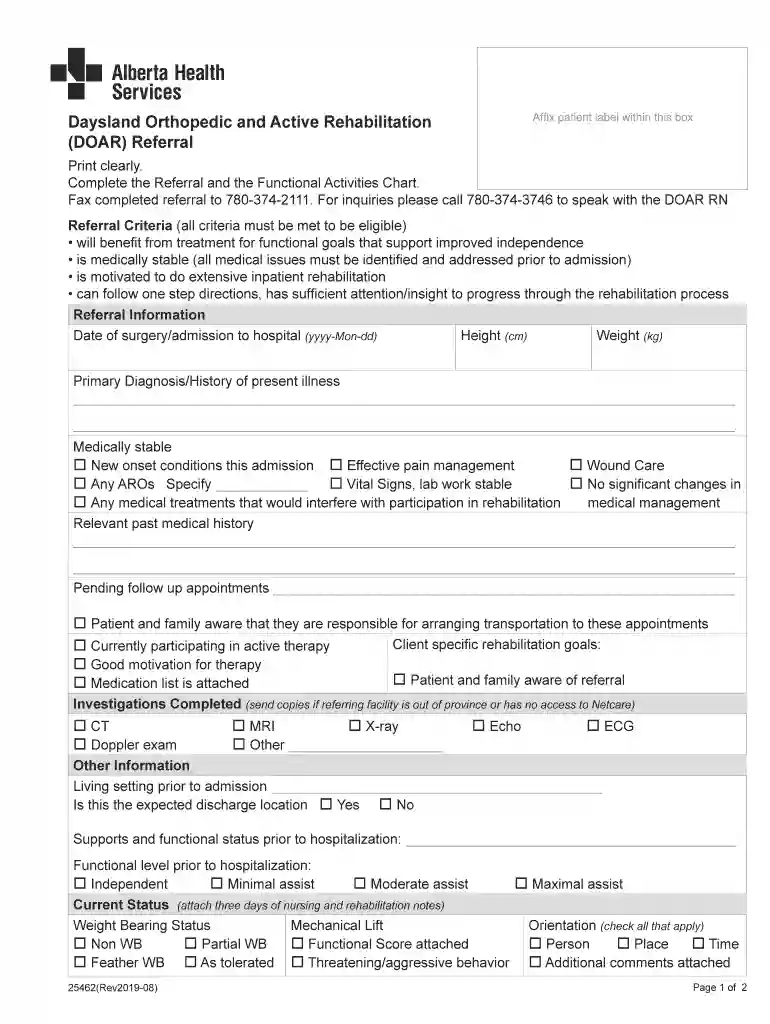
The "Printable Forms - Refer your patientSummit Orthopedics" serves as a referral document for healthcare providers. It is primarily used to refer patients to Summit Orthopedics for specialized orthopedic care. The form captures critical information such as patient details, medical history, and the referring physician's contact information. By standardizing this information collection, it facilitates efficient communication between healthcare providers and Summit Orthopedics, ensuring that patients receive appropriate and timely care. This tool is essential for maintaining a clear, organized approach to patient referrals, ultimately aiming to enhance the quality of orthopedic services provided.
Several essential components make up the "Printable Forms - Refer your patientSummit Orthopedics," each serving a specific purpose:
Filling out this form requires attention to detail to ensure all necessary information is provided accurately:
Utilizing these forms offers multiple advantages:
Follow these steps to accurately complete the form:
This form is mostly utilized by:

Legally, this form must adhere to various privacy laws, including:
Consider the following scenarios:
We've got more versions of the Printable Forms - Refer your patientSummit Orthopedics form. Select the right Printable Forms - Refer your patientSummit Orthopedics version from the list and start editing it straight away!
Managing your documentation with DocHub this way is extremely simple once you have downloaded its extension for Google Chrome. Navigate to the Chrome Web Store and set up DocHub - Sign PDF from Gmail to obtain it. Give our tool access to your Google account, and then open an email with the Printable Forms - Refer your patientSummit Orthopedics attached and point to the file with your cursor - the DocHub extension button will automatically appear there. Click on it to open your form in our editor. Make any required modifications, complete the blanks, and click Sign to create your legally-binding eSignature.
When you go for analog ways of completing your Printable Forms - Refer your patientSummit Orthopedics, it is simple to download your file for printing. Search DocHub’s Forms & Templates catalog to get the exact document template you require and open it for editing or download it on your gadget in the format of your choice. It is possible to complete your form electronically and put your handwritten signature on it after printing or eSign your document with DocHub.
At DocHub, your data security is our priority. We follow HIPAA, SOC2, GDPR, and other standards, so you can work on your documents with confidence.


