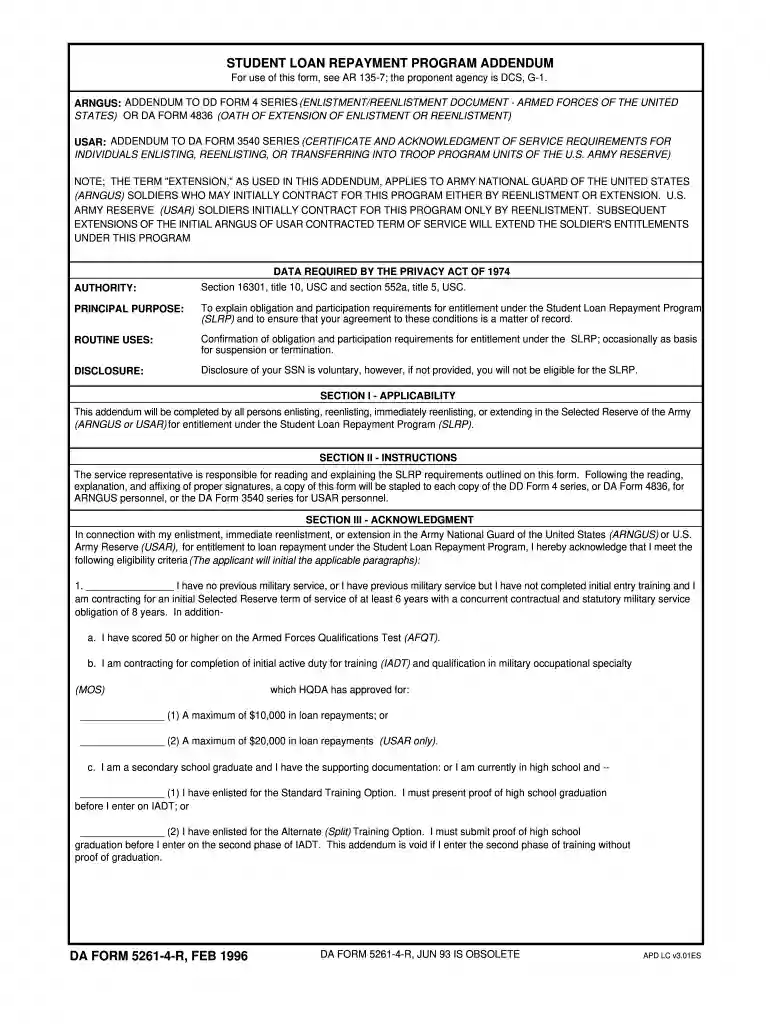
title 10 Preview on Page 1

5261 4-2026

Here's how it works

  • 01. Edit your title 10 online

    Type text, add images, blackout confidential details, add comments, highlights and more.

  • 02. Sign it in a few clicks

    Draw your signature, type it, upload its image, or use your mobile device as a signature pad.

  • 03. Share your form with others

    Send title 13 via email, link, or fax. You can also download it, export it or print it out.

How to use or fill out 5261 4 with our platform

Form edit decoration
9.5
Ease of Setup
DocHub User Ratings on G2
9.0
Ease of Use
DocHub User Ratings on G2
  1. Click ‘Get Form’ to open the 5261 4 in the editor.
  2. Begin with Section I - Applicability. Ensure you check the appropriate box indicating your enlistment status and eligibility for the Student Loan Repayment Program (SLRP).
  3. Move to Section II - Instructions. Read through the requirements carefully, as this section outlines your obligations and what is expected from you and your service representative.
  4. In Section III - Acknowledgment, initial next to each applicable criterion that confirms your eligibility for loan repayment. Make sure all initials are clear and legible.
  5. Proceed to Section IV - Obligation. Here, you will need to indicate your commitment by initialing the relevant paragraphs based on your military service history.
  6. In Section V - Entitlement, review the loan repayment details. Initial next to the applicable options regarding maximum repayment amounts and ensure you understand your responsibilities regarding loan requests.
  7. Complete Sections VI and VII regarding Suspension and Termination of benefits, ensuring you understand conditions that may affect your entitlement.
  8. Finally, sign in Section VIII - Statement of Understanding, confirming that you have read and understood all terms outlined in the form.

Start using our platform today for free to streamline filling out your forms effortlessly!

See more title 10 versions

We've got more versions of the title 10 form. Select the right title 10 version from the list and start editing it straight away!

VersionsForm popularityFillable & printable
19964.9 Satisfied (291 Votes)

be ready to get more

Complete this form in 5 minutes or less

Security and compliance

At DocHub, your data security is our priority. We follow HIPAA, SOC2, GDPR, and other standards, so you can work on your documents with confidence.

07 13

MacBook Air A2337 Not turning on, 0.00-0.05a current

Nov 26, 2025 Facing an issue with the MacBook Pro A2337 displaying 5V and a very low current draw of 0.00 to 0.05A on the USB-C meter.Read more

Learn more
Hinds Community College

The largest community college in Mississippi with six locations. Since 1917, we have provided quality, convenient, and affordable education.

Learn more
If you believe that this page should be taken down, please follow our DMCA take down process here