Cs4645 2026

Get Form
cs4645 Preview on Page 1

Here's how it works

01. Edit your cs4645 online
Type text, add images, blackout confidential details, add comments, highlights and more.

02. Sign it in a few clicks
Draw your signature, type it, upload its image, or use your mobile device as a signature pad.

03. Share your form with others
Send cs4645 form via email, link, or fax. You can also download it, export it or print it out.

How to use or fill out cs4645 with our platform

Form edit decoration
9.5
Ease of Setup
DocHub User Ratings on G2
9.0
Ease of Use
DocHub User Ratings on G2
  1. Click ‘Get Form’ to open cs4645 in the editor.
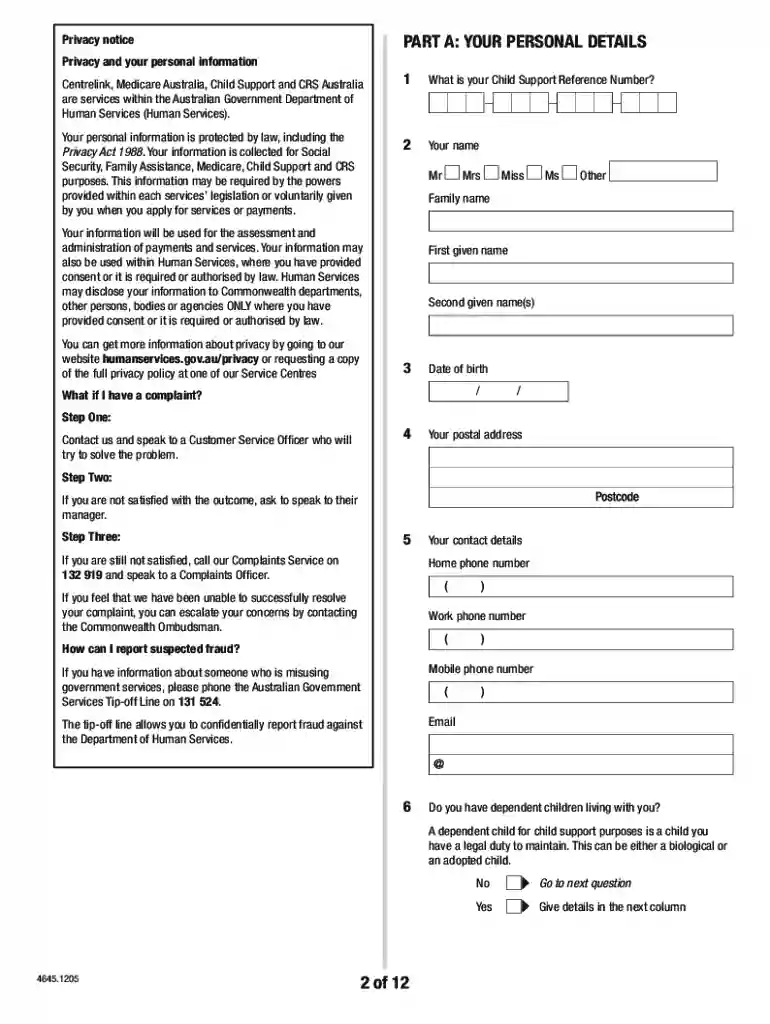
  2. Begin with PART A: Your personal details. Fill in your Child Support Reference Number, name, date of birth, and contact information using block letters.
  3. Proceed to PART B: Your employment details. Indicate your employment status and provide necessary income details. If self-employed, attach relevant documentation.
  4. In PART C: Your income details, list all sources of income including salary, government payments, and any other earnings. Ensure you specify whether amounts are gross or net.
  5. Move to PART D: Your expenditure details. Document all personal expenses accurately and calculate totals where applicable.
  6. For PART E: Your assets and liabilities, detail any owned properties or vehicles along with their current market values and amounts owed.
  7. In PART F: Your payment offer, propose a reasonable payment arrangement based on your financial situation.
  8. Finally, complete PART G: Your declaration by signing and dating the form before submitting it as instructed.

Start filling out cs4645 today for free using our platform!

See more cs4645 versions

We've got more versions of the cs4645 form. Select the right cs4645 version from the list and start editing it straight away!
Versions Form popularity Fillable & printable
2023 4.3 Satisfied (57 Votes)
2021 4.9 Satisfied (49 Votes)
2018 4.3 Satisfied (33 Votes)
2015 4 Satisfied (48 Votes)
2012 4.3 Satisfied (43 Votes)
be ready to get more

Complete this form in 5 minutes or less

Get form

Got questions?

We have answers to the most popular questions from our customers. If you can't find an answer to your question, please contact us.
Contact us

With DocHub, you can quickly approve your cs4645 form child support or any other document on iOS, even without setting up extra programs. You can access your DocHub account from any web-connected browser and complete and sign your form in any preferred method with just a few clicks.

You can easily edit and complete your cs4645 form pdf on any iOS gadget. Open an internet browser of your liking, go to the DocHub website, authorize or create a new account, upload your file for editing, and make your required adjustments. Our service is mobile-friendly, so utilizing its functions on your smartphone will be a no-brainer, even on the first try.

0:30 2:04 Agency. This could be your local child support enforcement office or court remember to keep copiesMoreAgency. This could be your local child support enforcement office or court remember to keep copies of all submitted forms for your records.
A: The most money child support can take in California is up to 60% of a persons wages if they are only responsible for one child. If they are responsible for two or more children, then up to 50% of their wages can be garnished. Wage garnishment can sometimes be mandated by a court order.
A waiver may be appropriate where recovery of the debt would be inequitable, or recovery of the debt would cause ongoing financial hardship. A debt is unlikely to be waived where it is a debt that is owed to the Commonwealth that will be paid on to a third party.