Homeless intake form 2026

Get Form
shelter intake form Preview on Page 1

Here's how it works

01. Edit your shelter intake form online
Type text, add images, blackout confidential details, add comments, highlights and more.

02. Sign it in a few clicks
Draw your signature, type it, upload its image, or use your mobile device as a signature pad.

03. Share your form with others
Send homeless shelter intake form via email, link, or fax. You can also download it, export it or print it out.

How to use or fill out homeless intake form with our platform

Form edit decoration
9.5
Ease of Setup
DocHub User Ratings on G2
9.0
Ease of Use
DocHub User Ratings on G2
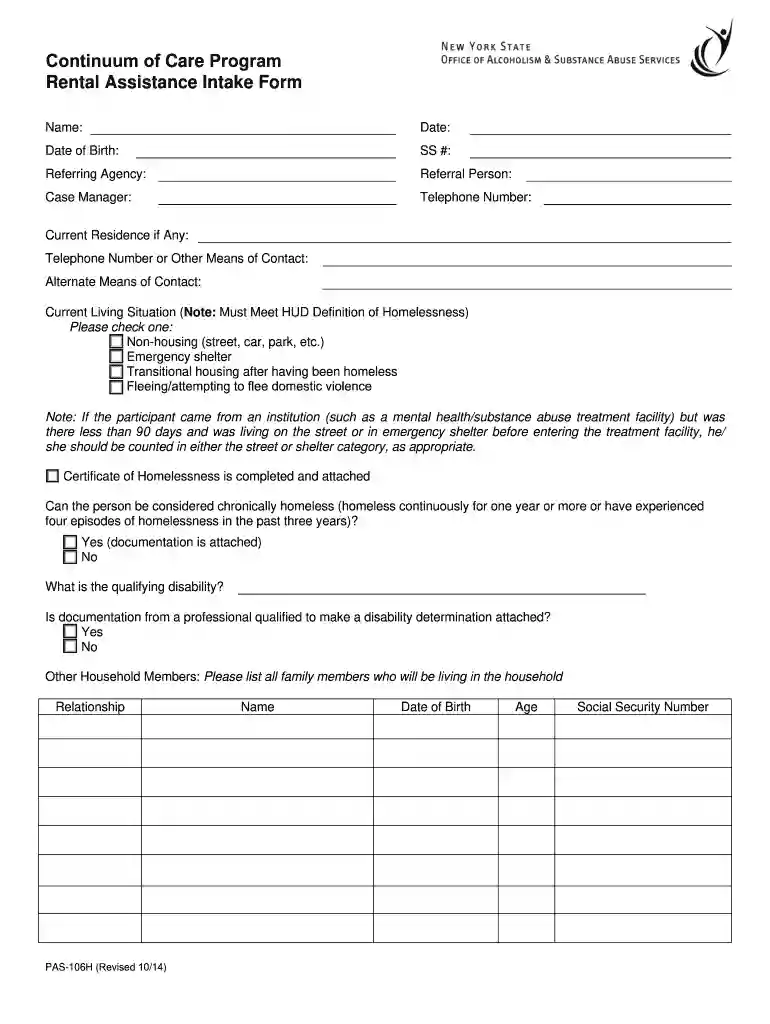
  1. Click ‘Get Form’ to open the homeless intake form in the editor.
  2. Begin by entering your name, date, and date of birth in the designated fields. Ensure accuracy as this information is crucial for identification.
  3. Fill in your Social Security number and contact details, including your current residence and alternate means of contact. This helps case managers reach you easily.
  4. Indicate your current living situation by checking the appropriate box that meets HUD's definition of homelessness. If applicable, attach the Certificate of Homelessness.
  5. Answer whether you can be considered chronically homeless and provide documentation if available. Specify any qualifying disabilities and ensure relevant documentation is attached.
  6. List all household members along with their relationships, dates of birth, ages, and Social Security numbers to complete demographic information.
  7. Detail your total household monthly income from various sources. This section is vital for assessing eligibility for assistance programs.
  8. Complete the asset declaration section by certifying that all listed assets are accurate and that you have not disposed of significant property recently.
  9. Finally, sign and date the application at the bottom before submitting it along with required documentation such as proof of income and disability verification.

Start filling out your homeless intake form today on our platform for free!

See more homeless intake form versions

We've got more versions of the homeless intake form form. Select the right homeless intake form version from the list and start editing it straight away!
Versions Form popularity Fillable & printable
2014 4.8 Satisfied (192 Votes)
be ready to get more

Complete this form in 5 minutes or less

Get form

Got questions?

We have answers to the most popular questions from our customers. If you can't find an answer to your question, please contact us.
Contact us
What is an intake form in social work? The social work intake assessment is a form typically filled out as new client paperwork. Its purpose is to gather basic information on a new patient or client so they can be formally onboarded as part of a social workers casework.
Yes. This is called doubled-up or couch surfing homelessness. It qualifies if youre staying temporarily with others and could be asked to leave anytime. Examples include students fleeing abuse or families displaced by violence.
Create a client intake form using Google Forms. In Google Forms, click the plus sign. Click the Untitled form header box. Enter a name and description for the form.
The most common definition identifies three types of homelessness: primary, secondary, and tertiary. Primary homelessness: people without conventional accommodation. For example: sleeping rough or in improvised dwellings. Secondary homelessness: people who frequently move from one temporary shelter to another.
To make fillable forms on Canva, you can use the Typeform app. Create and link your account to Canva so you could access any fillable forms. Embed these forms on any Canva design like a website, presentation, or whiteboard. Then share a link to your designs online.

Security and compliance

At DocHub, your data security is our priority. We follow HIPAA, SOC2, GDPR, and other standards, so you can work on your documents with confidence.

Learn more
ccpa2
pci-dss
gdpr-compliance
hipaa
soc-compliance
be ready to get more

Complete this form in 5 minutes or less

Get form