



Here's how it works



How to use or fill out Macy's returns with our platform

- Click ‘Get Form’ to open the Macy's returns form in the editor.
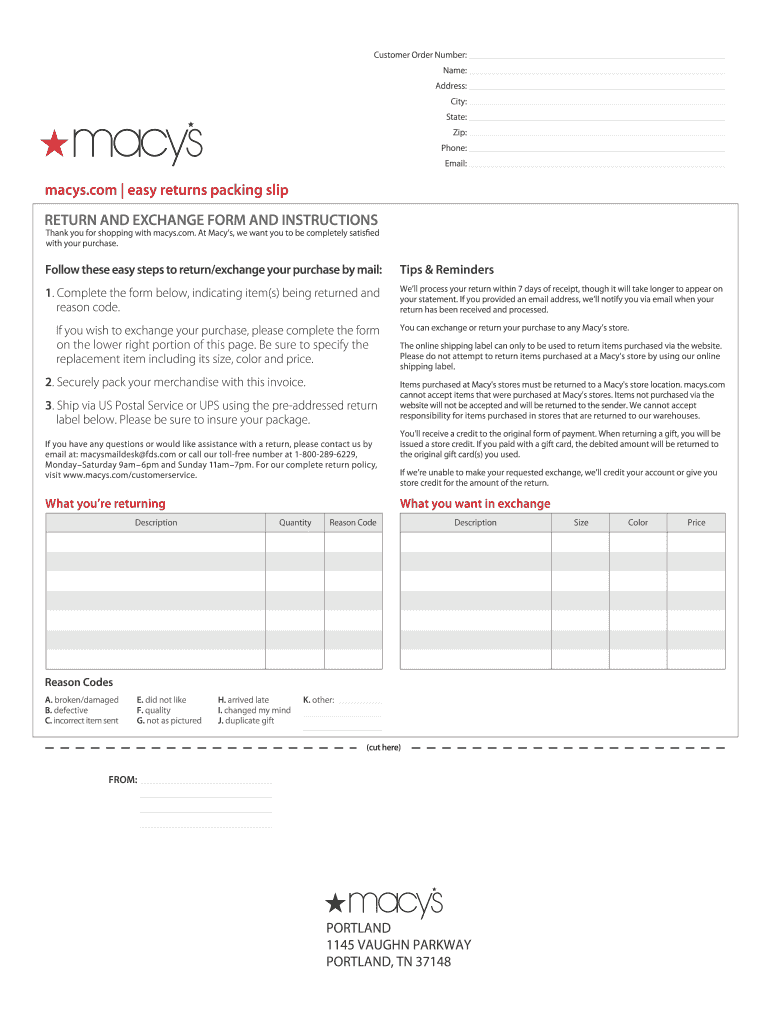
- Begin by entering your Customer Order Number, Name, Address, City, State, Zip, Phone, and Email in the designated fields. This information is crucial for processing your return.
- In the section labeled 'What you’re returning', provide a detailed description of the item(s) you wish to return. Be sure to include any relevant details that may assist in processing your return.
- Indicate the reason for your return by selecting a Reason Code from the provided list. This helps Macy’s understand why you are returning the item and improves their service.
- If you are exchanging an item, complete the lower right portion of the form with details about what you want in exchange, including Size, Color, and Price.
- Once all fields are filled out accurately, securely pack your merchandise along with this completed form and prepare it for shipping using the pre-addressed label provided.
Start using our platform today to streamline your Macy's returns process for free!
It's free
Got questions?
How do I sign my macys return on iOS?
With DocHub, you can quickly approve your macys return or any other paperwork on iOS, even without setting up additional programs. You can access your DocHub account from any internet-connected browser and fill out and sign your document in any way you like with just a few clicks.
Can I print my macy's return label and finish it on my own?
If you choose analog ways of completing your macy's return label, you can easily download your file for printing. Search DocHub’s Forms & Templates catalog to get the exact file template you need and open it for editing or download it on your device in the format of your choice. It is easy to complete your form electronically and place your handwritten signature on it after printing or eSign your file with DocHub.
What is Macy's return policy without a receipt?
Can you return an online order in store?
Can I return something at Macy's after 90 days?
Security and compliance
At DocHub, your data security is our priority. We follow HIPAA, SOC2, GDPR, and other standards, so you can work on your documents with confidence.
Learn more