Intent affidavit 2026

Get Form
intents and affidavits Preview on Page 1

Here's how it works

01. Edit your intents and affidavits online
Type text, add images, blackout confidential details, add comments, highlights and more.

02. Sign it in a few clicks
Draw your signature, type it, upload its image, or use your mobile device as a signature pad.

03. Share your form with others
Send intent and affidavit via email, link, or fax. You can also download it, export it or print it out.

How to use or fill out intent affidavit with our platform

Form edit decoration
9.5
Ease of Setup
DocHub User Ratings on G2
9.0
Ease of Use
DocHub User Ratings on G2
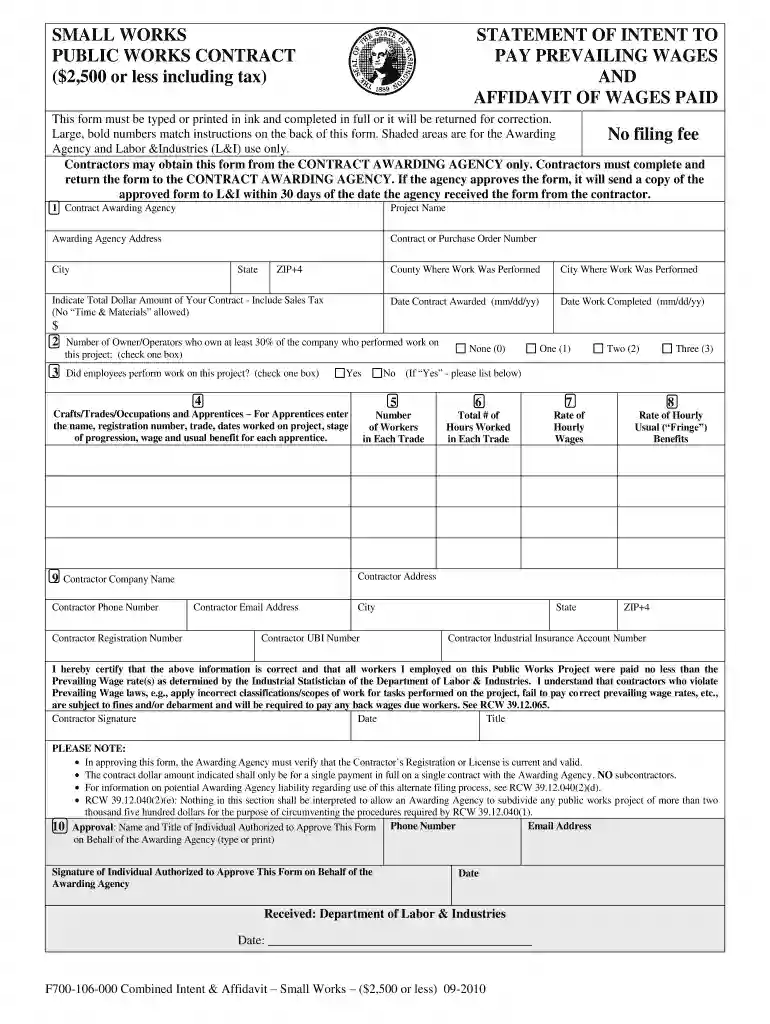
  1. Click ‘Get Form’ to open the intent affidavit in the editor.
  2. Begin by filling in the 'Contract Awarding Agency' section with the name and address of the agency that awarded your contract. Ensure you include the project name and contract number.
  3. Indicate the total dollar amount of your contract, including sales tax. Avoid using terms like 'Time & Materials'.
  4. Specify the county and city where work was performed, along with the dates for when the contract was awarded and when work was completed.
  5. In the section regarding owner/operators, indicate how many own at least 30% of your company. If employees worked on this project, check 'Yes' and proceed to list crafts/trades/occupations.
  6. For each craft/trade, enter details such as number of workers, total hours worked, hourly wages, and usual benefits. Make sure these figures meet prevailing wage requirements.
  7. Complete your company information including name, address, phone number, and email. Don’t forget to sign and date the form.
  8. Finally, ensure that an authorized representative from the awarding agency approves your form by providing their details in the approval section.

Start using our platform today to streamline your document editing and submission process for free!

See more intent affidavit versions

We've got more versions of the intent affidavit form. Select the right intent affidavit version from the list and start editing it straight away!
Versions Form popularity Fillable & printable
2010 4.9 Satisfied (515 Votes)
be ready to get more

Complete this form in 5 minutes or less

Get form

Got questions?

We have answers to the most popular questions from our customers. If you can't find an answer to your question, please contact us.
Contact us
Although affidavits are considered legal documents, anyone can draft one. As long as it is signed, witnessed, and docHubd correctly, the affidavit will be valid. This means that you do not need to ask a lawyer to create an affidavit.
A legal affidavit must be signed by the person making the statement to be considered legally binding. In many cases, the affiant must also sign the document in front of a witness. That witness is often the notary public, but they could be anyone willing to swear the signature is authentic.
An affidavit is a written statement, sworn to be true. Usually, you sign an affidavit in front of someone that is legally authorized to take oaths, like a judge or notary public. You can use an affidavit to share facts that you personally know. Affidavits are a form of evidence.
An affidavit is the written statement of a person which sets out facts that are within that persons own knowledge. Affidavits are often required in court proceedings as the evidence of the person giving the affidavit (sometimes called the depondent).
When you use any type of affidavit, youre essentially writing a statement of facts to present to the court. For example, you may use an affidavit to notify a spouse about a change in financial circumstances after dissolution proceedings.

Security and compliance

At DocHub, your data security is our priority. We follow HIPAA, SOC2, GDPR, and other standards, so you can work on your documents with confidence.

Learn more
ccpa2
pci-dss
gdpr-compliance
hipaa
soc-compliance

People also ask

They demand unquestionable credibility, concrete evidence, and sworn declarations. In such scenarios, an affidavit stands as a strong pillar of assurance. As a written statement made under oath, an affidavit ensures trust and validation in legal proceedings.

intent and affidavit lookup